



What Is Outbound Traffic Monitoring?
Outbound traffic monitoring is the process of continuously capturing and analyzing traffic exiting the network with the goal of detecting resident threats and unauthorized data transfers.
Unlike inbound monitoring, which focuses on identifying and blocking traffic entering the organization’s environment, outbound traffic monitoring focuses on communications initiated by assets that belong to the organization’s network (whether internal or external-facing) and are destined for entities outside that network.
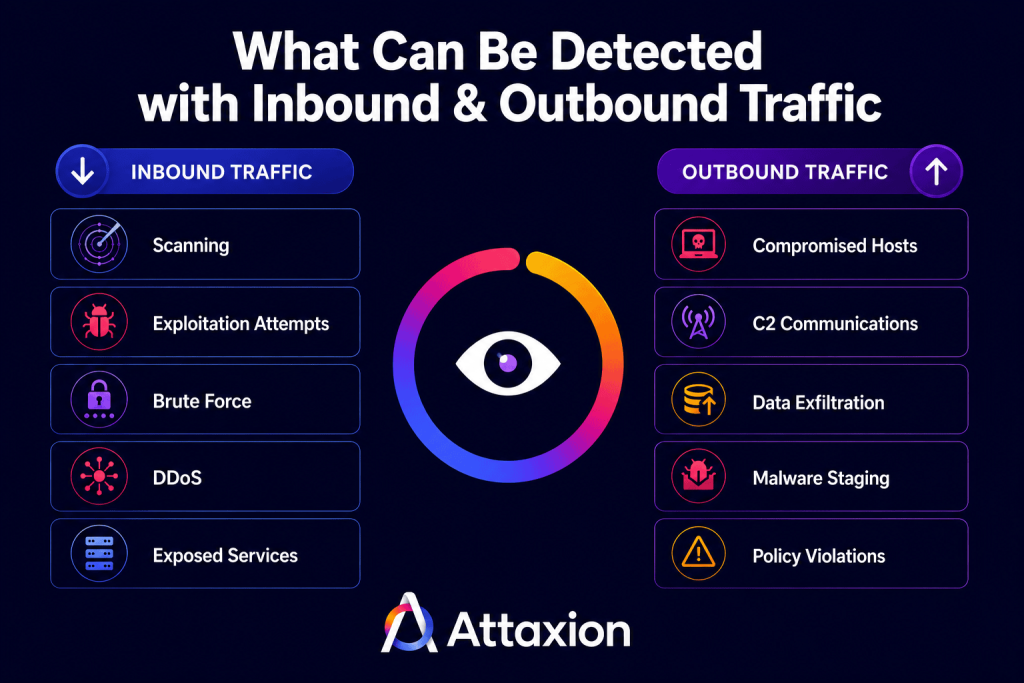
Outbound traffic monitoring does not necessarily mean blocking traffic. Its primary purpose is visibility: identifying which organizational assets are communicating with external destinations, how often those communications occur, which protocols they use, and how much data is being transferred. Security teams use this visibility to establish baselines of normal behavior and investigate deviations that could indicate malware activity, command-and-control communications, unauthorized third-party connections, or data exfiltration attempts.
You may also see the term egress monitoring. It’s often used interchangeably with outbound traffic monitoring, but egress technically refers to traffic leaving a specific network boundary, such as a corporate network through a firewall. Outbound traffic monitoring is a broader term that focuses on communications between an organization’s assets and external systems, regardless of where those assets are located. In modern cloud environments, that’s often the more accurate description.
Why Monitor Outbound Traffic?
Security teams usually pay a lot of attention to inbound traffic: one needs to know what’s trying to enter their network and stop all the nasty things before they have a foot through the door. However, keeping an eye on what leaves your network is just as important.
Outbound traffic shows you compromised hosts talking to command-and-control (C2) servers, data exfiltration, and other signals of the problem already being inside the network rather than trying to enter it. Hence, outbound traffic monitoring is a useful security exercise. This post walks through why outbound traffic monitoring matters, what data sources to collect, what to look for, and what tools can help you.
Let’s start with where an outbound traffic checkup can help.
Threat Detection
It would’ve been awesome if security teams could prevent 100% of threats from entering the network, however, unfortunately, it’s impossible. Threats do enter even the most protected networks and can remain undetected in an environment for an average of 181 days, according to IBM’s 2025 Cost of a Data Breach Report. Malware, for example, can stay dormant for days or even weeks before it calls home to its C2 server, either to ask for further commands, begin exfiltrating data to the server, or simply to notify the server that it has successfully entered the target system.
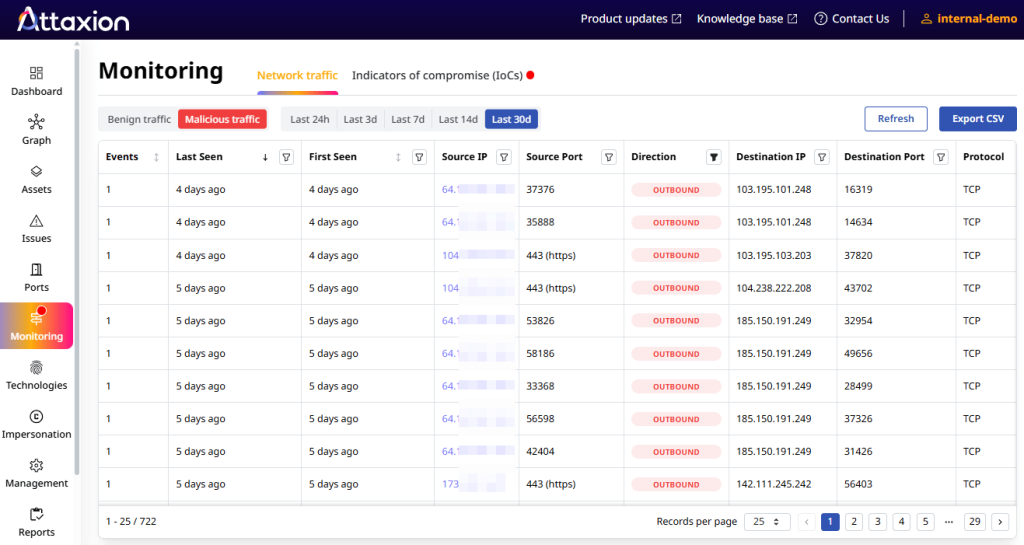
Monitoring outbound traffic allows security tools to automatically flag such malicious activities the moment they appear at your perimeter. And since not all outbound traffic is malicious, security teams have to establish baselines to identify deviations from normal behavior and scrutinize destinations to detect communications to known bad IP addresses.
Threat Hunting
Threat hunting assumes that adversaries have already bypassed your automated alerts, blended into your network, and are currently hiding inside your legitimate traffic.
Threat hunters use outbound traffic data as one of many telemetry sources to prove or disprove specific hypotheses.
- Supporting a hypothesis: Suppose your hypothesis is:
“A compromised host is bypassing our corporate proxy using a custom C2 protocol.”
In this case, you don’t look for blacklisted IPs. Instead, you analyze outbound NetFlow data for structural anomalies, such as a non-standard port carrying HTTPS, or a host maintaining a persistent, low-bandwidth connection to an external server for days. Finding these hidden, uniform patterns supports your hypothesis. - Ruling out a hypothesis: Conversely, if data analysis reveals that the unusual outbound traffic perfectly aligns with a scheduled, vendor-signed cloud backup or fluctuates naturally with user working hours, the hypothesis is weakened or ruled out, and the traffic is validated as legitimate.
Check out our guide to NetFlow-enabled threat hunting for more details.
Compliance
Different standards that apply to different industries have different requirements, but they agree on the fact that outbound traffic should be monitored.
Payment Processing: PCI DSS
For organizations that handle payment card data, outbound traffic monitoring isn’t optional because PCI DSS Requirement 1.2.1 restricts “inbound and outbound traffic to that which is necessary for the cardholder data environment, and specifically deny all other traffic.”
Monitoring is how you verify that your restrictions are working, especially since firewall rules may drift over time or be misconfigured after a change. PCI DSS Requirement 1.1.7 requires that firewall rules be reviewed at least every six months, but ongoing monitoring gives you continuous assurance rather than a point-in-time check.
Energy Industry: NERC CIP
For the energy sector, the North American Electric Reliability Corporation’s Critical Infrastructure Protection (NERC CIP) requires organizations to “have one or more methods for detecting known or suspected malicious communications for both inbound and
outbound communications” with Bulk Electric System (BES) Cyber Systems through defined security perimeters and access controls.
ISO 27001
The ISO 27001 standard that so many organizations seek to be compliant with states (in ISO 27001:2022 Annex A Control 8.16) that an organisation’s monitoring program should include traffic to and from applications, both inbound and outbound.
NIST Guidelines
Other frameworks also treat network monitoring (including outbound traffic monitoring) as a component of audit readiness and incident response capabilities. For one, NIST SP 800-41, which provides guidelines on firewalls, requires organizations to create a firewall policy specifying how firewalls should handle inbound and outbound traffic. It further states that “Generally, all inbound and outbound traffic not expressly permitted by the firewall policy should be blocked because such traffic is not needed by the organization.”
What You Can Detect When Monitoring Outbound Traffic
Outbound traffic can reveal a range of threats. Here are the most common categories, which we covered in our NetFlow threat hunting post.
- Data exfiltration: Large or unusual data transfers to external destinations, especially outside business hours or to unfamiliar cloud storage services, can indicate that sensitive data is leaving your environment.
- C2 beaconing: Consistent intervals for beacons and regular outbound communication patterns are classic indicators of C2 traffic. In practice, detecting this requires looking for hosts that make periodic connections to the same external IP or domain, especially when those destinations are new.
- Communication with known malicious IPs: Threat intelligence feeds publish lists of IP addresses and domains associated with malware, botnets, phishing infrastructure, and other malicious activity. Any host in your environment that communicates with a known bad IP is an immediate investigation priority.
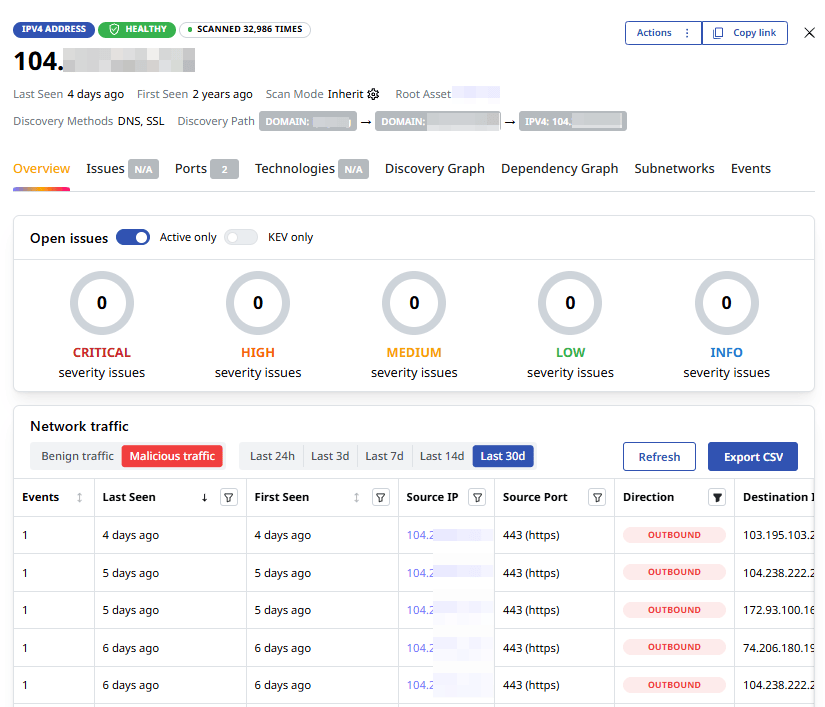
- Traffic on ports that should not be open: If a host is making outbound connections on a port or protocol that has no legitimate business reason to be used, that’s worth investigating. It can indicate malware trying to blend into allowed traffic, or a misconfigured service with an unintended exposure.
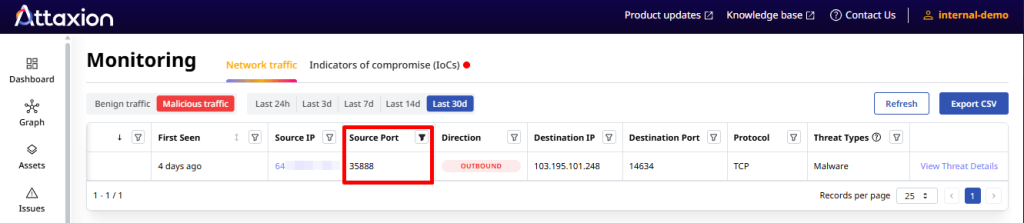
- Activity that deviates from the baseline: Anomaly detection works on a simple premise — establish a baseline of normal activity, then flag anything that falls outside it. A host that normally generates 10MB of outbound traffic per day suddenly generating 10GB is a red flag, even if every individual connection looks legitimate.
How To Monitor Outbound Traffic
There are different approaches to outbound traffic monitoring, each with its own trade-offs. Choosing the right one — or a combination of them — depends on your use case.
| Method | Visibility | Cost | Best For | Why |
| PCAP (Packet Capture) | Full packet headers and payloads | High | Forensics, incident response, deep investigations | PCAP captures the complete contents of network communications, allowing analysts to reconstruct sessions and inspect exactly what data was transferred. It provides the most detailed evidence but requires significant storage and processing resources. |
| NetFlow | Connection metadata (source, destination, ports, protocol, volume) | Low | Continuous monitoring, anomaly detection, threat hunting | Flow data provides a scalable view of who is communicating with whom and how much data is moving. While it doesn’t reveal packet contents, it’s highly effective for identifying beaconing, unusual destinations, and large outbound transfers across large environments. |
| Firewall Logs | Allowed and blocked connections at the network boundary | Low | Policy enforcement, compliance validation, access monitoring | Firewall logs show how traffic is handled by security controls, making them valuable for verifying egress policies and demonstrating compliance. However, they provide visibility only from the firewall’s perspective rather than the full network conversation. |
| DNS Logs | Domain queries and responses | Low | Early threat detection, destination analysis | DNS activity often occurs before an outbound connection is established, making DNS logs an early indicator of suspicious behavior. They are particularly useful for identifying malicious domains, DNS tunneling, and communications with previously unseen infrastructure. |
Full Packet Capture (PCAP)
PCAP is the highest-fidelity data source available. A PCAP file records every packet on the wire, including headers and content.
What it’s good for: PCAPs provide replayable evidence for analysts, allowing them to reconstruct sessions that are essential for incident response and forensics. It can also help prove the presence of a threat in a network, making it useful for threat hunting.
Its downsides: The storage and processing costs are high. Continuous full packet capture at scale requires purpose-built infrastructure, making PCAPs less practical for ongoing threat detection.
How to collect it: Packet captures can be collected using network sensors connected to SPAN/mirror ports, network taps, or packet capture tools such as tcpdump and Wireshark. Because continuous packet capture generates large amounts of data, organizations often deploy dedicated appliances or selectively capture traffic from high-value network segments.
Firewall Logs
Every time your firewall allows or denies a connection, it records it, including the source IP, destination IP, port, protocol, and whether the traffic was permitted or blocked.
What it’s good for: Firewall logs let you assess your policy enforcement. They tell you what traffic your rules are allowing and blocking, which makes them valuable for compliance auditing and for spotting connections that should have been blocked. They’re also relatively easy to collect and store.
Its downsides: Firewall logs are limited to the perspective of the firewall. So, they don’t provide visibility into threats beyond the network boundary.
How to collect it: Most firewalls generate logs by default and can export them to a SIEM, syslog server, or log management platform. Collection typically requires enabling logging for allowed and denied connections and configuring a destination where logs will be stored and analyzed.
NetFlow
NetFlow (and its variants, such as IPFIX and sFlow) captures metadata about network conversations rather than the full packet content. A flow record tells you which IP talked to which IP, on which port, using which protocol, and how much data was transferred.
What it’s good for: Rather than capturing every packet and storing it in a data lake, NetFlow gives you a scalable, lightweight alternative to PCAP that helps answer key operational and security questions about who is communicating with whom and how much data is moving. NetFlow is well-suited for spotting anomalies, tracking baselines, and identifying connections to suspicious external IPs, making it very useful for both threat detection and threat hunting.
Its downsides: Flow data does not include the content of the conversation. You can see that a host sent 50MB to an unfamiliar IP in Eastern Europe at 2 AM, but you can’t see what was in that transfer. For deeper investigations, flow data usually needs to be paired with another source.
How to collect it: Flow data can be exported by supported routers, switches, firewalls, and cloud networking services. To collect it, enable flow export on your devices and configure them to send flow records to a NetFlow collector or analyzer.
Alternatively, you can use platforms that offer global aggregated flow data, such as Attaxion LiveSight. This allows you to skip the setup and collection part and jump straight to analysis.
For more details, check out our guide to NetFlow in cybersecurity.
DNS Logs
Every time a host in your network tries to reach an external destination, it almost always starts with a DNS query. That makes DNS logs a useful source of outbound traffic visibility.
What it’s good for: Because DNS queries happen before a connection is established, they can give you an early threat signal. DNS tunneling, for example, can be used to move data out of your environment by encoding it inside what looks like normal name resolution traffic. DNS logs are also relatively lightweight to collect and store compared to PCAPs.
Its downsides: DNS logs show you the query and the response, but not what happens after the connection is made. They also don’t capture the volume of data transferred, so they won’t help you quantify a potential exfiltration event on their own. Encrypted DNS is another challenge — if endpoints are resolving names through an encrypted DNS resolver that bypasses your internal DNS infrastructure, those queries won’t appear in your logs at all.
How to collect it: DNS logs can be collected from internal DNS servers, DNS resolvers, cloud DNS services, or dedicated DNS security tools. Organizations typically centralize these logs in a SIEM or analytics platform to make it easier to identify suspicious query patterns and destinations.
Outbound Monitoring Tools to Use
1. Firewalls
Modern next-generation firewalls (NGFWs) offer application-layer visibility, meaning they can identify traffic by application rather than just by port. This is important because malware frequently uses ports 80 and 443 to blend in with normal web traffic. The logs generated by NGFWs feed directly into compliance auditing and provide the raw material for detecting policy violations and anomalous connection patterns.
Visibility type: Connection metadata and application identity.
2. Intrusion Detection and Prevention Systems (IDS/IPS)
These tools monitor inbound and outbound traffic from your devices and flag threats. An IDS/IPS can operate using signature-based detection, which matches traffic against known threat patterns, and anomaly-based detection, which flags deviations from normal behavior. Each method has its benefits and limitations, and using both increases the scope of detection.
The key visibility advantage of an IDS/IPS over firewall logs is that it can inspect traffic content, not just connection metadata. This makes it more effective for catching known malware patterns and protocol abuse. An IPS can also block threats in real time.
Visibility type: Traffic content inspection against known patterns and behavioral baselines.
3. NetFlow Analyzers
NetFlow analyzers collect and process flow data from routers, switches, and firewalls that support flow export. They help detect unusual connection patterns, geographic anomalies, and unexpected spikes in data transfer that can indicate exfiltration or beaconing.
Visibility type: Flow-level metadata across all network conversations.
4. Other Network Monitoring Tools
Other network monitoring tools, such as Network Detection and Response (NDR) and Security Information and Event Management (SIEM), are also valuable for outbound traffic checkup.
- NDR visibility type: Behavioral and AI-driven detection across network traffic, including encrypted traffic.
- SIEM visibility type: Centralized correlation of log data across the entire IT environment.
5. Attaxion LiveSight
Setting up firewall log collection, configuring NetFlow export, and deploying an IDS and other network monitoring tools takes time, infrastructure, and ongoing tuning. If you want visibility into outbound traffic from your external assets without building out that full stack, Attaxion is an alternative worth considering.
Attaxion LiveSight continuously monitors your external attack surface and provides retroactive visibility into the network traffic associated with your assets.
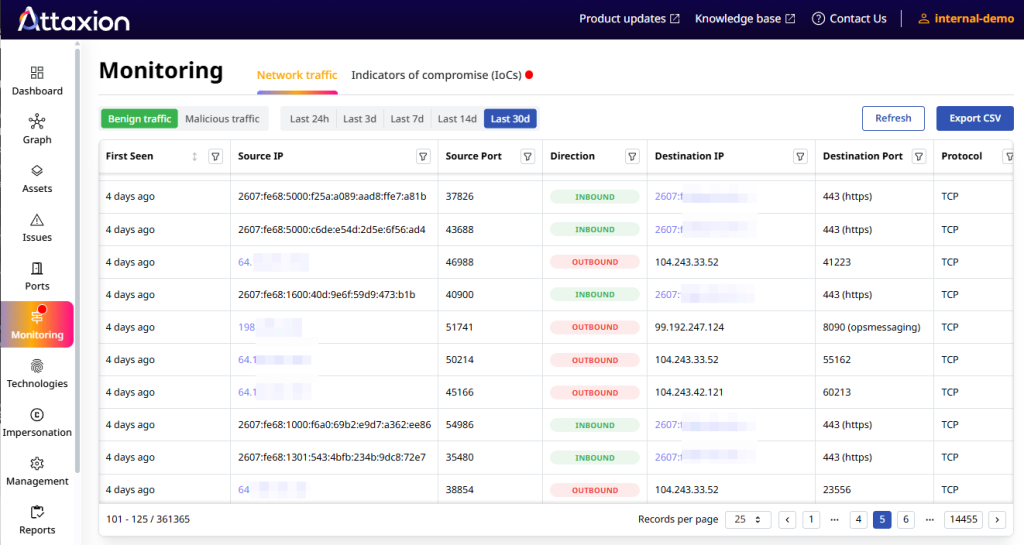
The NetFlow data Attaxion LiveSight provides is sampled and retroactive, meaning you don’t have to wait for it to accumulate data since you can already look back at historical traffic patterns for assets in your environment. This makes it useful for quick checkups and investigations, especially for teams that don’t have a dedicated network monitoring infrastructure.
Visibility type: Sampled NetFlow monitoring mapped to threat intelligence.