



NetFlow is not frequently discussed as a source of threat hunting data, but it deserves a seat at the table just as much as any other telemetry source.
Threat hunting — the practice of proactively searching your environment for threats — typically starts with a hypothesis backed by data. That data can come from external threat intelligence feeds or internal telemetry sources such as endpoint detection and response (EDR) systems, firewall logs, or full packet captures (PCAPs).
NetFlow can serve as another valuable data source, helping support existing hypotheses while also uncovering new ones through hidden communication patterns. In this post, we explore how NetFlow can support threat hunting efforts.
An Introduction to Threat Hunting with NetFlow
NetFlow is a protocol developed and maintained by Cisco that is used to collect and export network flow data (OK, network flow and netflow are the same thing, but NetFlow with two capital letters is somewhat different. If this capitalization is confusing, read our guide to NetFlow in cybersecurity to understand what’s the difference).
Essentially, NetFlow captures the metadata of your network traffic — who talks to whom, on which ports, and how much. Similar protocols include IPFIX from the Internet Engineering Task Force (IETF) and sFlow from InMon Corp, among others, though Cisco’s NetFlow remains the best known.
NetFlow gives you visibility into communication patterns across your network without exposing packet contents. This stripped-down view is actually what makes NetFlow so useful at scale: because it captures only metadata, storage requirements stay manageable and queries remain fast.
As a threat hunter, this makes it possible for you to build historical baselines and identify unusual network behavior. Those anomalies can help you validate existing hypotheses, disprove them, or even uncover entirely new leads for investigation.
Here’s how network flow compares to other common data sources in a threat hunting context:
| Aspect | NetFlow (IPFIX/sFlow) | PCAP | Logs | EDR |
| Data Type | Network metadata (flows) | Full packet content + headers | Event records from systems/apps | Endpoint telemetry |
| Visibility Scope | Network-wide | Network segments, where captured | Depends on the log source | Individual endpoints |
| Payload Visibility | No | Yes | No (but can be configured to include payload) | No |
| Storage Requirements | Low | Very high | Low | Moderate |
| Retention Feasibility | Long-term (weeks/months) | Short-term (hours/days typical) | Long-term | Medium (depends on tooling) |
| Scalability | High | Low | High | Medium |
It’s worth noting that NetFlow doesn’t replace EDR and logs, but complements them. In threat hunting, it shines the most when you don’t have access to PCAPs — either because the system is too sensitive or because you don’t constantly capture traffic everywhere.
NetFlow becomes even more useful if you have access to historical data (baseline) and threat intelligence feeds. We’ll talk about specific use cases later in this article. Let’s start with what information you can get from NetFlow.
What Data Can NetFlow Provide?
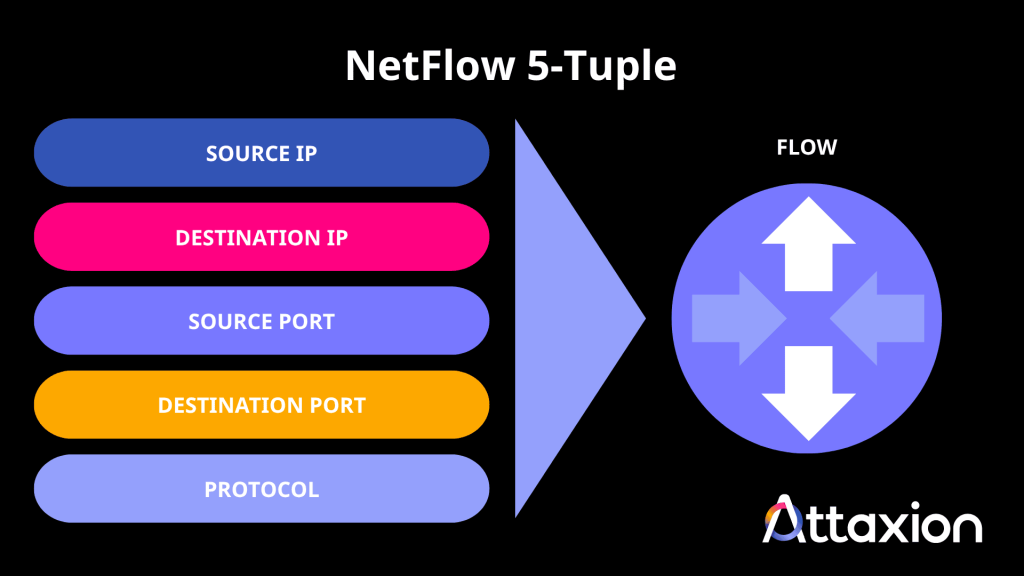
The core of any NetFlow record is the five-tuple:
- Source IP address
- Destination IP address
- Source port
- Destination port
- IP protocol
On top of that, you also get:
- Flow direction (ingress or egress)
- Byte counts per flow
- Timestamps
- Session duration
- Number of sessions between two endpoints
On its own, any one of those datapoints doesn’t tell you much. But combined, they reveal patterns. A host that suddenly initiates multiple short connections on port 53 (DNS) to an external resolver looks very different from normal web traffic, even if each individual connection appears benign.
Malicious Network Activities You Can Spot with NetFlow
NetFlow is useful across the different stages of the cyber kill chain. Here’s what to look for in practice.
| Kill Chain Stage | Detection | Example of Telling NetFlow Pattern |
| Reconnaissance | Port scanning | Rapid connections from one IP to many ports/IPs |
| Unusual geographic communications | Outbound communications to geographic regions, ASNs, or hosting providers that are rare, first-seen, or inconsistent with the asset’s historical and organizational behavior. | |
| Delivery | Credential bruteforcing | High frequency of connection attempts targeting authentication portals from external IPs outside your normal baseline. |
| Exploitation and installation | Lateral movement | A workstation with no prior history of this behavior suddenly initiates connections to multiple internal hosts. |
| Shadow IT | Outbound traffic on a non-standard port to a previously unseen IP address. | |
| Command and control (C2) | C2 beaconing | Regular, periodic connections to the same suspicious IP. |
| Distributed denial of service (DDoS) patterns | Massive surge in flows or connection attempts targeting a single IP address. | |
| Actions on objective | Data exfiltration | Unusually high volume outbound traffic over uncommon ports. |
Port Scanning
Port scanning is a reconnaissance method that threat actors and cybersecurity tools use to identify a target’s open ports and active services.
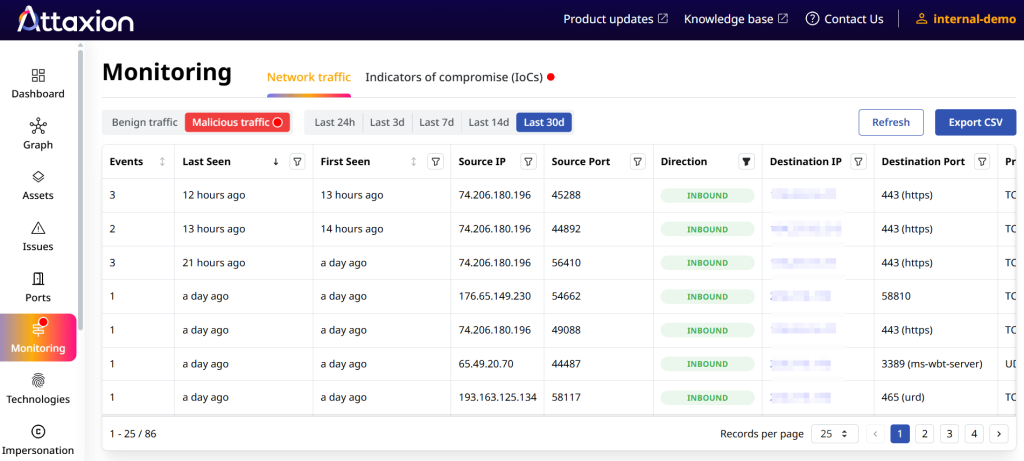
NetFlow pattern to look out for: There are two types to watch for: vertical scanning, where one source probes multiple ports on a single internal host, and horizontal scanning, where one source hits the same port across many hosts in your network.
Say an external IP shows up doing either of the above in a short span of time. If you have access to threat intelligence feeds or IP reputation sources, you can look this IP up to see if it has a history of malicious activity, and pull the historical flow records to find out which ports and internal addresses it already touched before you identified the scanning activity.
Unusual Geographic Communications
This refers to network traffic to or from geographic regions that are unusual for your environment or associated with increased cyber risk. While this won’t confirm an attack on its own, it can lead to a hypothesis worth investigating, especially if combined with other anomalies.
NetFlow pattern to look out for: Source or destination IP addresses mapping to geographic locations that fall outside your normal behavioral baseline. For example, if an internal server begins communicating with infrastructure in a region it has never contacted before, it serves as an immediate pivot point for a hunt.
Being able to access the geolocation data of IP addresses communicating with your network would enable you to immediately check for unusual geographic connections.
Credential Bruteforcing
These are attempts to gain unauthorized access to accounts by repeatedly trying different username and password combinations against authentication services such as VPNs, remote desktop gateways, or web login portals.
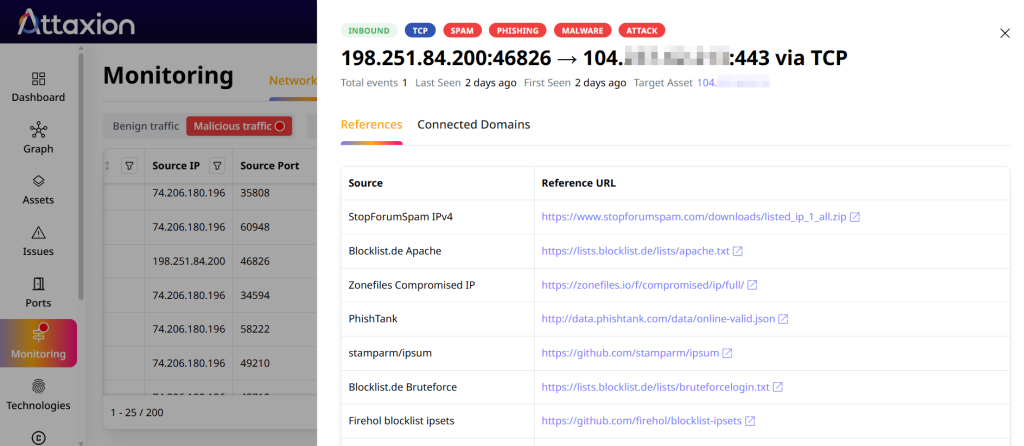
NetFlow pattern to look out for: Look for repeated connection attempts targeting authentication infrastructure from external IP addresses that fall outside your normal behavioral baseline. You may also notice spikes in traffic toward VPN gateways, SSO portals, or other login services over a short period of time.
If you identify suspicious authentication-related traffic, cross-reference the source IPs against threat intelligence feeds and correlate the activity with authentication logs. This can help you determine whether the activity was part of a known password-spraying campaign and whether any accounts may have been compromised.
Lateral Movement
Lateral movement occurs when an attacker moves from an initially compromised host to other systems within the same network.
NetFlow pattern to look out for: Look for unusual host-to-host communication. For example, a regular workstation that’s normally silent suddenly initiating connections to multiple internal servers — or scanning a domain controller — is a red flag.
Shadow IT
Shadow IT refers to IT assets, services, or applications that people inside your organization use without the approval — or sometimes even the knowledge — of the IT and security teams. Because these tools fall outside normal oversight, they can bypass security controls, monitoring, and patch management, creating additional security risks.
Common examples include unauthorized SaaS platforms, cloud services, and — more recently — “Shadow AI”: unapproved AI tools or chatbots employees start using on their own to automate tasks or improve productivity.
NetFlow pattern to look out for: Look for traffic on unexpected or non-standard ports, which can indicate unauthorized file-sharing or cloud storage tools running on your network.
C2 Beaconing
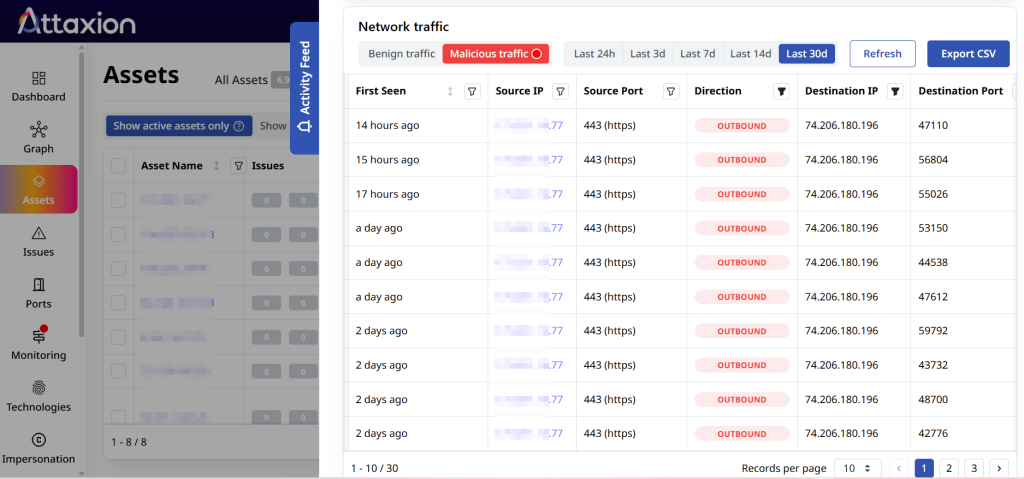
After compromising a system, attackers enable that system to communicate back to their infrastructure. They do this through beaconing — rhythmic, automated check-ins between a compromised internal host and a malicious external IP address.
NetFlow pattern to look out for: Since C2 beacons are regular pings to the same external IP, they can be easily detected in NetFlow. Even when attackers randomize the timing to evade detection, NetFlow can still reveal traffic patterns through consistent byte counts and session durations over time. Multiple inbound connections directed at the same host are also strong signals.
Distributed Denial of Service (DDoS) Patterns
DDoS attacks flood a target with massive amounts of traffic from multiple sources (botnets) to disrupt its availability.
NetFlow pattern to look out for: Check for a massive surge in unique flows targeting a single IP address.
If inbound flow toward a single IP suddenly spikes from dozens or hundreds of sources, checking whether those sources belong to known botnet infrastructure helps confirm whether you’re looking at a real DDoS or something else, like a misconfigured deployment.
Data Exfiltration
Exfiltration is the unauthorized transfer of sensitive information from your internal network to an external, attacker-controlled destination. This attack can happen in a smash-and-grab (large, fast transfer) or a low-and-slow fashion (small, persistent transfers over time to avoid threat detection).
NetFlow pattern to look out for: For smash-and-grab exfiltration, you look for sessions with unusually high byte counts and long session durations. To detect the low-and-slow method, monitor network traffic for multiple connections to a single external IP address. High volumes of outbound traffic on port 53 (DNS) could also indicate that data is being tunneled through DNS queries (DNS tunneling).
Benefits of NetFlow Threat Hunting
Visibility across the network. NetFlow gives you an easy overview of host-to-host communications across your environment. Threats that move laterally or communicate with external infrastructure will leave traces in flow data, even if they’ve cleared their logs on the host.
Encryption is not a problem. Because NetFlow captures metadata rather than payloads, it remains useful even when payload inspection isn’t possible because of encryption. As TLS adoption continues to grow, this is an advantage that packet capture tools don’t share.
Low storage footprint. NetFlow data is more compact compared to PCAPs, making long-term retention realistic — which matters a lot for threat hunting. Many attacks unfold slowly over weeks or months. Having 30 days of historical data lets you trace activity back in time and understand the full scope of a compromise.
Fast historical queries. Querying network flow data for a specific IP or time range is much faster than searching through PCAP archives. When you’re in the middle of an investigation and need to pivot quickly, this speed matters.
Baseline is easy to build. The compact nature of NetFlow allows for scaling, which is much harder to achieve with PCAPs. So, it’s much more realistic to analyze NetFlow at scale, build a baseline, and find behavioral deviations, than doing the same with PCAPs.
Suits sensitive or privacy-constrained environments. Because it doesn’t contain user data, NetFlow is easier to manage from a privacy compliance perspective than PCAPs.
NetFlow Threat Hunting Limitations
No payload visibility. NetFlow tells you that a host sent 500MB to an external IP. It doesn’t tell you what that 500MB contained. If you need to confirm that an exfiltration happened or understand what type of exploit was used, you’ll need PCAP or endpoint forensics to validate the finding.
You need to collect it. NetFlow has to come from somewhere. Routers and switches can export it, but you need collectors and analyzers to make it usable. Building and maintaining that infrastructure takes resources. One option to simplify this is using network flow data collected by a third party, such as Attaxion LiveSight, which provides global aggregated NetFlow data. Monitoring your own internal NetFlow would still be beneficial though.
You need other data. Knowing that two hosts communicated is useful, but only when you know that one of those hosts has a history of malicious activity, this data becomes actionable. NetFlow needs to be paired with IP reputation, threat intelligence, user identity, and geolocation data to be fully useful, whether that’s an analyst triaging a suspicious connection or an AI/ML model trying to detect patterns across thousands of flows.
Best Practices for Effective NetFlow Threat Hunting
- Build a baseline before you hunt. Anomaly detection only works when you know what normal looks like. Before you start hunting, spend time profiling your network — which hosts communicate regularly, what protocols they use, and what traffic volumes are typical at different times of day.
- Know the difference between full and sampled NetFlow. Full NetFlow records every flow. Sampled NetFlow captures a subset to manage volume. Full records are always better, but sampled network flow is often what’s available in practice, especially on high-traffic networks.
- Make sure your retention period is long enough for your security team. While network teams care about current NetFlow for troubleshooting, security teams need historical data to trace how an attacker moved through the environment over time. For example, Attaxion LiveSight offers 30 days of global aggregated NetFlow.
- Reduce flow data before analysis. Techniques like deduplication (removing duplicate data) and aggregation (grouping together similar-looking flows) help cut volume, which matters when you’re querying across weeks of data. Again, if you’re working with data provided by a third party (such as Attaxion), somebody probably did it for you beforehand.
- Pair NetFlow with threat intelligence. Cross-referencing external IP addresses against threat intelligence feeds, as Attaxion LiveSight does, reveals which connections to prioritize. Together with historical NetFlow data, this also enables retroactive analysis: once an IP appears in a threat database, having access to historical NetFlow lets you check whether it interacted with your environment before.
Go hunting for threats using global aggregated NetFlow combined with threat intelligence with Attaxion LiveSight. Book a demo now.