



As gateways for data from the outside world, ports are destined to become prime targets for anyone intent on attacking a server. Port scanning attacks are among the most common reconnaissance methods used by threat actors — Fortinet observes about 36,000 scans every second.
In this guide, we talk about what malicious port scanning is, how it works, and how to detect it.
What Is a Port Scanning Attack?
Port scanning is a reconnaissance technique that threat actors use to gather enough information about your environment so they can move on to the next stage of an attack. It’s categorized under Network Service Scanning (T1046) within the MITRE ATT&CK framework and typically occurs after (or performed along with) a network scan, where attackers identify reachable hosts on the target network and map them to their IP addresses.
When scanning for open ports, attackers can identify:
- Operating systems (OS) characteristics (via fingerprinting techniques)
- Running services and their versions
- Presence of firewalls or filtering mechanisms
- Likely device type
They can use the information gathered to identify outdated services, known vulnerabilities (CVEs), misconfigurations, and other weaknesses that they can exploit.
How a Port Scanning Attack Works
Typically, port scans rely on the mechanics of the Transmission Control Protocol (TCP)/IP protocol, specifically the three-way handshake:
- The client sends SYN: The client (in the case of port scanning, the client is the scanner) sends a segment with the “synchronize” flag used to initiate sequence numbering.
- The server responds: If the port is open, the server responds with the SYN and acknowledgment (ACK) segment (SYN-ACK) to let the client know that it did receive the previous segment. If the port is closed, the server sends a reset (RST) packet (RST or RST + ACK).
- ACK: The client acknowledges the server’s response, signaling a reliable connection.
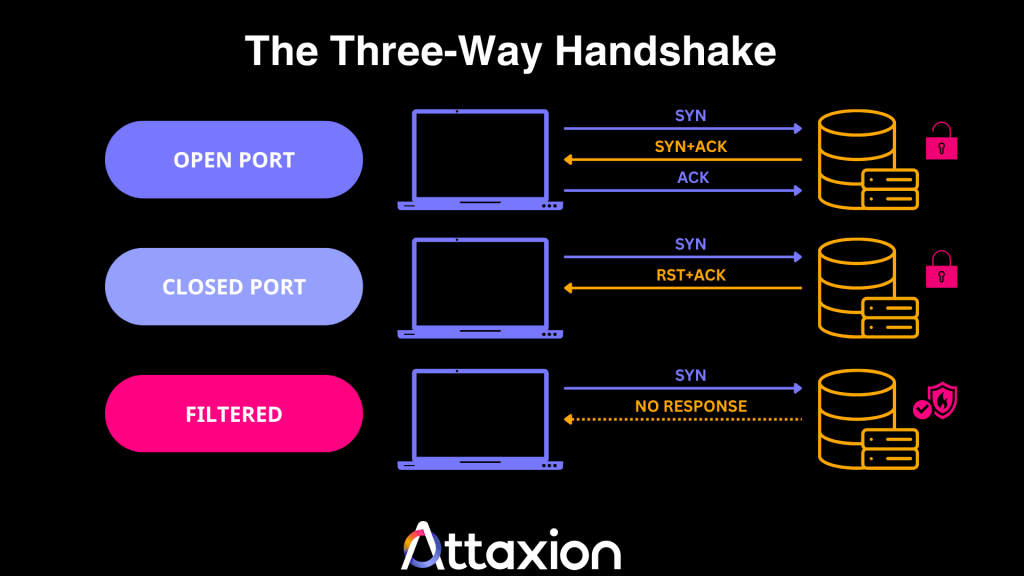
When a scan is performed, a port can have one of three statuses.
- It can be open, meaning that the target is actively listening and ready to accept connections (including those from an attacker).
- A port can be closed. The target receives the packet but responds that no service is listening. The response helps threat actors map out which services are unavailable.
- Or a port can be filtered — a firewall is blocking the traffic, so the port scan tool cannot determine if the port is open or closed. This status alerts an attacker to the presence of a security device, prompting them to try stealthier methods.
Not all port scans rely on the three-way handshake, but it is important for understanding the mechanics of all of them.
Types of Port Scanning Attacks
There are two ways you can categorize port scanning attacks — based on the direction of the attack (horizontal and vertical port scan) and the level of interaction with the target system (active and passive port scan).
Horizontal vs. Vertical Port Scanning
Horizontal port scanning is when attackers look for one port across multiple IP addresses. For example, if the threat actors find a new exploit for port 445, the port used for network file sharing, they will scan thousands of IP addresses, specifically looking for that one open port so they can target whatever organization is connected to it.
In vertical port scanning, the attacker has already identified a target and wants to find any way inside. For instance, an attacker targeting 198[.]51[.]100[.]45 will scan port numbers 1 through 10,000 to see all services running (web, email, databases, etc.) to map out the organization’s attack surface.
Passive vs. Active Port Scanning
Passive port scanning is more like research than scanning. The attacker doesn’t directly interact with the target during the attack and instead uses services such as Shodan and Censys, which act like search engines that constantly crawl the internet and store what they find.
The attacker simply searches these databases to see what was open the last time the passive intelligence platform did a scan.
In an active scan, the attacker uses port scanner tools to send packets directly to the target’s IP address to obtain a real-time response from the server.
Because there’s a direct connection, the target’s firewall or IDS will log the attacker’s IP address. We cover some of the most common active scanning methods in the next section.
7 Active Port Scanning Methods
As you read through the different scanning methods, the three-way handshake (SYN → SYN-ACK → ACK) we talked about earlier will come in handy. Here’s a TL;DR table for the meantime.
| Scanning Type | How It Works | Stealth Level |
| TCP SYN scan | Completes half a handshake. | High |
| TCP connect scan | Completes a full handshake. | Low |
| FIN scan | Sends packets with the FIN flag. | High |
| Null scan | Sends packets with no flags set. | High |
| Xmas scan | Sends packets with the FIN, PSH, and URG flags set. | High |
| UDP scan | Probes connectionless services. | Medium |
| Idle scan | Uses a third-party host. | High |
TCP SYN Scan
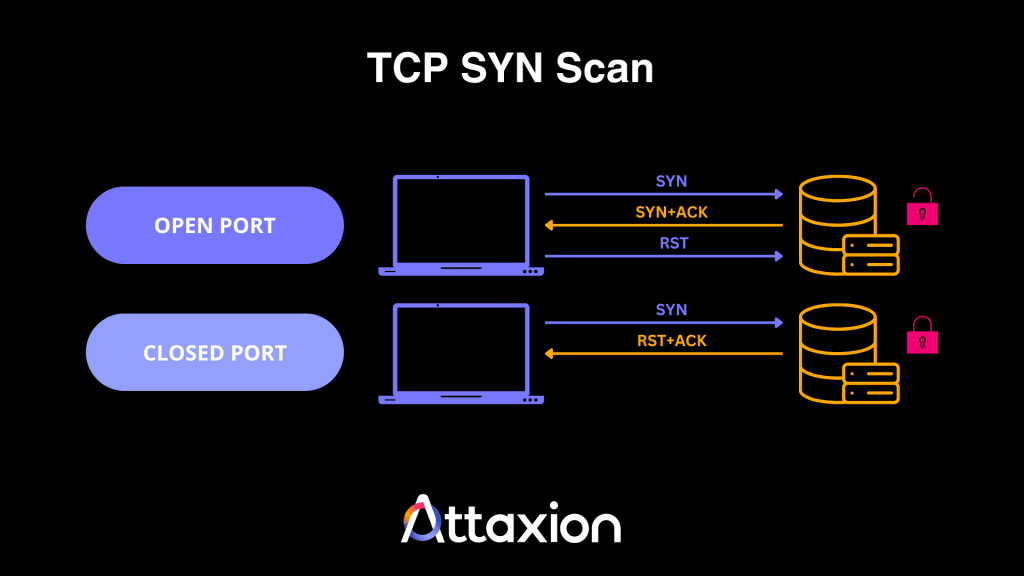
In a TCP SYN scan, the scanner sends a SYN packet and waits for a SYN-ACK. If it receives one, it knows the port is open. But instead of sending the ACK segment, the scanner sends an RST (Reset) packet to close the connection, making the scan half-open and less likely to be logged by basic connection logs, but still detectable by IDS/IPS and advanced monitoring.
TCP Connect Scan
This type of scan is also called a full TCP scan since the tool completes the three-way handshake. If the scanner receives a SYN-ACK segment, that means the TCP port is open.
While reliable, it’s the easiest to detect because the completed connection is almost always logged by the operating system.
The illustration for this scan looks exactly like the illustration for the three-way handshake we’ve posted in the beginning of this article.
FIN Scan
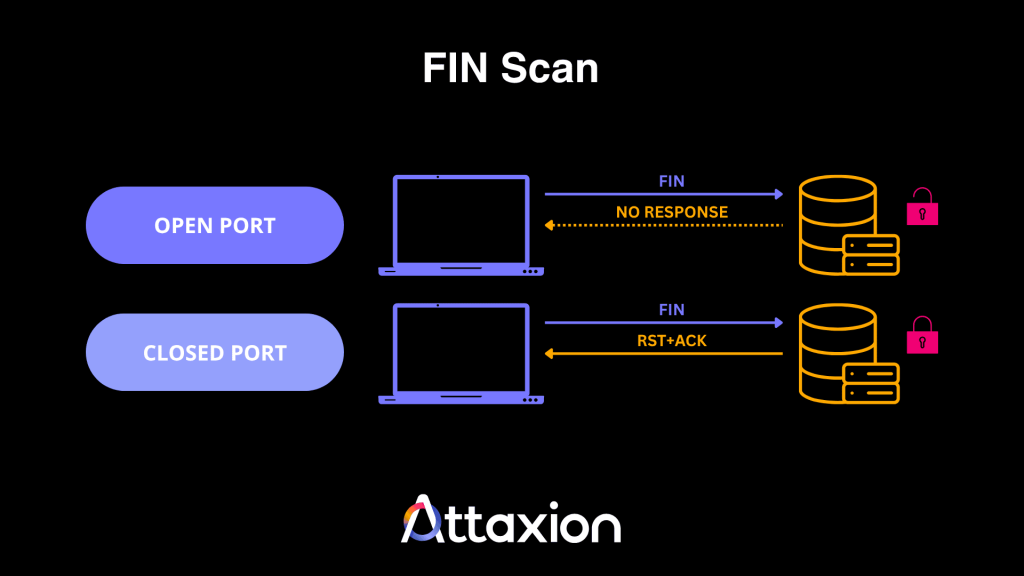
Port scanners can also be used to send a packet with only the FIN (Finish) flag set. A closed port should respond with an RST + ACK (or just an RST) packet, while an open port will have no response.
Xmas Scan
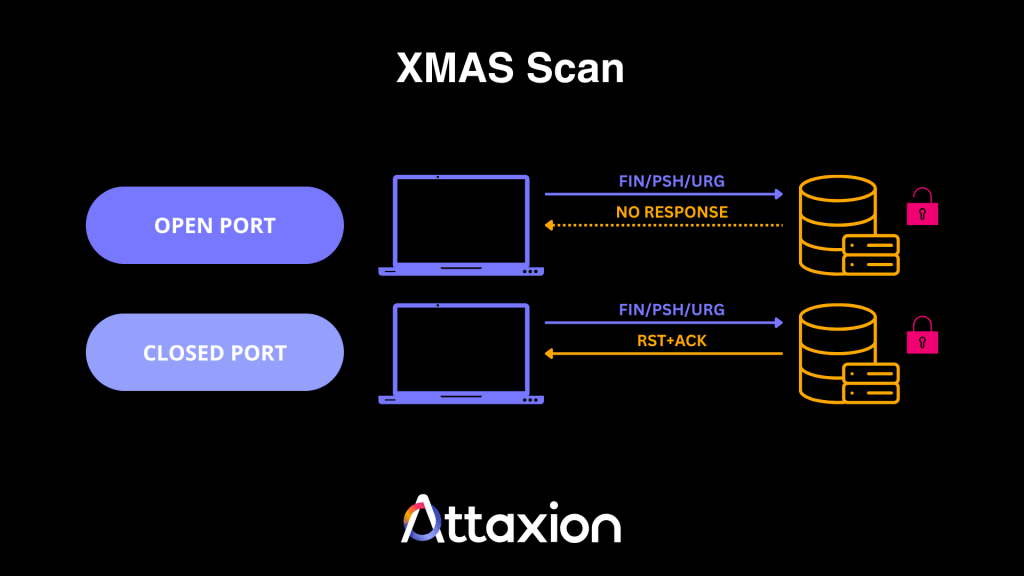
An Xmas scan works similarly to a FIN scan, but here, the attacker uses a combination of different flags, such as FIN and PSH (Push) or URG (Urgent).
If the port is closed, it responds with RST + ACK. An open port will send no response.
Null Scan
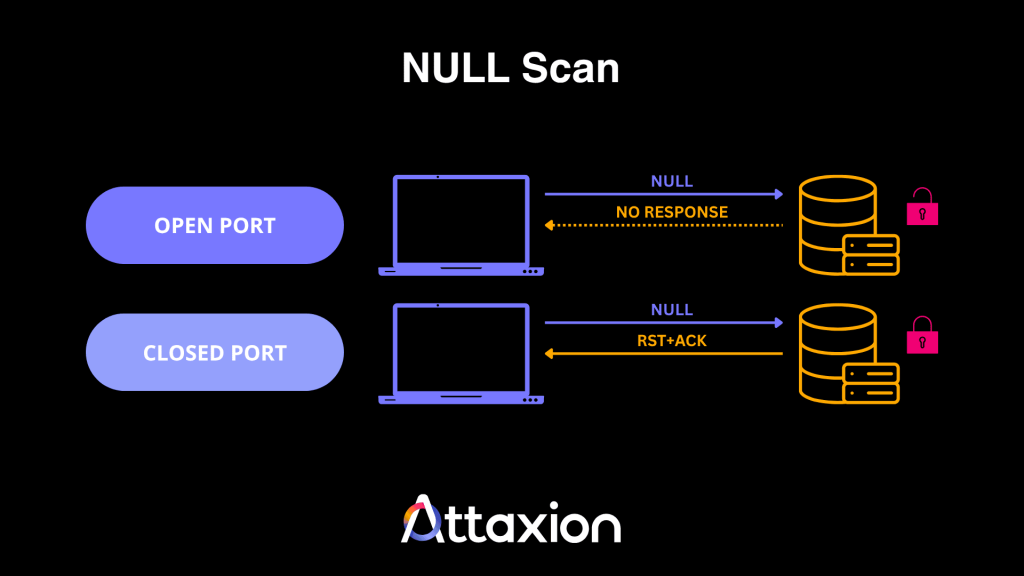
In null scans, the attacker will send a packet without any flags. And like FIN and Xmas scans, an open port will not respond to the packet, but a closed port will send an RST + ACK packet.
UDP Scan
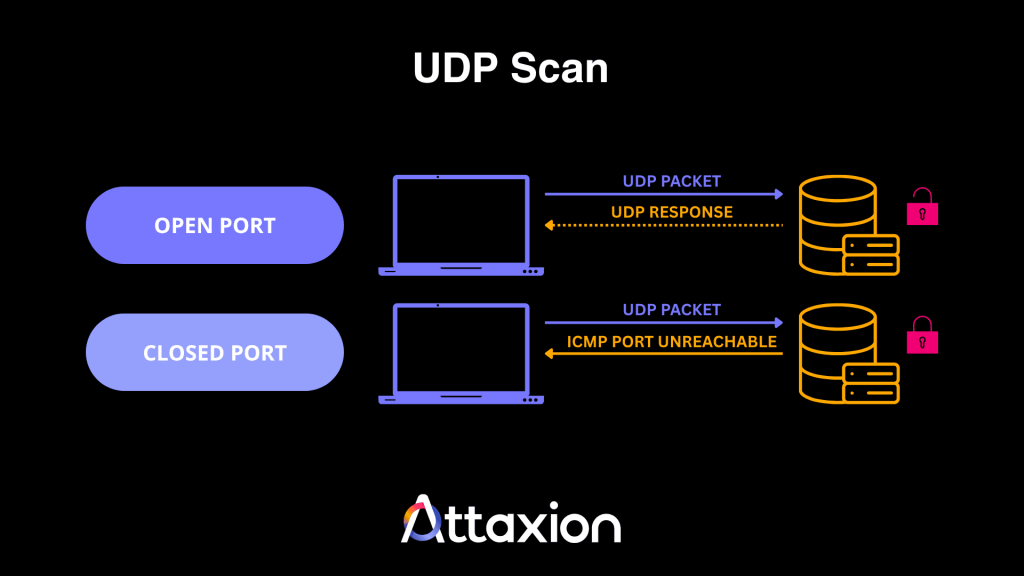
In this type of port scan, the attacker configures a scanner to send a User Datagram Protocol (UDP) packet to the target. Unlike TCP, UDP is connectionless and does not require a handshake, making the results harder to interpret. But generally, here’s how to know the port status:
If the scanner sends a protocol-specific payload, the target application will return a UDP response if the port is open. If the target sends back an ICMP port unreachable error, that indicates the port is closed. However, lack of response may also indicate filtering or rate limiting.
Idle Scan
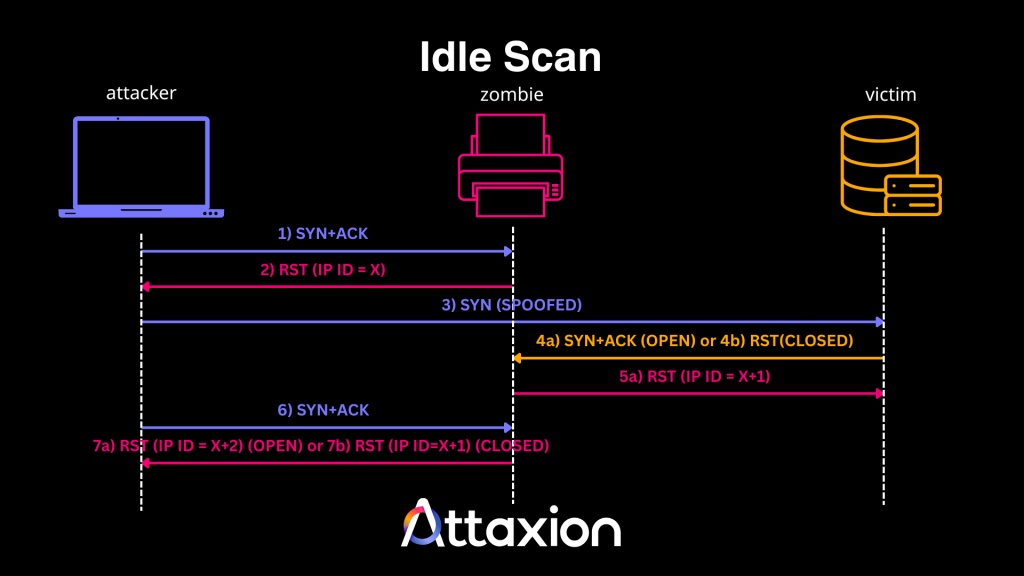
In an idle port scan, the attacker first probes a third-party zombie device to obtain its IP ID. Then, they send a packet to the target, making it appear as if it comes from the zombie. The target responds to the zombie, which does not expect the response and resets the connection. However, the zombie increments its IP ID — increasing it by one if the target’s port was open.
The attacker then probes the zombie again, causing it to increment its IP ID once more. If the attacker observes that the zombie’s IP ID increased by two increments, the target’s port is open. If it increases by only one, the port is closed. This method effectively hides the threat actor’s IP address, making it appear as if the zombie is performing the scan.
6 Common Port Scanning Tools
The most popular port scanning tools are open-source and freely available to everyone on the internet. This means that whatever the theoretical attackers would use, you — as a blue team player — could use just as well to see what they would see and prepare in advance.
Below, we list the tools most commonly used for port scanning:
1. Nmap
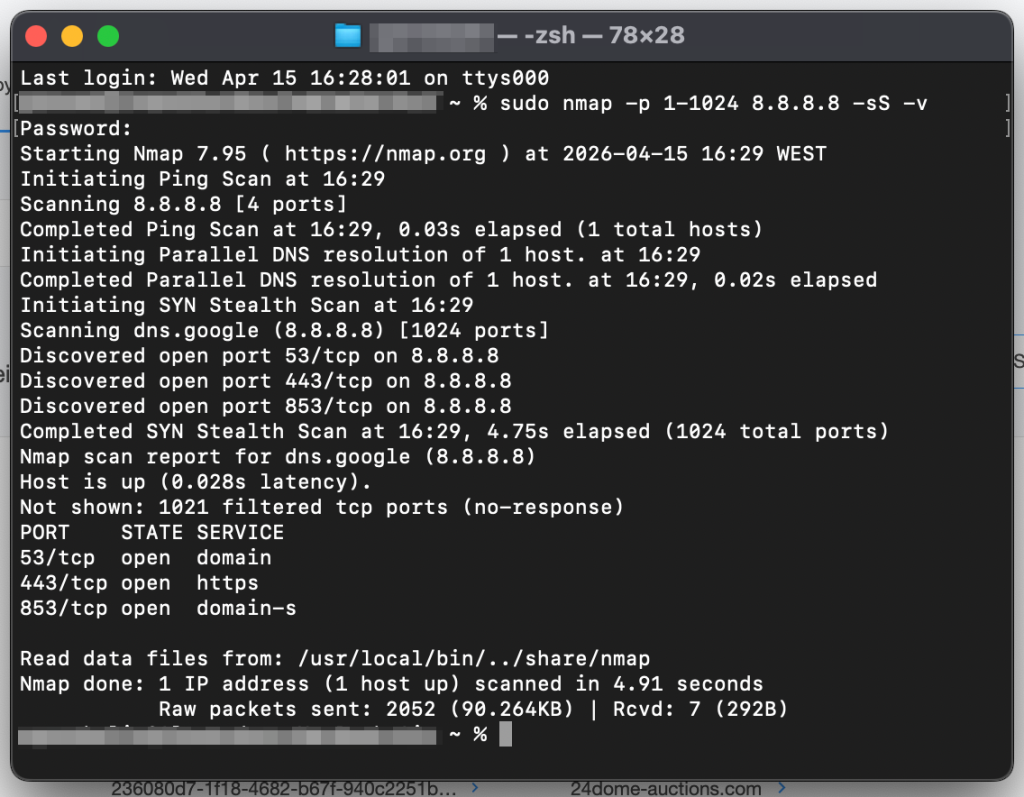
Nmap, or Network Mapper, is a free and open-source command-line tool widely used for network scans and security audits which can perform simple port scans and complex OS fingerprinting. For those who prefer to use a graphical user interface (GUI), there’s Zenmap, which is essentially Nmap + GUI and is designed to make it easier to use.
Nmap is the industry standard. If someone’s learning cybersecurity, Nmap would likely be on the curriculum. It has its drawbacks though — it’s not very fast and has quite a learning curve.
2. Masscan
Masscan is another free and open-source command line tool designed for extreme speed and can scan very large address spaces very quickly (within minutes under high-bandwidth conditions). The tool achieves this by using an asynchronous architecture that emits SYN packets without waiting for a response, making it ideal for massive network ranges.
Masscan works great in big stable environments, but shows weaker results than the rest in unstable networks where packets are often lost.
3. Advanced Port Scanner
Advanced Port Scanner is a free GUI-based network scanner for Windows that allows users to quickly discover network devices and their open ports. It integrates with Remote Desktop Protocol (RDP) and Radmin, so users can remotely control computers found during the scan directly from the Advanced Port Scanner interface.
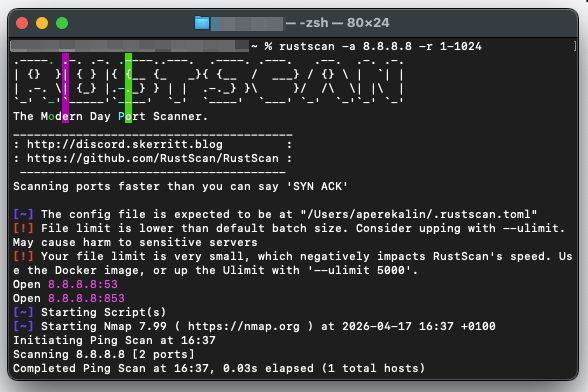
4. RustScan
Built in Rust for high performance, RustScan is a modern and fast free and open-source port scanner that integrates with Nmap, essentially replacing Nmap’s own port scanning. It can scan 65,535 ports in seconds and automatically pipes the discovered open ports into Nmap for more detailed service and version enumeration.
5. Netcat/Ncat
Netcat is a networking utility for reading and writing data across network connections using the TCP/IP protocol. It combines basic port scanning with the ability to immediately interact with whatever it finds.
Netcat itself is old and not supported anymore, but there is Ncat — a modern reimplementation of Netcat written for Nmap.
6. Naabu
Naabu is ProjectDiscovery’s free and open-source port scanning tool written in Go that focuses on simplicity and ease of integration into automation pipelines. It supports multiple scanning types and is frequently used in bug hunting and penetration testing because it can handle large lists of active hosts.
Is Port Scanning Always Malicious?
No, it’s not. In fact, the port scanners mentioned above are neutral tools that security professionals use for:
- Vulnerability assessments: Finding open ports before attackers do.
- Network debugging: Ensuring services are reachable.
- Inventory management: Identifying all active assets on a network.
Port scanning only becomes malicious when performed without permission or as a precursor to exploitation.
Signs of a Port Scanning Attack
If you know what indicators to look for, spotting a port scan attack is possible even when attackers attempt to mask their activity through stealth techniques or distributed sources.
Traffic Anomalies
- Rapid connection spikes: A sudden surge in connection attempts from a single source IP targeting multiple ports on one system or same ports on different systems within a very short time window.
- Repeated failed or denied connections: System logs filled with “Connection Denied” messages from the same source.
- Incomplete TCP handshakes: A high volume of SYN packets that are never followed by an ACK may indicate half-open scanning (i.e., TCP SYN scan)
- Unusual protocol flags: The use of unconventional TCP flags (FIN scan), a combination of flags (Xmas scan), or having no flag at all (Null scan).
Behavioral Patterns
- Sequential port probing: Attackers may follow a port sequence when scanning, using commands like:
sudo nmap -p 1-1024 <server_ip> -sS -vthat would go through ports one by one, which is somewhat easy to detect.
- Vertical mapping: One source IP is scanning many ports on a single target.
- Horizontal scanning: One source IP probing the same port across multiple IP addresses.
- Blind network sweep: An unusual amount of traffic to closed ports or non-existent IP addresses.
Automated tools can detect some of these signs, but only a combination of a solid understanding of port scan attack types and the patterns they generate — combined with the right threat intelligence sources — allows you to differentiate between legitimate network traffic and targeted reconnaissance.
How to Detect Malicious Port Scanning
Port scanning is an active reconnaissance technique that can be detected. The challenge is that without threat intelligence, it can be very difficult to tell the intent behind the port scan — whether it is just routine or a malicious activity (but we’ll get to that later).
Analyze System and Firewall Logs
We talked about how a trail of incomplete and denied connection attempts can indicate a port scanning attack. You can see all of that in the firewall logs, though you may first need to configure logging so that your firewall logs failed connections.
For Windows firewall users, for instance, log in to the Microsoft Intune admin center, create a new policy, and configure the following:
- Log file path
- Enable log dropped packets
- Enable log success connections
- Log max file size
The process is detailed in this documentation. Once your firewall starts logging dropped packets, you can analyze the deny logs or start looking for the patterns we’ve described above to identify port scan attacks.
Use Network Monitoring Tools
Network monitoring tools allow you to track and analyze traffic in real-time, so you’ll have the big picture — your internal network as well as your cloud infrastructure and services.
For example, aside from looking at individual packets, you may also analyze NetFlow, which summarizes traffic conversations and makes it easier to identify a single source talking to multiple ports or internal destinations.
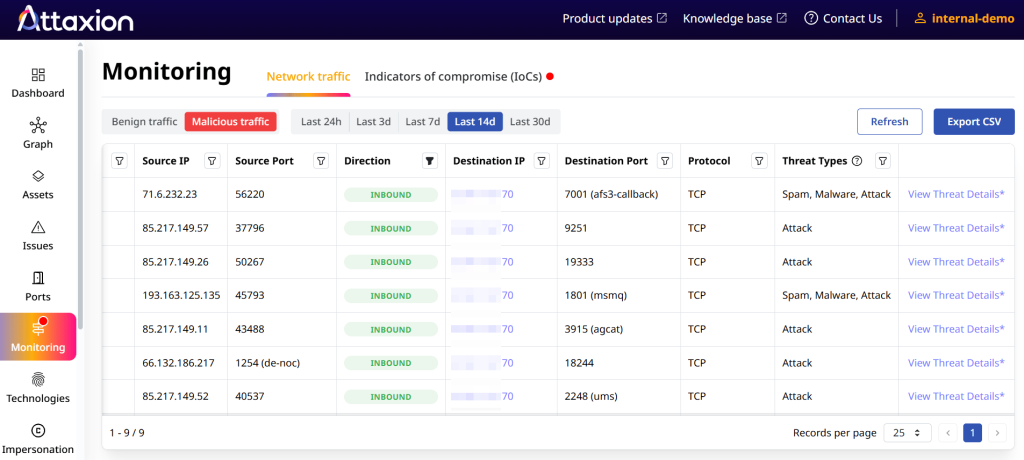
There are two ways to approach this. Either you can set up NetFlow collectors and analyzers yourself, or you can use a solution like Attaxion LiveSight — a cybersecurity platform with an agentless traffic monitoring feature that relies on globally distributed network telemetry to observe traffic flowing between your ports and external-facing IPs. That way, you don’t need to deploy collectors to gain visibility into external traffic patterns.
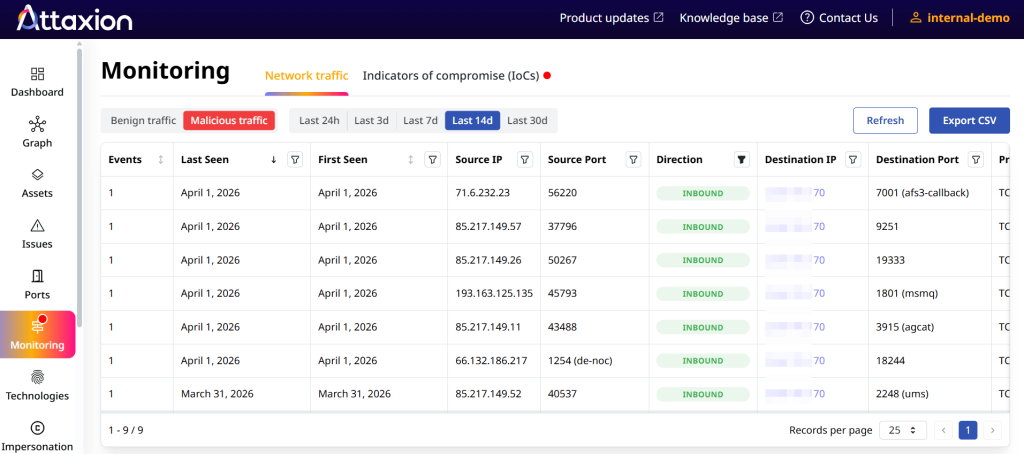
Attaxion then correlates this data with real-time threat intelligence, enabling it to flag if a source IP has a bad reputation or is linked to a known malware family.
Intrusion Detection and Intrusion Prevention (IDS/IPS) Systems
IDS/IPS tools check for patterns that may indicate malicious port scanning using:
- Signature-based detection: IDS/IPS have fingerprints for common attack signatures and suspicious behaviors. For example, they can detect the specific packet structure of a SYN scan or a Xmas scan.
- Anomaly-based detection: IDSs use statistical or behavioral analysis (some even use machine learning) to establish a baseline of normal network behavior. If an IPS observes a sudden spike in connection attempts that deviates from normal behavior, it can trigger an alert or automatically block the IP address.
How to Prevent Port Scanning Attacks
Port scanning cannot be prevented. It can be detected — with the means we’ve described above. And also, you can be better prepared for it, minimizing your attack surface by closing any port that isn’t necessary for business operations. That begins with visibility over all ports, and you can use tools like Attaxion to achieve that visibility:
- Continuously detect which ports are open and what assets are associated with them.
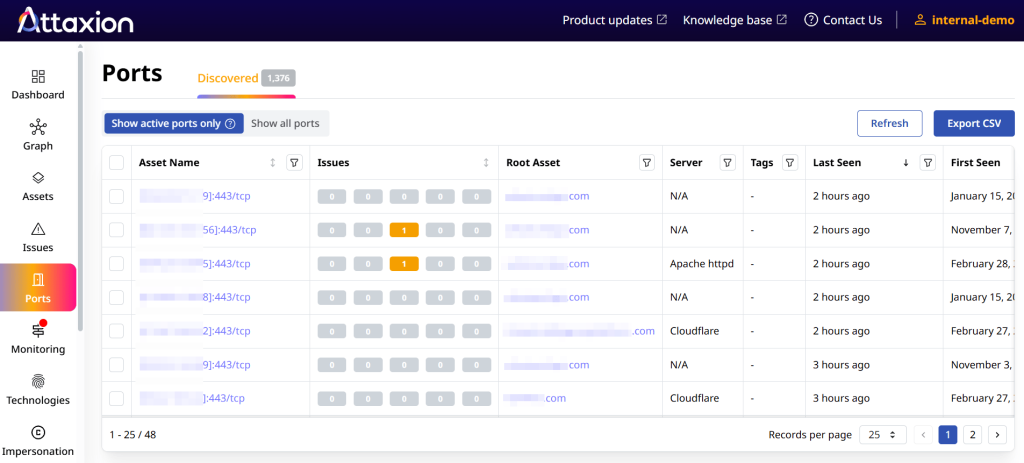
- Zoom in on a particular asset and see all ports on it.
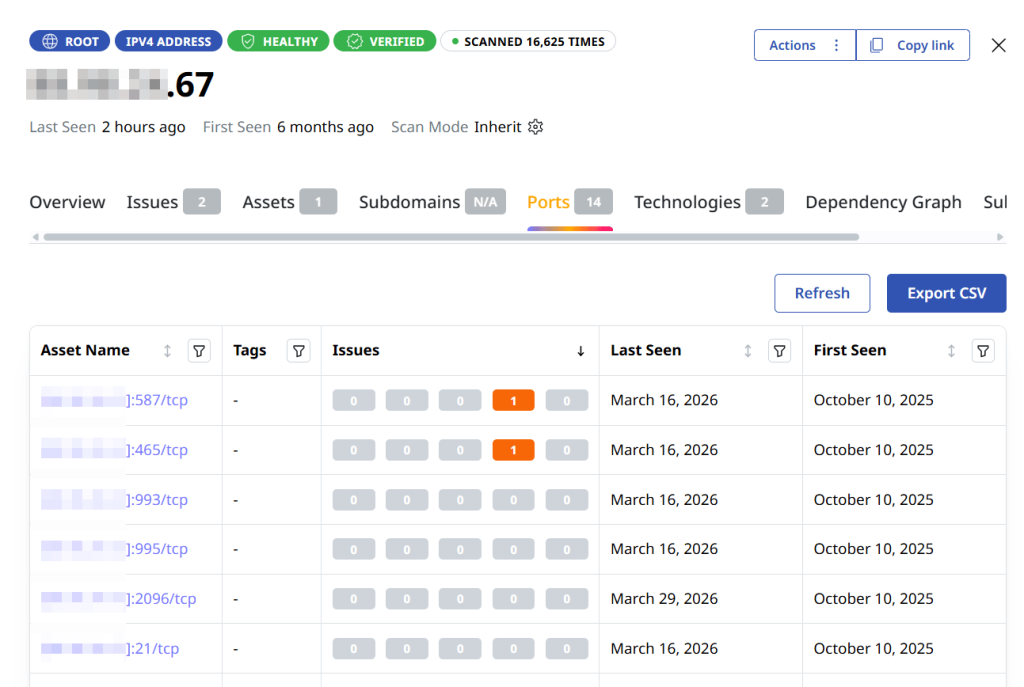
Aside from reducing your attack surface, using a firewall with a default deny policy can help keep attackers at bay since firewall rules like that block all incoming traffic, unless a specific rule allows it. When an attacker runs a port scan, the firewall drops or rejects the request, resulting in a filtered status in tools like nmap.
Keep in mind that most attackers look for easy wins. If a scan returns nothing but timed-out connections, the target may seem like a dead end. You are essentially increasing the effort required for threat actors to find a vulnerability, and this drives attackers to find easier targets elsewhere (unless, of course, it’s a targeted attack).
Start using Attaxion LiveSight to protect your assets from malicious port scanning.