



Analyzing full packet captures (PCAPs) in Wireshark is almost a rite of passage in cybersecurity — no matter whether your starting point was higher education or lower level cybersecurity certifications, such as CompTIA Security+ or CCNA.
However, once you get out of the lab environment and into the sprawling, multi-cloud reality of modern networks, you run into a problem with PCAP — and that problem is scalability. Full packet captures are very resource-intensive: both in terms of processing and storage — especially storage.
One solution to that scaling problem is analyzing NetFlow instead of full packet captures. This guide explores different ways to use NetFlow in cybersecurity, along with their benefits and drawbacks.
What is NetFlow
Surprisingly, NetFlow is not as well known in the cybersecurity community as PCAPs. NetFlow is a network monitoring protocol originally developed by Cisco. It is used to collect metadata about IP traffic flowing across network devices such as routers and switches, providing visibility into both application and network performance.
NetFlow records are directional, meaning each flow represents traffic in one direction only. It’s also worth noting that NetFlow does not capture packet payloads. Instead, it records metadata about flows, commonly identifying them using the 5-tuple of a network flow:
- source IP address
- destination IP address
- source port
- destination port
- IP protocol.
It also records flow duration and total bytes/packets transferred.
When a NetFlow exporter (usually a router, firewall, or network appliance) sees packets crossing an interface, it examines the packet headers — commonly the 5-tuple (but in some cases some other things too) — to determine whether those packets belong to an existing flow record or if a new one should be created.
If the 5-tuple matches an existing entry in the flow cache, the packet and byte counters get updated. If it doesn’t match anything, a new flow entry is created.
Here’s an example of a NetFlow record represented in JSON:
{
  "header": {
    "version": 5,
    "count": 1,
    "sys_uptime": 12345678,
    "unix_secs": 1713972360,
    "unix_nsecs": 456000000,
    "flow_sequence": 5021,
    "engine_type": 0,
    "engine_id": 0,
    "sampling_interval": 0
  },
  "flow_record": {
    "source_ip": "192.168.1.50",
    "destination_ip": "8.8.8.8",
    "nexthop_ip": "10.0.0.1",
    "input_snmp": 2,
    "output_snmp": 5,
    "packets_in_flow": 15,
    "octets_in_flow": 1240,
    "first_switched": 12344000,
    "last_switched": 12345600,
    "src_port": 51234,
    "dst_port": 53,
    "tcp_flags": "0x00",
    "protocol": 17,
    "tos": 0,
    "src_as": 64512,
    "dst_as": 15169,
    "src_mask": 24,
    "dst_mask": 32
  }
}
From this flow record, you can see the who, where, when, and how of that particular traffic.
- The source: A device at 192.168.1.50
- The destination: 8.8.8.8, which is Google’s Public DNS.
- The communication: The source used port number 51234 to send the request.
- Traffic volume: The network flow consisted of 15 packets totaling 1,240 bytes
- Flow Duration: The connection started at 12344000 and ended at 12345600 or 1600 milliseconds.
- The route: The traffic entered the router on interface index 2 and was sent out on interface index 5.
- The next hop: The router handed these packets off to a gateway at 10.0.0.1.
- Autonomous System (AS) source and destination: The traffic moved from a private Autonomous System (64512) to Google’s Autonomous System (15169). This suggests that the traffic was routed from an internal/private AS toward an external/public AS.
NetFlow vs. netflow
Before we go any further, there’s a naming convention worth clarifying.
NetFlow is a proprietary network flow monitoring protocol developed by Cisco. Two versions are currently widely used: NetFlow v5 and v9.
NetFlow v5 uses fixed fields and remains popular for its simplicity and IPv4 support, while NetFlow v9 is also common because it’s template-based (and therefore more flexible) and supports IPv6.
But this protocol is not the only one used for capturing network metadata. So, netflow (without any capitalization) is a general term used to refer to other network flow monitoring protocols, such as the following:
- IPFIX: An IETF standard (described in RFC3955) that emerged in the early 2000s, IPFIX is very similar to NetFlow, and in fact, it’s sometimes informally referred to as NetFlow v10 because it was based on NetFlow v9. IPFIX is an open standard, so it is supported by many networking vendors beyond Cisco Systems.
- sFlow: Introduced by InMon Corp, sFlow (which stands for sampled flow) captures a random sample of network traffic rather than tracking every packet. This reduces data volume and processing load, but means you might miss some things.
- xFlow: This is another generic term used to describe a family of protocols collectively, including J-Flow from Juniper Networks, Cflow from Alcatel-Lucent, and NetStream from Huawei.
Private vs. External Aggregated NetFlow Traffic
Another important distinction we need to establish is between where NetFlow data comes from.
First-Party NetFlow Traffic
First-party NetFlow is what your own network devices export, giving you visibility into what’s happening inside your environment.
To get it, you need to somehow capture it, which usually involves three components working together — exporters, collectors, and analyzers.
- Exporters are the devices that generate flow records. A NetFlow-enabled device, typically a router or firewall, operates as a NetFlow exporter, aggregating data packets into flows and periodically exporting NetFlow records to one or more NetFlow collectors. For environments where hardware doesn’t support NetFlow or IPFIX, software exporters can be deployed on servers or virtual machines.
- Collectors receive the exported data. A NetFlow collector can be hardware- or software-based, although software-based tools are more common. NetFlow collectors receive aggregated flow record data from exporters, then preprocess and store it.
- NetFlow analyzers then process and evaluate flow records that a NetFlow collector receives and stores. It turns data into reports and alerts that provide insight into bandwidth usage, traffic patterns, application usage, and other metrics that may identify security threats and performance problems.
There are plenty of open-source and commercial NetFlow tools that combine these functions into a single platform. However, in any case, you’ll need to have exporters on every major network node as well as collectors and analyzers to ensure that you capture everything.
Third-party Aggregated NetFlow Traffic
First-party NetFlow gives you visibility into both what’s happening inside your network and how your network nodes communicate with the outside environment. While it’s impossible for third parties to see inside your network (without being somehow present inside it), they can observe portions of external network communications by collecting flow telemetry from globally distributed vantage points and upstream network infrastructure. This data can provide valuable additional threat intelligence when combined with other data sources.
Collecting NetFlow at a global scale is complex and relatively uncommon, although there are providers that offer such intelligence. Attaxion LiveSight, for one, aggregates NetFlow data from global sources and correlates it with threat intelligence data, giving security teams a way to monitor their external attack surface in near-real time.
That kind of correlation — pairing raw flow data with actionable threat context — is what turns a stream of IP traffic into security signals you can act on.
What Can NetFlow Reveal
From a single NetFlow record, you can extract a solid set of facts — which IP addresses communicated with each other, what ports they used, the session duration, and how much data was moved.
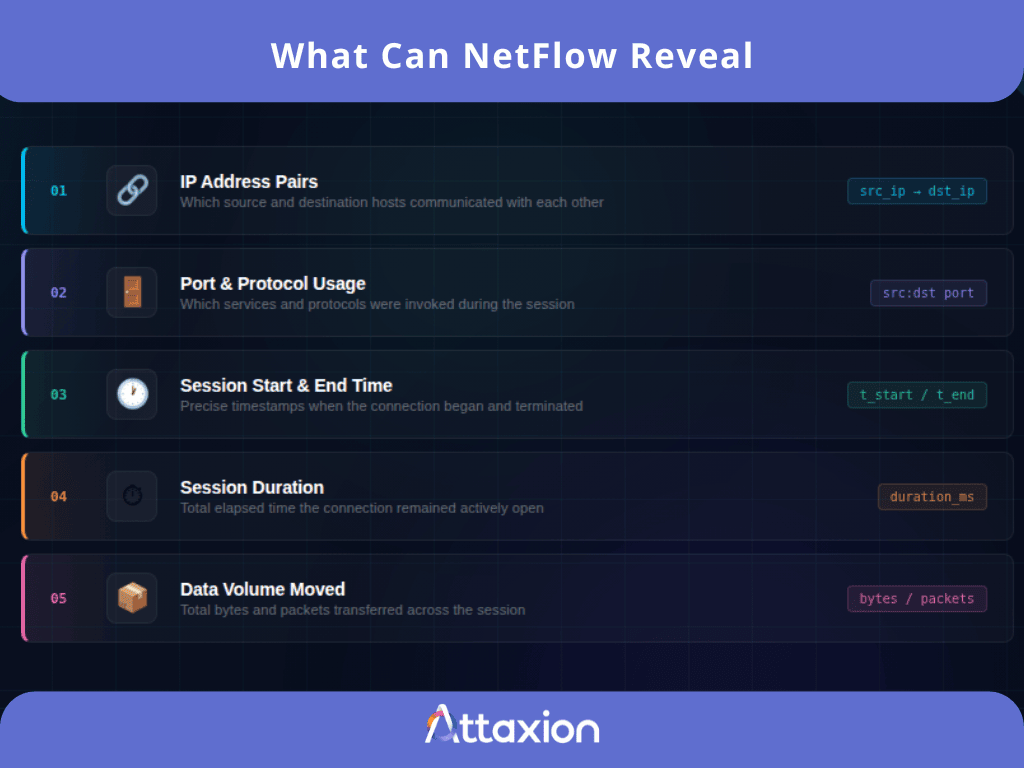
That’s useful on its own, especially for incident response. But the real value comes when you analyze flows at scale over time. Patterns start to emerge, and those patterns tell a story.
Here are some of the things you can detect by watching NetFlow across your environment:
- Hosts communicating with the internet when they shouldn’t be. For example, a database server making outbound connections to an external IP is a red flag that NetFlow can help identify (check out our blog post on outbound traffic monitoring to learn what else it can identify and how).
- Traffic on ports that should be closed. If port 3389, the default network port used by Microsoft’s Remote Desktop Protocol (RDP), is seeing traffic from a subnet that has no reason to use remote desktop, that should be investigated.
- Communications with known-malicious IPs. Correlating NetFlow data with threat intelligence feeds helps you identify connections to command-and-control (C&C) infrastructure, botnets, or IP addresses flagged for malicious activity.
- Deviations from baseline behavior. If a workstation that normally sends a few megabytes a day suddenly starts pushing gigabytes out to an external host, that’s a potential data exfiltration event that NetFlow can make visible.
NetFlow Use Cases in Cybersecurity
Whether you’re working with first-party or third-party aggregated flow data (or both), there are a bunch of security use cases that NetFlow supports well.
1. Detect Data Exfiltration
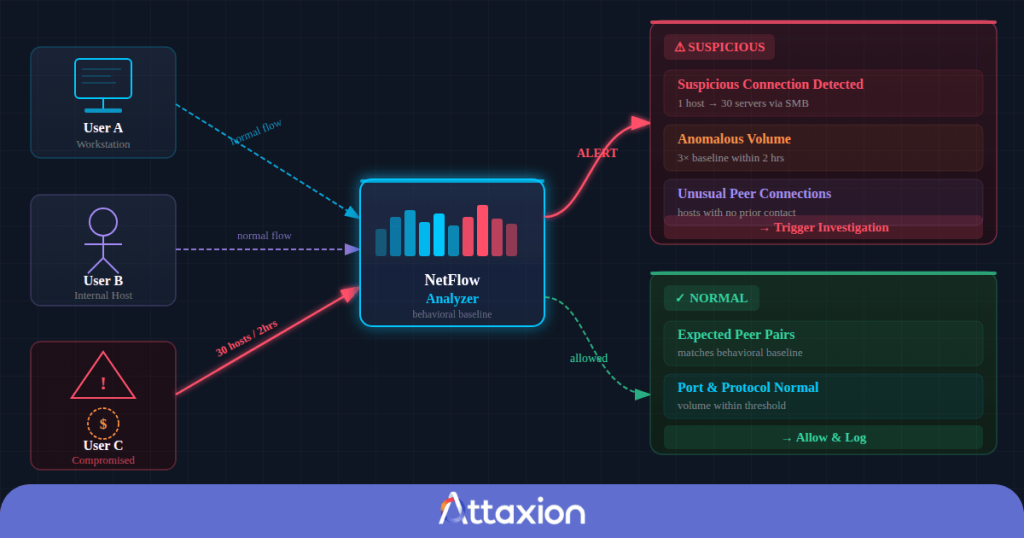
The signature of large-scale data theft is that a host sends out a lot more data than it normally does, often to an external IP address that isn’t part of your regular traffic patterns. NetFlow byte counts can help detect this, especially when combined with behavioral baselines.
If you add in threat intelligence or IP reputation checks, you can also see if the external IP is known to have participated in malicious activities earlier.
2. Detect Lateral Movement
When an attacker gains access to your network, they rarely stay in one place. They move from host to host, looking for credentials, sensitive data, or a path to their actual target. This movement shows up in NetFlow data as unusual connection patterns between internal hosts, especially ones that don’t normally talk to each other.
If a workstation suddenly starts making SMB connections to 30 different internal servers over a span of a few hours, that’s a signal. With NetFlow, you won’t see the payload, but the pattern is enough to trigger an investigation. Combined with a behavioral baseline, lateral movement becomes one of the most effective detections you can have with NetFlow.
Lateral movement within the network can only be detected with the use of first-party NetFlow data — aggregated third-party NetFlow would not reveal it.
3. Detect Shadow IT
NetFlow makes shadow IT such as unapproved third-party services visible. If hosts on your network are regularly connecting to a cloud storage service, a personal VPN, or a SaaS tool that your organization hasn’t approved, the flow data can reveal these connections.
You see the destination IPs and ports, and from there you can map them back to specific services using netblock lookups and DNS data.
4. Network Segmentation Validation
Network segmentation is supposed to keep different parts of your environment isolated from each other, for example, keeping your production systems separate from your development environment, or isolating IoT devices from your core network.
But segmentation rules drift over time — firewall changes get made and forgotten, and new devices get added without proper policy review.
NetFlow lets you continuously validate that your segmentation is actually working. If traffic appears between network segments that shouldn’t be communicating, you’ll see it in the flow data before it turns into an incident.
To detect that, you’ll need first-party NetFlow.
5. Identify C2 Communications and Beaconing
C2 traffic is how malware phones home. The malware on an infected host periodically reaches out to an attacker’s server to receive instructions or send back results. This is called beaconing, and it has a distinctive rhythm (regular, short connections to the same external IP at consistent intervals).
NetFlow is well-suited to detect this because you don’t need the payload. You just need the timing and the destination. Correlating NetFlow data with threat intelligence can also help here by telling you whether that destination IP is associated with known C2 servers.
6. Early Threat Detection
NetFlow can help identify early signs of reconnaissance activities like port scanning, giving you a window into threats before a successful intrusion occurs. NetFlow patterns like communications from one external IP to a variety of hosts on one port or to a variety of ports on one host are clear signs of port scanning.
You can use threat intelligence to strengthen the signal and tell you if a particular IP range is currently being used for malicious scanning or exploitation campaigns.
7. Policy Enforcement
NetFlow can help you enforce policies like:
- No communication with IP ranges in specific geographic regions
- No outbound connections to known P2P or torrent networks
- No internal systems reaching out to IP addresses outside approved categories
NetFlow data, correlated with geolocation and content classification databases, makes this kind of enforcement possible at scale.
8. Threat Hunting
While threat hunters love PCAPs, they value NetFlow as well, because it provides the historical visibility needed to test the hunters’ hypotheses against real network activity. A hunter might ask questions like: “Did any internal systems communicate with infrastructure associated with this malware family?” or “Has this compromised host been moving laterally across the environment?” And historical NetFlow enriched with threat intelligence is likely to have answers to these questions.
For threat hunters, NetFlow is equally useful for both helping prove existing hypotheses or coming up with new ones. Read more in our blog post on NetFlow-enabled threat hunting.
9. Threat Intelligence Enrichment
For threat intelligence analysts, third-party aggregated NetFlow is a treasure trove of data. Instead of looking at a malicious IP or domain in isolation, analysts can use flow data to understand how that infrastructure is being used, who is communicating with it, how frequently connections occur, and what other systems are involved.
For example, for a newly identified command-and-control (C2) server, NetFlow can help identify related IPs, uncover additional infrastructure communicating with the same hosts, and observe beaconing or scanning patterns associated with the campaign. It helps analysts map attacker infrastructure and identify potentially affected organizations or systems.
Conclusion
NetFlow occupies a middle ground between raw packet capture and high-level security alerts. It doesn’t give you packet payloads or full session contents, but it does provide something incredibly valuable at scale: a continuous historical record of how systems communicate across a network. That visibility makes NetFlow useful for everything in cybersecurity — from threat detection and incident response to threat hunting and threat intelligence enrichment.
As modern environments keep growing larger, more distributed, and increasingly encrypted, flow telemetry is establishing itself as one of the most practical ways to understand network behavior at scale. First-party NetFlow provides deep visibility into your own environment, but collecting and analyzing it at scale requires significant infrastructure — exporters, collectors, storage, and analysis pipelines.
Third-party aggregated NetFlow, on the other hand, can often be consumed immediately as a service, giving security teams instant access to broader Internet-scale visibility and, in some cases, historical retroactive data that can support investigations and threat intelligence work.
Improve your cybersecurity workflows with 30 days of retroactive visibility into your NetFlow traffic. Book an Attaxion LiveSight demo to learn more.