

Shadow IT assets are the specific technological resources such as devices, software, cloud infrastructure, or AI used for work outside an organization’s established IT approval or oversight processes, whether or not the IT department knows they exist.
While shadow IT refers to the general practice of using unapproved systems, shadow IT assets are the specific items that security and IT teams need to identify, evaluate, govern, secure, or retire to mitigate risk.
Table of Contents
- What Is Shadow IT?
- What Are Shadow IT Assets?
- What Are Examples of Shadow IT Assets?
- Why Do Employees Create and Use Shadow IT?
- What Risks Do Shadow IT Assets Pose?
- How Shadow IT Expands the External Attack Surface
- How to Discover Shadow IT Assets
- How to Manage and Prioritize Risky Assets
- Example of a Shadow IT Policy
- How to Reduce Shadow IT
- How Attaxion Can Help
- Frequently Asked Questions
What Is Shadow IT?
Shadow IT is an umbrella term for any software, hardware, or service used for work-related tasks that falls outside the IT department’s approval or oversight. This practice creates blind spots that make it difficult for security teams to protect company data.
IBM’s 2025 edition of the Cost of a Data Breach Report found that 20% of organizations reported a breach due to shadow AI, the unapproved use of AI tools. Organizations with high levels of shadow AI paid an average of $670,000 more per breach than those with low levels or none.
What Are Shadow IT Assets?
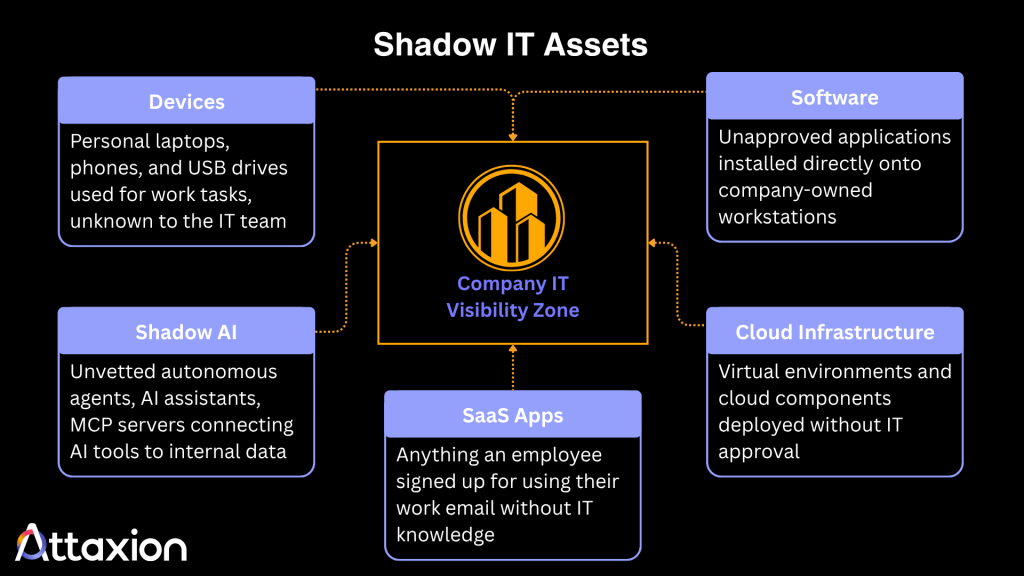
Shadow IT assets are any IT resources used for work outside the organization’s IT approval or oversight processes. These assets generally fall into these categories:
- internet-facing assets,
- endpoints and devices,
- cloud and SaaS services,
- AI tools.
Some assets fit more than one category. For example, a cloud server can also be internet-facing, and a public AI chatbot is also a SaaS application. Not all shadow IT assets are internet-facing.
Unapproved websites, cloud servers, and exposed applications expand an organization’s external attack surface, while unauthorized SaaS tools, personal devices, and AI applications mainly create endpoint, identity, and data security risks. Each group needs a different discovery and monitoring approach.
Simply, if the IT department hasn’t approved a resource and doesn’t manage it, that resource is a shadow IT asset, even if IT knows it exists. A personal laptop used under an approved bring-your-own-device (BYOD) policy isn’t shadow IT, but a campaign website the marketing team launched without telling IT is.
What Are Examples of Shadow IT Assets?
Here are some examples of shadow IT assets, grouped by category.
Internet-Facing Assets
- Unsanctioned websites and subdomains: Marketing teams sometimes launch campaign landing pages or microsites on new subdomains or third-party hosting services without telling IT. Because nobody tracks them, these sites can run outdated plugins, use expired SSL certificates, or stay online long after the campaign ends.
- Personal servers or cloud instances: Developers, software testers, and other employees may operate unsanctioned cloud servers and virtual machines to build, debug, and test applications. These may expose the organization to attacks such as unauthorized access and ransomware because these environments often lack the patching, access controls, and monitoring applied to managed infrastructure.
Endpoints and Devices
- Unapproved physical devices: These include personal laptops and mobile devices used to access work emails and documents, as well as personal storage devices, such as USB drives and external hard drives, used to transfer sensitive files.
- Local applications and macros: Employees may install one-off applications or browser extensions to automate tasks. These unvetted tools can introduce vulnerabilities or contain malware.
Cloud and SaaS Services
- SaaS applications: Many software-as-a-service (SaaS) platforms, including productivity and communication tools, require only an email address to sign up. The ease of creating an account and using SaaS applications has significantly contributed to the prevalence of shadow IT, exposing organizations to threats.
- Personal email accounts: While all employees have personal emails, these become shadow IT assets when used for sending or receiving work-related emails. These assets can expose sensitive information, especially when the personal email uses unsecured mail servers or is compromised.
AI Tools
- Shadow AI: Employees are increasingly using public artificial intelligence chatbots and agents to speed up tasks such as writing or coding. When employees feed confidential data into public AI tools without IT or legal approval, it creates serious data leakage risks. In IBM’s 2025 Cost of a Data Breach Report, only 37% of organizations have policies to manage AI or detect shadow AI.
These are just a few common examples of shadow IT assets. Some of them may have become the norm among employees over the years because they are easy to use and access, making them difficult for IT teams to track down and manage.
Why Do Employees Create and Use Shadow IT?
The main reason why employees use shadow IT is convenience. They may want to immediately find and use tools that meet their needs without having to go through their company’s IT approval process.
In many cases, shadow IT users do not know about, or choose to ignore, the security risks tied to unvetted resources since they focus only on getting the job done. Access to certain tools is necessary for some departments to hit their goals. If the approved company tools are outdated or hard to use, employees will seek out alternatives. The same thing happens when the process for vetting and approving a new tool is long or complicated.
Another factor influencing the shadow IT trend is the shift to remote and hybrid work, as employees use personal home networks and devices to handle corporate tasks. Personal devices count as shadow IT only when employees use them outside a formal BYOD policy and without the security controls it requires, such as mobile device management (MDM).
What Risks Do Shadow IT Assets Pose?
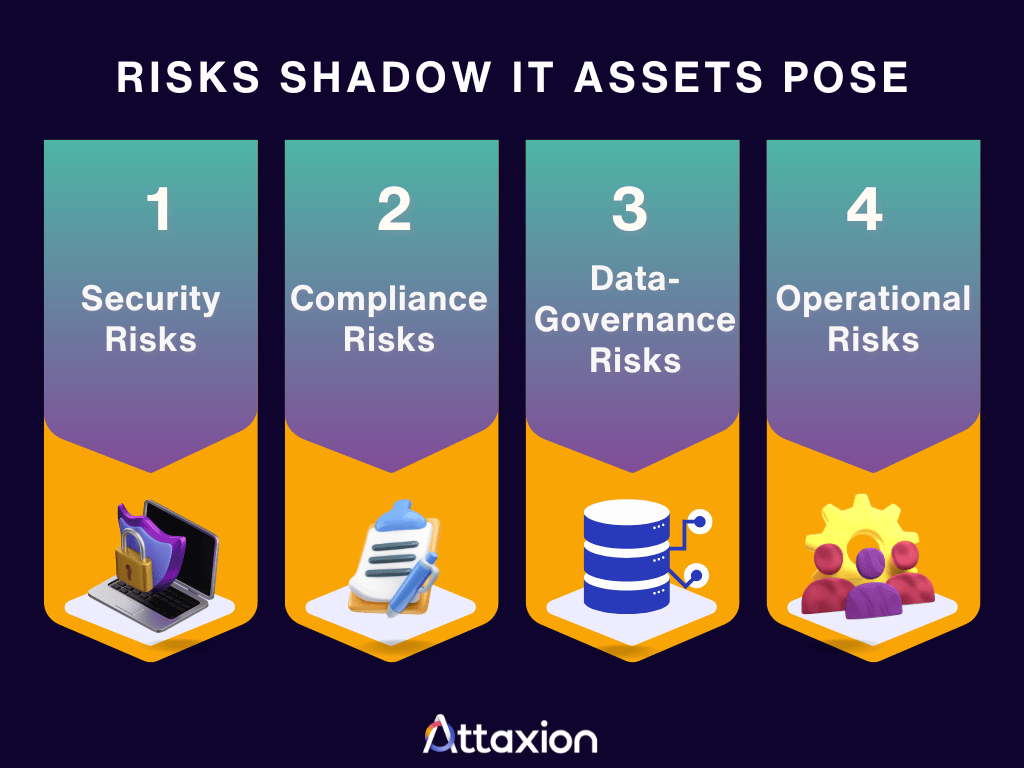
Because shadow IT operates outside of standard monitoring and protection protocols, they pose different types of risks, including those related to security, compliance, data governance, and operations.
Security Risks
Some shadow IT assets, especially unmanaged cloud workloads, domains, subdomains, and web applications, are public-facing and can expand the external attack surface. Others create less visible but still serious risks through identity, data, endpoint, and SaaS exposure.
Since shadow IT assets likely bypass an organization’s standard security policies and procedures, they may contain security vulnerabilities that could pave the way for successful cyber attacks if not timely detected and addressed.
Here are some examples of security vulnerabilities that are commonly seen in shadow IT assets.
- Unpatched software and misconfigurations: Shadow IT assets are often overlooked during system-wide security updates because the IT team is unaware of them. These assets may run outdated software, expose unnecessary services, use weak/default credentials, or be configured in ways that increase the risk of exploitation. Misconfigured assets can also leak sensitive data, such as credentials, internal file paths, or system details, a weakness known as information exposure (CWE-200).
- Insecure data storage and transmission: Unsanctioned apps or websites may lack encryption in transit or at rest, use weak TLS configurations, permit insecure HTTP access, or store files in locations that are not covered by corporate data-protection controls.
- Weak authentication and access controls: Shadow IT applications may lack the authentication methods required by company security policies. For example, employees may not implement MFA on shadow IT resources even when they are required to do so on company-sanctioned applications. They may also use weak passwords or fail to change a system’s default password. These practices make shadow IT assets particularly vulnerable to brute-force attacks and hacking.
Compliance Risks
Organizations must comply with regulations such as GDPR, HIPAA, and industry-specific data protection standards. These compliance frameworks require companies to know exactly where their data lives and how it is protected. Shadow IT weakens this chain of custody.
When employees store regulated data into unvetted and unmanaged cloud apps or personal devices, the company may lose the visibility and control needed to meet compliance standards. This failure can result in hefty financial penalties and legal action.
Data-Governance Risks
Proper data governance ensures that information is accurate, available, and secure. Shadow IT puts this at risk since when data gets spread across multiple unsanctioned applications, organizations lose their single source of truth, and employees end up working with outdated or conflicting information.
Furthermore, when an employee leaves the company, the organization may lose access to the data stored in their personal shadow IT accounts, exposing the organization to the risk of data loss and intellectual property theft.
Operational Risks
When an unapproved application suddenly stops working, the company’s IT helpdesks lack the documentation or training to fix it. This leaves non-technical employees trying to troubleshoot the software issues themselves, which could take a lot of time and ultimately cause extended project delays and drain productive working hours.
How Shadow IT Expands the External Attack Surface
The external attack surface consists of all digital assets connected to the internet that an attacker could potentially exploit. Shadow IT expands this surface by adding unknown and unprotected access points.
- When a marketing team launches a promotional website using a third-party hosting provider without IT approval, they create a new, unmonitored node that may run an outdated CMS or expose an admin panel nobody patches. The Validate Asset Ownership and Authorization section below shows how security teams find this kind of assets and what they can do with them.
- When developers create a cloud environment for testing and forget to decommission it, they leave an open door on the internet.
Each exposed shadow IT asset, such as an unmanaged cloud instance, web app, open port, or subdomain, can become another attack vector that threat actors may discover through internet-wide scanning.
Even as IT security teams use firewalls, endpoint detection, and continuous monitoring to defend the known attack surface, they simply cannot defend the assets they can’t see.
How to Discover Shadow IT Assets
Use the Right Discovery Method for Each Asset Type
The first step is to build an inventory of technologies used across the organization, using different discovery methods for internal networks, endpoints, cloud services, SaaS applications, and internet-facing infrastructure. No single tool finds every type of shadow IT asset, so organizations combine asset discovery tools that scan internal networks, internet-facing systems, and cloud environments with other sources of visibility. Here are the assets to look for and the methods that work best for each group:
| External assetsDiscovery methods: external attack surface management (EASM) and other external asset discovery tools | Endpoint and device assetsDiscovery methods: endpoint management, endpoint detection and response (EDR), and device inventory tools |
| Domains SubdomainsOpen portsSSL certificatesWeb applications | LaptopsPhonesUSB drivesLocal softwareBrowser extensions |
| Cloud and SaaS assetsDiscovery methods: cloud inventory and cloud security tools, SaaS discovery tools, identity logs (SSO and OAuth), and web proxy logs | AI-related assetsDiscovery methods: SaaS and identity monitoring, endpoint controls, and employee reporting |
| Virtual machinesStorage bucketsManaged databasesCloud-native networkingCloud accounts Cloud-to-cloud integrationsSaaS accountsOAuth-connected appsAPI tokens | LLM tools (ChatGPT, Claude, etc.)AI coding assistantsAI agentsMCP server integrationsEmbedded AI features within existing SaaS appsGenerative AI tools used by employees |
Once security teams have an inventory of everything connected to the organization, they can compare the list against the official IT registry of approved technology. Any resource detected during asset discovery that is missing from the official registry should be flagged for validation.
Validate Asset Ownership and Authorization
Validation confirms whether the discovered asset belongs to the organization (for example, through WHOIS records, DNS records, SSL certificates, or the hosting account), whether an approved vendor runs it, which team owns it, and whether it was ever authorized (for example, by checking the approved asset inventory or confirming with IT). Only then can it be classified as shadow IT and assigned for remediation.
For example, an external attack surface scan may find a new subdomain through DNS records or certificate transparency logs. The security team confirms that the subdomain belongs to the company and that the marketing team owns it. They then check the approved asset inventory and confirm with IT that the site was never authorized. Next, they check it for risks, such as an outdated content management system (CMS), an exposed admin panel, or a weak TLS configuration. Finally, the team either secures the site and adds it to the asset inventory or takes it down.
Analyze Network Traffic and Logs
Security teams can analyze network traffic and firewall logs to help them identify when employees access unsanctioned cloud applications or transfer large amounts of data to unknown external domains.
This step involves evaluating specific data points across multiple network layers to uncover hidden activity through activities such as:
- DNS query tracking: Monitoring DNS logs allows teams to see the domain names that devices look up through the company’s DNS resolvers. Frequent or unusual queries to unapproved cloud storage services, file-sharing sites, or newly registered domains may indicate shadow IT usage. Lookups that bypass these resolvers, such as DNS over HTTPS (DoH) traffic or remote devices that aren’t on the VPN, won’t show up in these logs.
- NetFlow analysis: Security teams track traffic volume using NetFlow data to monitor the amount of data leaving the network. A sudden rise in outbound data to an unrecognized external IP address may point to the use of an unauthorized backup tool or cloud database.
- Behavioral pattern recognition: Modern security tools analyze traffic patterns over time to establish a baseline of normal company behavior. When an employee workstation suddenly starts uploading encrypted data packets to an unknown cloud service, the system flags the anomalous behavior for manual investigation.
Ask Employees
Getting information directly from employees through surveys can uncover shadow IT and align your technology with business needs. Examples of questions you can ask are:
- Have you used a personal email or cloud storage account to send or store work files?
- Do you use non-company apps for your daily tasks? What do you use each tool for?
- What specific features or capabilities are currently missing from the company’s approved technology toolkit?
- Have you used public generative AI tools or chatbots to assist with your work tasks?
- Is the current approval process for requesting new software or hardware too slow or complicated?
It’s important to clarify that the goal of the survey is to understand shadow IT usage rather than reprimand users.
How to Manage and Prioritize Risky Assets
Managing shadow IT assets effectively requires a multifaceted cybersecurity strategy, involving some of the practices discussed below.
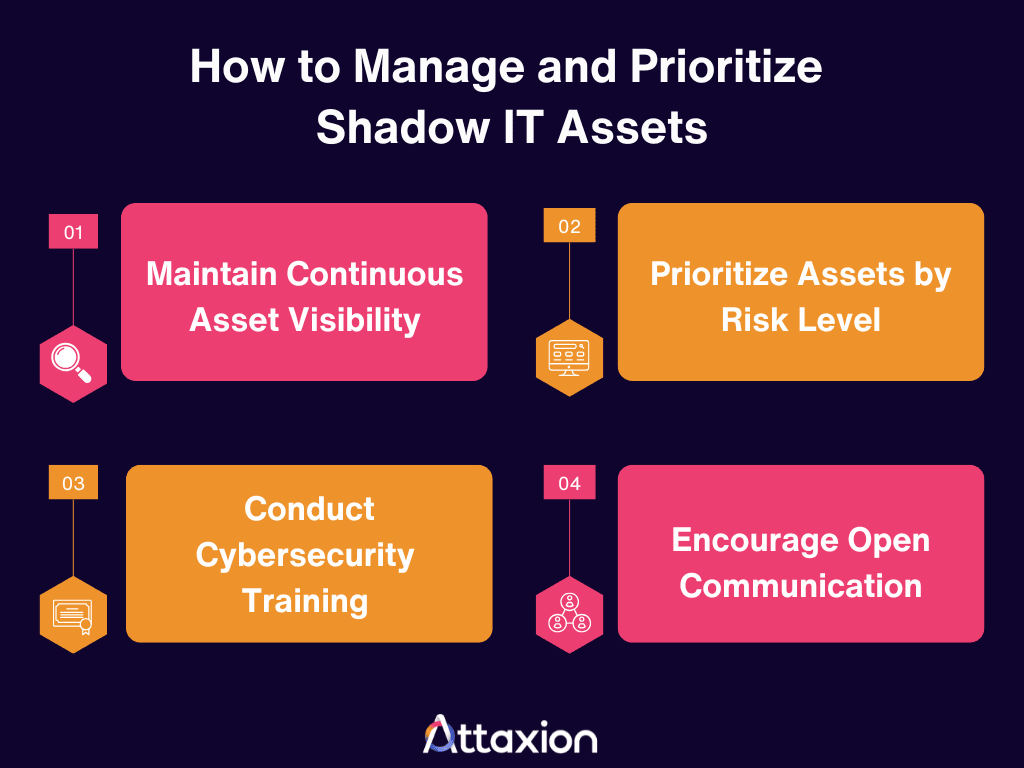
Maintain Continuous Asset Visibility
The first step is to ensure that you have the capability to detect digital assets associated with the company, including those previously unknown. Employees may have been using shadow IT assets for a long time, and it’s important to thoroughly catalog them so issues can be remediated or mitigated before vulnerabilities get exploited.
Many organizations use a combination of tools to continuously discover cloud and other Internet-facing shadow IT assets and scan them for security issues and vulnerabilities. EASM platforms, for one, can help detect unmanaged domains, subdomains, web apps, cloud-hosted services, open ports, and exposed infrastructure. They are used along with SaaS, identity, endpoint, cloud, network, and data-security controls to manage shadow IT more broadly.
Prioritize by Risk Level
Once you have a list of shadow IT assets, don’t treat each of them the same way. A free PDF converter handling sensitive financial data is a huge problem, but a team tracking lunch preferences on a random kanban board is not.
Depending on company policies and the sensitivity of the data they hold, shadow IT assets may need to be decommissioned, or the IT team may need to secure them and add them to the list of sanctioned applications and systems.
Here’s a general guideline on how to prioritize these assets. Treat the indicators as illustrative rather than automatic classifications: an asset’s actual risk depends on several factors, including data sensitivity, internet exposure, vulnerabilities, privileges, and existing security controls.
| Priority level | Asset type indicators | Recommended action |
| Critical | Handles sensitive or regulated data (such as customer PII, financial records, or health records), has administrative privileges, or is internet-facing with exploitable vulnerabilities. | Isolate or sanction. Immediately migrate to an approved tool or apply corporate security controls. |
| High | Connected to internal networks, lacks multi-factor authentication (MFA), or collects employee credentials. | Evaluate. Schedule a detailed security review to determine if the business utility justifies the risk. |
| Medium | Redundant tools used by specific teams, like unapproved project management apps holding non-sensitive plans. | Consolidate. Guide the team toward official corporate alternatives that do the same job. |
| Low | Publicly available tools or individual productivity apps with no access to internal data. | Monitor. Keep an eye on data volume, but leave it at the bottom of the remediation list. |
Example of a Shadow IT Policy
A clear policy sets boundaries and helps employees understand the right way to procure technology. Here is a basic framework for a Shadow IT policy:
| Corporate Shadow IT Policy | |
| Objective | The goal of this policy is to educate employees on the cybersecurity risks of unvetted technologies while providing a clear path to safely introduce new tools. This policy balances network protection with the agility required for employees to perform their roles efficiently. It aims to reduce hidden risks by discovering, listing, and classifying every asset operating on the network. |
| Audience | This policy applies to all business units, full-time and part-time employees, remote workers, contractors, and third-party vendors who access corporate data or networks. |
| Ownership | The Governance, Risk, and Compliance (GRC) Team owns this policy and is responsible for evaluating business needs and providing practical software alternatives.The Security Team is responsible for continuous network monitoring, running discovery tools, and handling risk classification.The IT Procurement Team is responsible for rapidly vetting and officially provisioning new software requests to eliminate friction. |
| Monitoring and enforcement methodology | The security team uses automated capabilities to continuously monitor the corporate network, cloud environments, and endpoint logs for unapproved tools or anomalous data migrations. |
| Employee responsibility | Employees are expected to use company-sanctioned tools for all business operations. When a tool falls short, employees must collaborate with their managers and the GRC team to formally request an evaluation rather than bypassing protocols. Employees are collectively responsible for maintaining proper security hygiene and data protection standards across all workflows. |
| Request and reporting process | Employees submit requests through [the IT service portal], listing the tool, its purpose, the data it will access, and who will use it. IT Procurement responds within [X] business days. Unapproved tools already in use should be reported through the same channel and are reviewed for approval, replacement, or removal, without penalty for self-reporting. |
How to Reduce Shadow IT
Reducing shadow IT requires eliminating the reason why employees seek out unofficial tools in the first place. These best practices can help:
- Streamline the software approval process. If employees know they can get a secure and necessary tool approved in a few days, they will not bypass the system.
- Listen to employee feedback. If multiple departments are using an unauthorized project management tool, it means the sanctioned tool is failing them.
- Encourage open communication. When employees can share their technology needs without fear of reprimand, IT can offer secure alternatives before they turn to unapproved tools.
- Evaluate the most used shadow IT tools, secure them, and consider making them an approved option if they meet your requirements.
- Deploy automated monitoring to block access to known high-risk applications.
- Restrict administrative privileges on local machines so users can’t install unapproved software.
- Train employees on shadow IT risks. Add shadow IT to regular cybersecurity awareness training, with a clear definition and examples of the security, compliance, and data risks it creates.
How Attaxion Can Help
Attaxion helps organizations take control of their digital footprint by uncovering and monitoring internet-facing shadow IT assets, such as unmanaged domains, subdomains, web applications, exposed services, and cloud-hosted infrastructure associated with their external attack surface.
Core capabilities that enable Attaxion to detect shadow IT assets and other hidden vulnerabilities include:
- Agentless asset discovery: Because Attaxion works from an outside-in perspective, it can help detect internet-facing shadow IT assets, such as unmanaged domains, subdomains, web apps, exposed services, and cloud-hosted infrastructure, even when those assets are not tracked in the internal inventory.
- NetFlow traffic monitoring: Attaxion LiveSight uses NetFlow-enhanced visibility to show inbound and outbound traffic involving your organization’s exposed IP addresses, helping security teams identify which assets are active, spot traffic that doesn’t align with security policies, and detect communication with known malicious IPs.
- Continuous monitoring: Attaxion runs continuous scans to automatically discover new assets and scan them for security misconfigurations and vulnerabilities.
Curious to see if you have shadow IT assets? Attaxion can help detect them for you. Schedule a free demo tailored to your organization now.