



If you’re the only security person at your company, or one of two, you already know that the real problem isn’t the lack of tools. It’s that you lack the hours for everything — to deploy those tools, tune them, and act on what they find. Most lists of free cybersecurity tools don’t consider that part. They list tools without saying how much upkeep each one takes, so you find out after you’ve installed it.
This list is for small teams. We picked 13 free cybersecurity tools for the usefulness of their free offerings, their value to one- or two-person security teams, the range of security jobs they address, available documentation to verify capabilities, and substantive community or third-party review discussions.
Every tool on this list is free to use, either as open-source software or as a permanent free plan, not a time-limited trial.
Free vs. Open Source: What Small Teams Should Know
Let’s also clear up one thing: free and open source aren’t exactly the same.
Open-source tools are released under a license that lets you use, inspect, and modify the code for free. You run them yourself, either on a server you maintain (Wazuh, Greenbone, CrowdSec, Velociraptor) or on your desktop or in a CI pipeline (ZAP, Gitleaks, Semgrep). Either way, updates and tuning are your job.
Free plans of commercial tools are proprietary products offered at no cost, with limits on users, assets, scan volume, features, or data retention. For hosted services, the vendor runs the infrastructure, so setup is faster, but you work inside their limits.
Neither is cheaper by default. For a small team, the real question is which one can cost you fewer hours for the job you need done. We go deeper on this trade-off in our post on free and open-source vulnerability management tools.
The 13 Best Free Cybersecurity Tools for Small Teams
Here’s a quick look at all 13 tools. Note that they are not ranked by detection accuracy, which would require controlled comparative testing. The “Who runs it” column is very important for a small team since self-hosted tools cost you setup and maintenance time, while hosted free plans cost you flexibility.
| Tool | Security job | Free offering | Who runs it | Main consideration |
|---|---|---|---|---|
| Wazuh | Endpoint vulnerability and configuration checks | Open source | You (self-hosted) | Narrow the monitoring scope; the platform still needs maintenance |
| Greenbone Community Edition (OpenVAS) | Network vulnerability scanning | Open source | You (self-hosted) | Multi-service setup and upkeep |
| ZAP | Web app security testing (DAST) | Open source | You (desktop or CI) | Automated findings need validation |
| CrowdSec | Automated attack blocking | Open source engine + free community tier | You (self-hosted) | Needs correct client IPs and enforcement points |
| Velociraptor | Digital forensics and incident response (DFIR) | Open source | You (self-hosted) | Requires forensic investigation skills |
| Gitleaks | Secrets detection | Open source | You (CLI or CI) | Feature-complete; security patches only |
| Semgrep Community Edition | Static code analysis (SAST) | Open source | You (CLI or CI) | Custom rules take time to write |
| Burp Suite Community Edition | Manual web penetration testing | Free proprietary edition | You (desktop) | No automated scanner |
| Snyk Free | Code, dependency, container, and IaC scanning | Free plan | Vendor (SaaS) | Monthly test caps |
| Cloudflare Free | Website and edge protection | Free plan | Vendor (SaaS) | 5 custom WAF rules, basic managed rules |
| VirusTotal | Malware and threat triage | Free public service | Vendor (SaaS) | Privacy issues since uploaded files can be shared with premium VirusTotal customers |
| Shodan | External exposure research | Limited free access | Vendor (SaaS) | Search and export limits |
| GitGuardian Free | Secrets detection | Free plan | Vendor (SaaS) | Test credentials can generate alert noise |
Free and Open-Source Tools
1. Wazuh
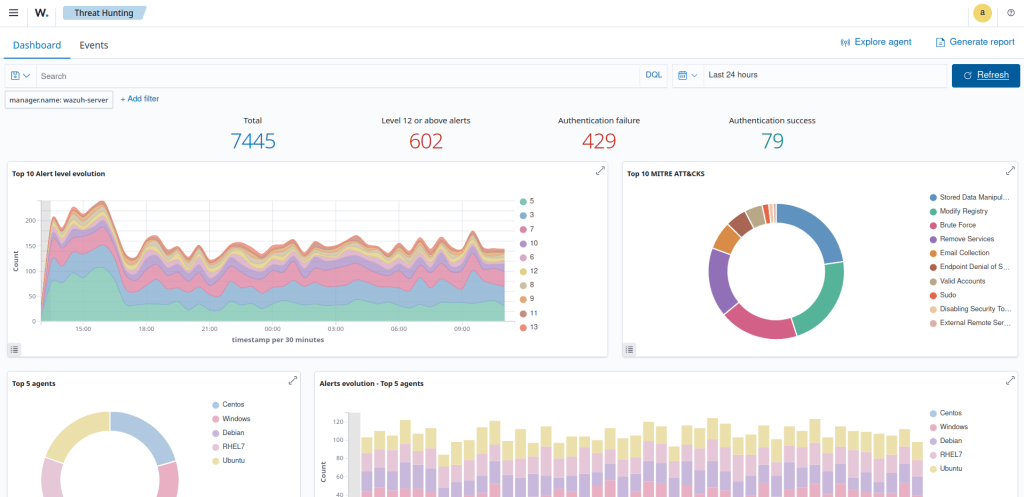
Wazuh is known to many cybersecurity practitioners as a free, open-source SIEM. Maintaining a SIEM can be too much for a small cybersecurity team, but that’s not all that Wazuh has to offer — it also provides endpoint vulnerability detection and security configuration assessment. You can use Wazuh for that work without taking on full-scale SIEM monitoring.
You’ll still need to deploy Wazuh server, indexer, dashboard, and endpoint agents. The agents collect software inventory from your endpoints and servers, and its vulnerability detection module matches that inventory against vulnerability data. Its security configuration assessment checks system settings against policies such as CIS benchmarks and reports failed checks with remediation guidance. Results appear in the dashboard. File integrity monitoring can also flag unexpected file changes.
To avoid being overwhelmed with Wazuh, start with vulnerability and configuration checks on a few critical servers. This narrows the monitoring workload, but the maintenance would still fall on your shoulders. Review the default log collection and alert settings so they match that scope, and expand monitoring only when someone can own the triage.
Key features:
- Endpoint vulnerability detection: Matches software inventory from agents against vulnerability data to identify known flaws.
- File integrity monitoring: Flags changes to files and directories you choose.
- Security configuration assessment: Checks system settings against policy benchmarks.
- Central dashboard: Lets you investigate alerts from every agent in one place.
Pros:
- A user found custom decoders and rules useful for testing simulated attacks, instead of relying only on the default detections.
- A DevOps engineer found Wazuh’s integrations straightforward to set up and its documentation well maintained.
Cons:
- PeerSpot’s review summary says Wazuh’s alerts and monitoring have to be configured manually, and reviewers describe the upkeep as ongoing effort.
- A SOC analyst found that keeping the indexer and server clusters performing well at scale takes dedicated infrastructure monitoring.
- Users reported false vulnerability findings in some older versions, so confirm the behavior on the current release.
Pricing: Free and open source. You pay for hosting and admin time, and Wazuh sells optional commercial services.
2. Greenbone Community Edition (OpenVAS)
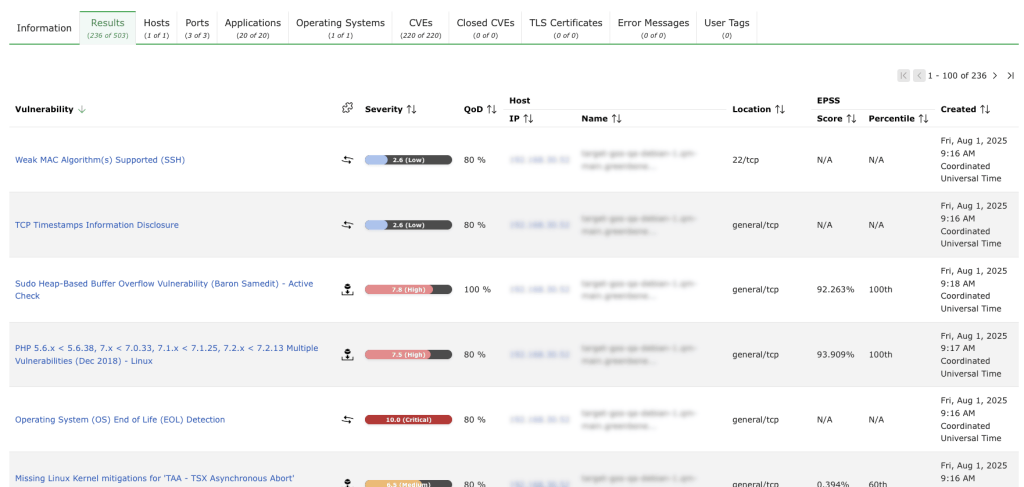
Greenbone Community Edition is the free version of Greenbone’s vulnerability management stack, built around the OpenVAS scanner. You deploy it yourself, using Docker containers, a source build, or Kali Linux packages. It scans hosts over the network without agents and can run authenticated scans over protocols such as SSH or SMB. Our post on free and open-source vulnerability management tools covers how OpenVAS compares with other scanners in more detail.
Key features:
- Network vulnerability tests: Checks reachable hosts and services against a large set of vulnerability tests.
- Authenticated scanning: Uses credentials to look past service banners into installed software.
- Community feed: Pulls regular updates to its vulnerability tests.
- Scan management: Organizes targets, scan tasks, and reports.
Pros:
- A user who ran OpenVAS for about two years considered the scan results worth the maintenance effort.
- A user liked the quick deployment using a virtual machine image.
- Another reviewer called OpenVAS free, stable, and backed by a helpful community.
Cons:
- Can be resource-intensive during authenticated scans.
- A vulnerability management analyst found the interface confusing for new users, with options that are hidden and not very intuitive.
- A reviewer found that dependencies can break when Linux distributions update, with PDF report generation breaking most often.
Pricing: Free and open source, so hosting and maintenance are on you. Greenbone sells commercial products, feeds, and support separately.
3. ZAP
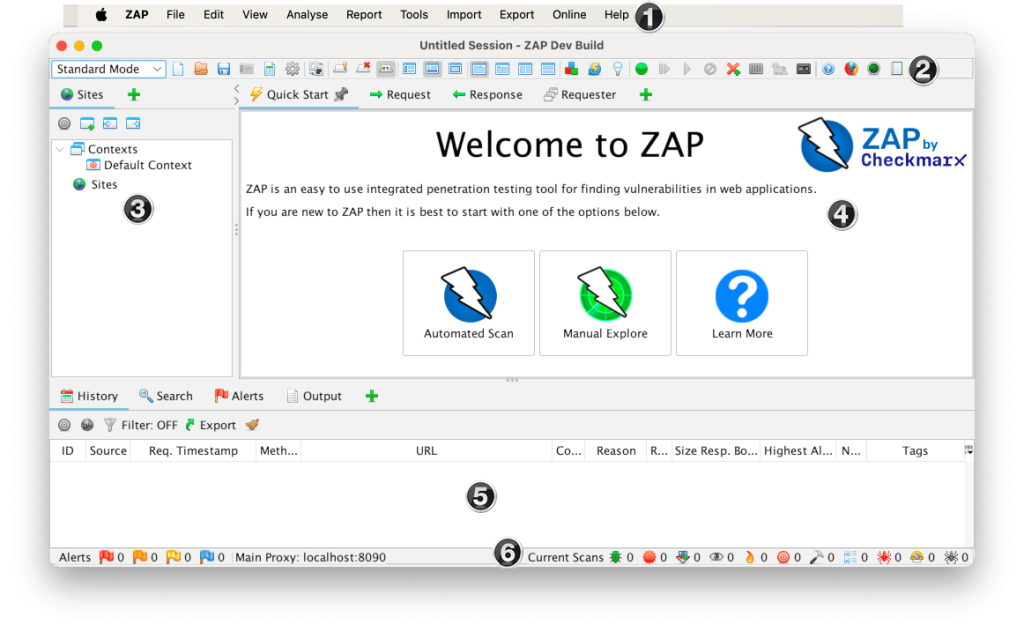
ZAP (Zed Attack Proxy) is an open-source dynamic application security testing (DAST) tool for web apps and APIs. It works as an intercepting proxy and adds passive scanning, active scanning, scripting, and automation. You’ll still see it called “OWASP ZAP,” but ZAP left OWASP in 2023, and since September 2024 it has been backed by Checkmarx, which employs its project leaders. The ZAP core team still controls the project, and it stays open source under the Apache 2.0 license.
Key features:
- Intercepting proxy: Lets you inspect and edit HTTP and HTTPS traffic.
- Passive and active scanning: Flags issues in observed traffic, then probes the target for supported vulnerability classes.
- Automation Framework: Runs repeatable test plans in CI/CD pipelines.
- Add-ons and scripts: Extend the checks and testing behavior.
Pros:
- A reviewer likes that ZAP can be customized for different testing needs with scripts.
- A security analyst found that ZAP has more automated scan features than Burp Suite and praised its spider and AJAX spider.
- ZAP is great for automation workflows. For example, we at Attaxion use it as one of the parts of our vulnerability scanning engine.
Cons:
- Testers find the interface and navigation less polished than Burp Suite.
- A penetration tester found some false positives, so you need to check whether each finding is real.
- A reviewer said ZAP comes with very little documentation and pointed new users to YouTube videos and online articles.
Pricing: Free and open source.
4. CrowdSec
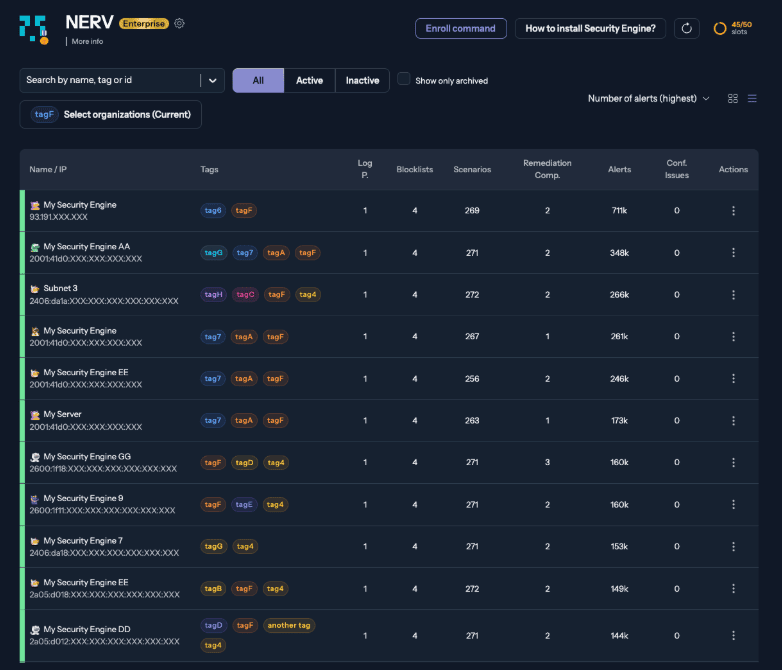
CrowdSec is an open-source intrusion detection and prevention engine (IPS + IDS). Its Security Engine reads your logs and selected HTTP traffic, looks for abusive behavior such as repeated failed logins, and decides what to do about the offending IP addresses. Separate remediation components, which CrowdSec calls bouncers, enforce those decisions at your firewall or reverse proxy.
Users can also opt in to sharing information about attacks they detect, helping other users block the same attackers — hence the “Crowd” in CrowdSec.
Key features:
- Behavioral scenarios: Parsers and rules detect patterns such as brute-force attempts.
- Remediation components: Block or challenge IPs through compatible firewalls and proxies.
- Community blocklist: Shares IP reputation data across participating deployments.
- CLI and optional console: Show alerts, decisions, and engine status.
Pros:
- A user said they could install CrowdSec, configure it, and add a bouncer to protect their servers within a few minutes.
- A reviewer who compared it with Fail2Ban found CrowdSec’s grok-based parsers easier to write.
Cons:
- A user found that setup gets harder once you deploy more complex bouncers, and documentation for community-submitted bouncers is hit or miss.
- A reviewer pointed out that some protections depend on the quality and volume of community-contributed threat intelligence. Which is quite normal for a community-driven product.
Pricing: The Security Engine itself is free and open source, while the free Community tier includes blocklist access with some limits. The premium console features, extra blocklists, higher threat-intelligence quotas, and SLA-backed support require a paid plan.
5. Velociraptor
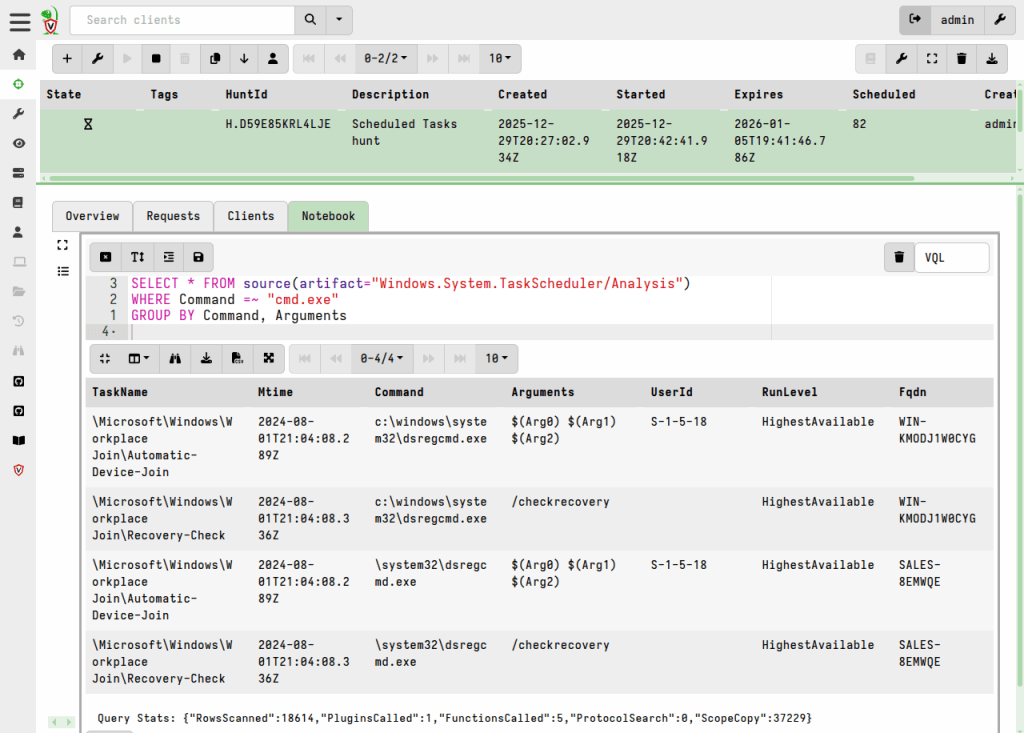
Velociraptor is an open-source digital forensics and incident response (DFIR) platform. It requires you to install an agent on endpoints, and then you can use collection definitions (artifacts) and the Velociraptor Query Language (VQL) to collect evidence from the endpoints and analyze it.
Like Wazuh, Velociraptor puts agents on your endpoints, but its strength is investigation rather than day-to-day alerting. You use it to pull evidence from many machines quickly once something looks wrong.
Key features:
- Remote evidence collection: Pulls selected artifacts from managed endpoints.
- VQL: Queries endpoint state and forensic data with flexible expressions.
- Artifact library: Reuses collection definitions across investigations.
- Endpoint hunts: Runs the same query across groups of systems.
Pros:
- A user found the agent easier for customers to deploy than a separate forensic collection toolkit.
- A DFIR practitioner found VQL (the query language) easy to learn and said the open-source community, including creator Mike Cohen, is responsive to users of all skill levels.
Cons:
- A Reddit user found the interface cumbersome compared to other tools.
- Investigators note that you need forensic knowledge to make use of the endpoint artifacts Velociraptor collects. So, it’s easy to learn, but still has some learning curve.
Pricing: Free and open source.
6. Gitleaks
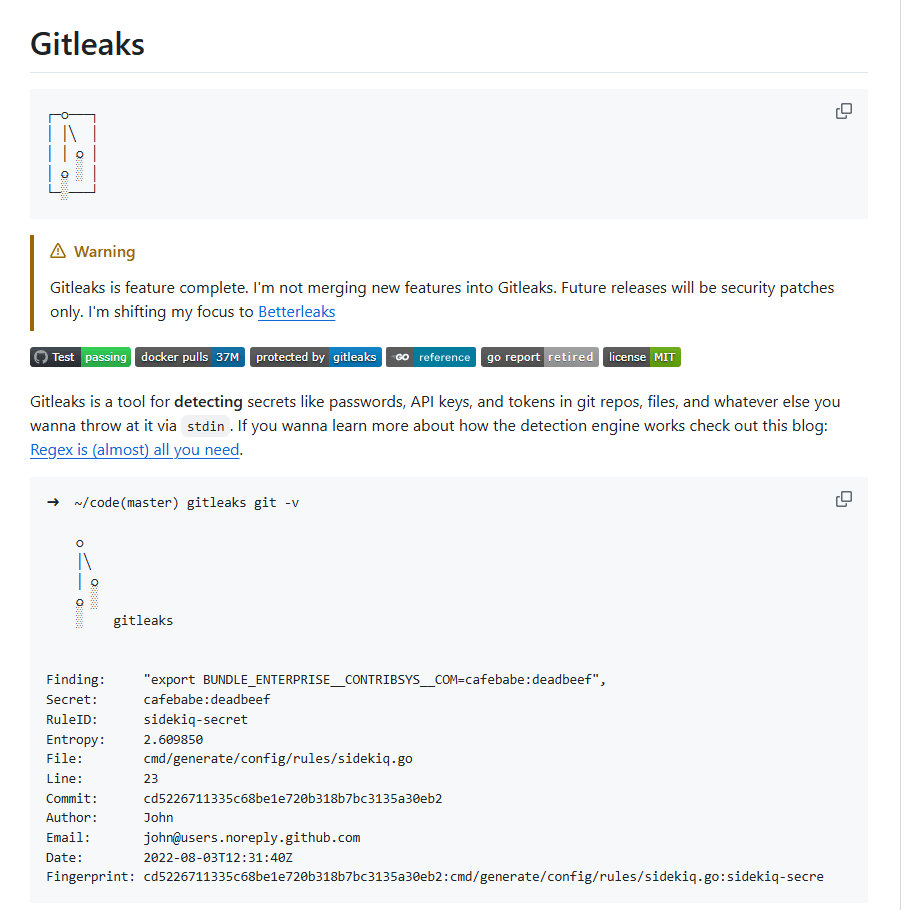
Gitleaks is an open-source command-line secrets scanner. It searches Git history, local files, and directories for strings that look like hardcoded passwords, tokens, and API keys, using rules you can configure.
One thing to know before you build on it is that the Gitleaks README now says the tool is feature-complete and will only get security patches. Its original author, Zach Rice, started a successor project called Betterleaks after losing full control of the Gitleaks repository. Betterleaks is MIT-licensed and compatible with Gitleaks, so switching later doesn’t mean starting over.
Key features:
- Git history scanning: Finds secrets in past commits, including ones later deleted from a branch.
- File and directory scanning: Checks local project files outside Git history.
- Configurable rules: Supports custom patterns and allowlist exceptions.
- Baselines: Separates new findings from ones you’ve already reviewed.
- Scriptable output: Produces machine-readable results for scripts and CI.
Pros:
- A user suggested running it offline first and tuning out false positives before turning it on in your pipeline, a gradual rollout that suits a small team.
- A user recommended pairing Gitleaks with GitHub’s secret scanning patterns.
Cons:
- A user warned that it can generate a lot of false positives, so it needs tuning before you rely on it.
- Gitleaks doesn’t verify whether a secret is still live, so you spend more time triaging pattern matches.
- Its README says the project is feature-complete and will only get security patches, so don’t expect new detection features.
Pricing: Free and open source under the MIT license.
7. Semgrep Community Edition
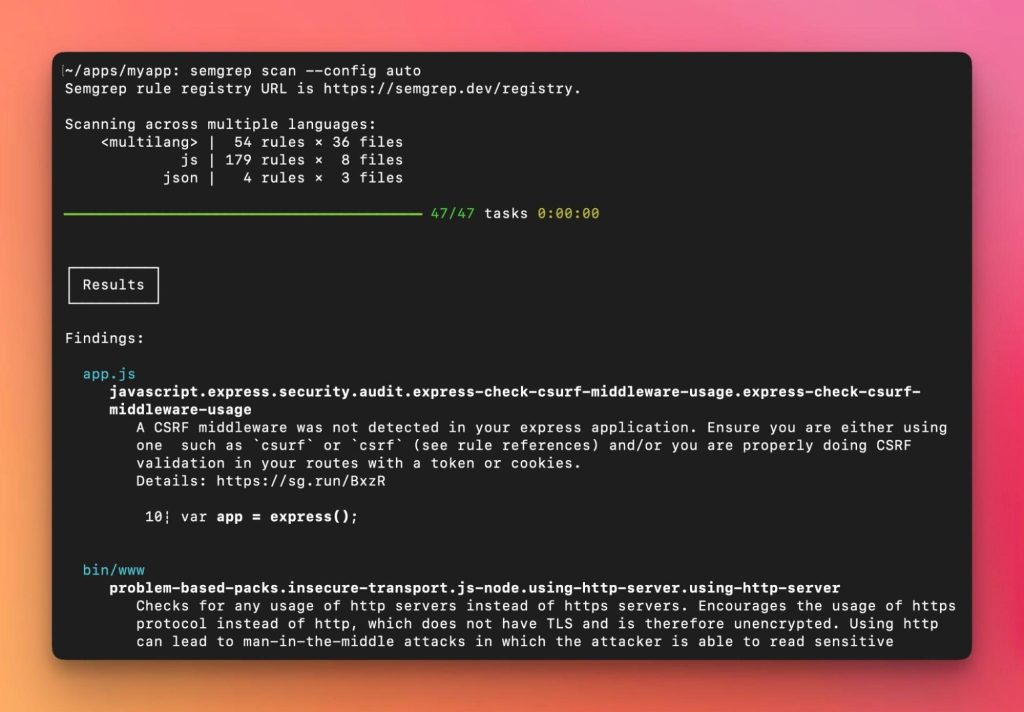
Semgrep Community Edition is an open-source static analysis (SAST) engine. It matches code patterns described in YAML rules, so you can catch insecure coding patterns without running the application. You can use the public rules or write your own for issues specific to your codebase.
Key features:
- Rule-based analysis: Matches syntax-aware patterns across supported languages.
- Custom rules: Encode your organization’s own insecure patterns in YAML.
- CLI and CI scanning: Runs locally or in a pipeline.
- Machine-readable output: Feeds results into other tools.
Pros:
- Reviewers value the flexibility of writing their own detection logic in YAML rules instead of waiting for a vendor check.
- Users report that lightweight scans fit into frequent CI checks.
- A developer comparing SAST tools says that it’s faster and has fewer false positives.
Cons:
- Complex rules take time to write and debug.
- Keeping shared rules and exceptions in sync across many repositories can be tedious.
- A PeerSpot reviewer noticed occasional false positives.
Pricing: The Community Edition engine is free and open source. Semgrep’s commercial platform has separate terms, and many third-party reviews describe paid features, so check which edition a review is about.
Free Security Tools from Commercial Vendors
The tools in this category are proprietary, but each has a free plan or edition you can keep using without a time limit. For the hosted services in this group, the vendor handles hosting and updates, which saves a small team a significant amount of time. Burp Suite Community Edition is the exception, since it’s a desktop app you install and update yourself. The trade-off, though, is the plan’s limits.
8. Burp Suite Community Edition
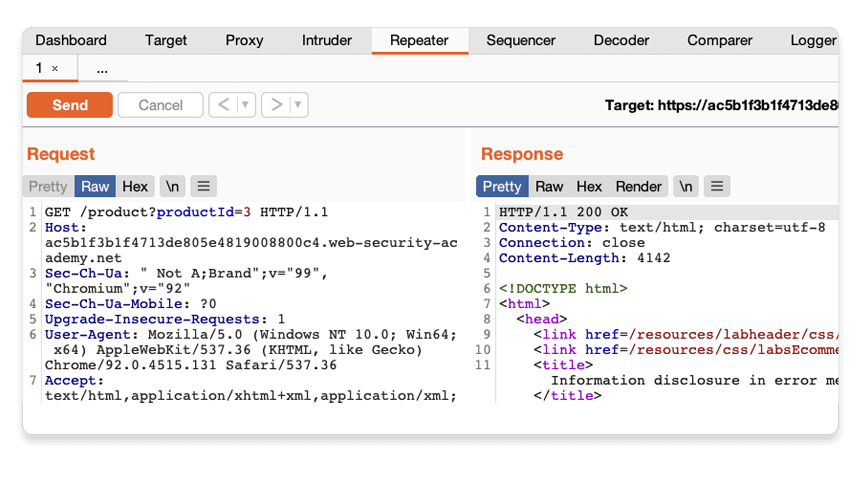
Burp Suite Community Edition is PortSwigger’s free web security testing app. It gives you an intercepting proxy and manual tools to inspect, change, and replay HTTP and WebSocket traffic. It’s the free counterpart to Burp Suite Professional, which many penetration testers use daily. Unlike ZAP, Community Edition has no automated vulnerability scanner and no CI automation. It’s for manual testing, where Burp’s proxy and Repeater workflow is the main draw.
Key features:
- Proxy and HTTP history: Records and edits traffic between your browser and the target app.
- Repeater: Resends edited requests so you can see how the app responds.
- Decoder and Comparer: Transform and compare test data.
- Intruder (limited): A throttled version of Burp’s automated request tool.
Pros:
- A developer uses Community Edition’s Repeater to edit and resend a request, then compare the response side by side, which makes it easy to follow what the server returned.
- A reviewer found the setup to be straightforward and the interface easy to use, since you just download it, configure it, and start intercepting traffic.
- A QA engineer considered the BApp Store extensions useful even in the free Community Edition.
Cons:
- The automated vulnerability scanner is only in Professional, so Community isn’t a free scanner, but rather a toolkit for manual web application security testing — don’t expect it to become a part of your automated application security testing pipeline.
- Reviewers mention high resource use when you run several of its tools at once.
- Users find the Community Edition throttled to the point of being barely practical for fuzzing.
Pricing: Community Edition is free. Professional is a paid license costing $499 per user per year.
9. Snyk Free
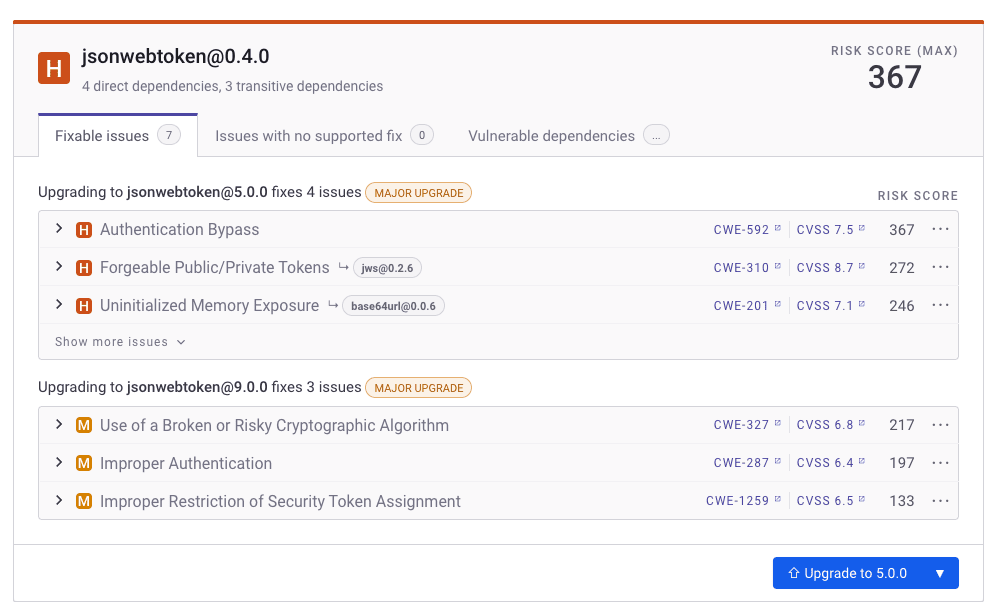
Snyk is a developer security platform that scans open-source dependencies (SCA), source code (SAST), container images, and infrastructure as code (IaC). The free plan gives you all four — with monthly test limits — through IDE plugins, the CLI, and source control integrations. Where Semgrep Community Edition is a rule engine for your own code, Snyk’s free plan also checks the open-source packages, container images, and infrastructure code you depend on, using checks the vendor maintains, within monthly test limits.
Key features:
- Software composition analysis: Finds known vulnerabilities in your dependencies.
- Static code analysis: Flags insecure code patterns.
- Container and IaC checks: Covers image vulnerabilities and infrastructure misconfigurations.
- Developer integrations: Connects to IDEs, the CLI, CI pipelines, and source control.
Pros:
- A DevSecOps architect found that Snyk’s VS Code and JetBrains plugins give real-time vulnerability feedback while coding.
- A software engineer found it easy to run Snyk as a GitHub Action alongside existing CI processes.
- A developer said that it helps that scans show the versions in which vulnerabilities are fixed.
Cons:
- A user found that false positives and alert volume can force a lot of manual validation.
- A reviewer found the documentation out of date, which caused issues during setup.
Pricing: The Free plan is $0, with monthly test limits per product, such as 100 Snyk Code tests. The Team plan costs $25 per contributing developer per month, for teams of 5 to 10 developers. Check the current plan table for exact limits.
10. Cloudflare Free
Everyone knows Cloudflare, but not everyone knows that you can use it for free. Cloudflare runs DNS, a CDN, and security services at the network edge, in front of your origin server. The Free plan covers a website with DDoS protection, a basic web application firewall (WAF), and traffic analytics.
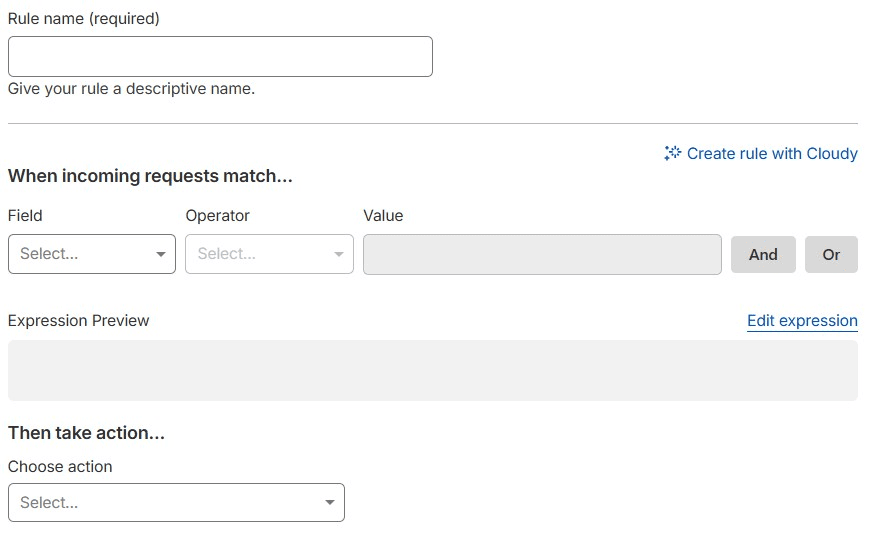
The Free plan lets you create up to five custom firewall rules to block or challenge requests — for example, based on IP addresses, countries, or URL paths. It also includes one rate-limiting rule, which you could use to curb repeated requests to a login page. Cloudflare maintains the included Free Managed Ruleset, but it covers only a subset of the protections available on paid plans.
Key features:
- Proxy and DNS: Routes your website traffic through Cloudflare’s network.
- DDoS protection: Absorbs common attacks before they reach your server.
- WAF: The Free plan includes the Free Managed Ruleset and up to 5 custom rules. Pro raises that to 20 custom rules and the full managed ruleset.
- Security analytics: Shows blocked and challenged requests within plan limits.
Pros:
- A website administrator said Cloudflare blocks malicious bots and DDoS traffic before it reaches their server, without them maintaining complex firewalls.
- A user found the setup straightforward and called the free tier solid.
Cons:
- A reviewer says that firewall rules are hard to create without clearer instructions on which settings to use.
- A founder found it hard to tell which Cloudflare service or setting causes a particular behavior, since its features span several products and dashboards.
- A user found support on the free and lower-tier plans hard to get, so expect to rely on the documentation.
Pricing: The Free plan is $0. Advanced WAF, bot, and reporting features are only available in paid plans.
11. VirusTotal
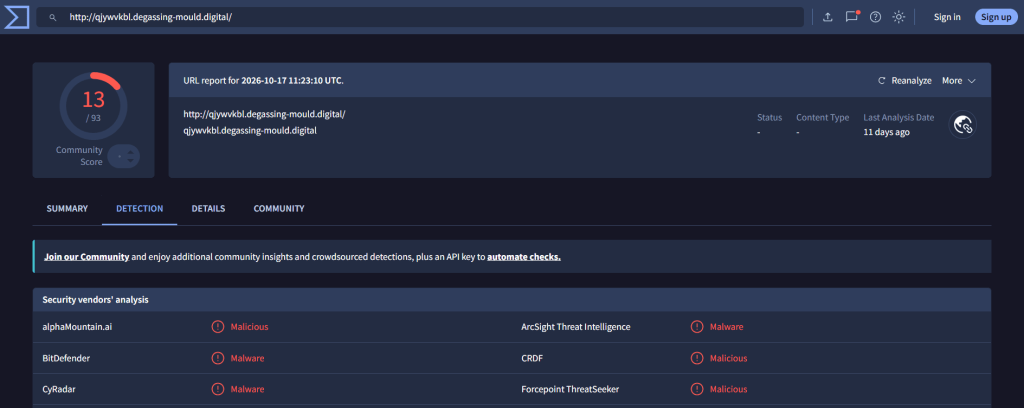
VirusTotal is a malware and threat intelligence service operated by Google. You can look up a file hash, URL, domain, or IP address, or submit a file, and see verdicts from dozens of security engines plus related indicators.
Check an existing file-hash report first where possible. Submitted files and pages may be shared with security partners and premium customers, so avoid uploading confidential documents or submitting URLs containing sensitive information.
Key features:
- File and hash lookups: Check whether a sample is already known.
- URL, domain, and IP analysis: Investigate indicators from phishing emails or alerts.
- Multi-engine verdicts: Compare detections from many security vendors.
- Relationships: See related files, domains, and infrastructure.
Pros:
- A reviewer uses it to check URLs and files from phishing emails against results from dozens of security vendors.
- A reviewer said checking files against many antivirus engines at once makes them more confident in what they download.
Cons:
- A reviewer found that it can miss zero-day threats and mark those files and URLs as clean.
- Reviewers note that engines can produce false positives or disagree with one another, and deeper searches need a paid VirusTotal Intelligence subscription.
Pricing: Public lookups and submissions are free, with usage limits. The free Public API has separate restrictions on commercial use and business workflows, so check its terms before automating company processes. Premium intelligence and higher-volume API access require a commercial plan.
12. Shodan
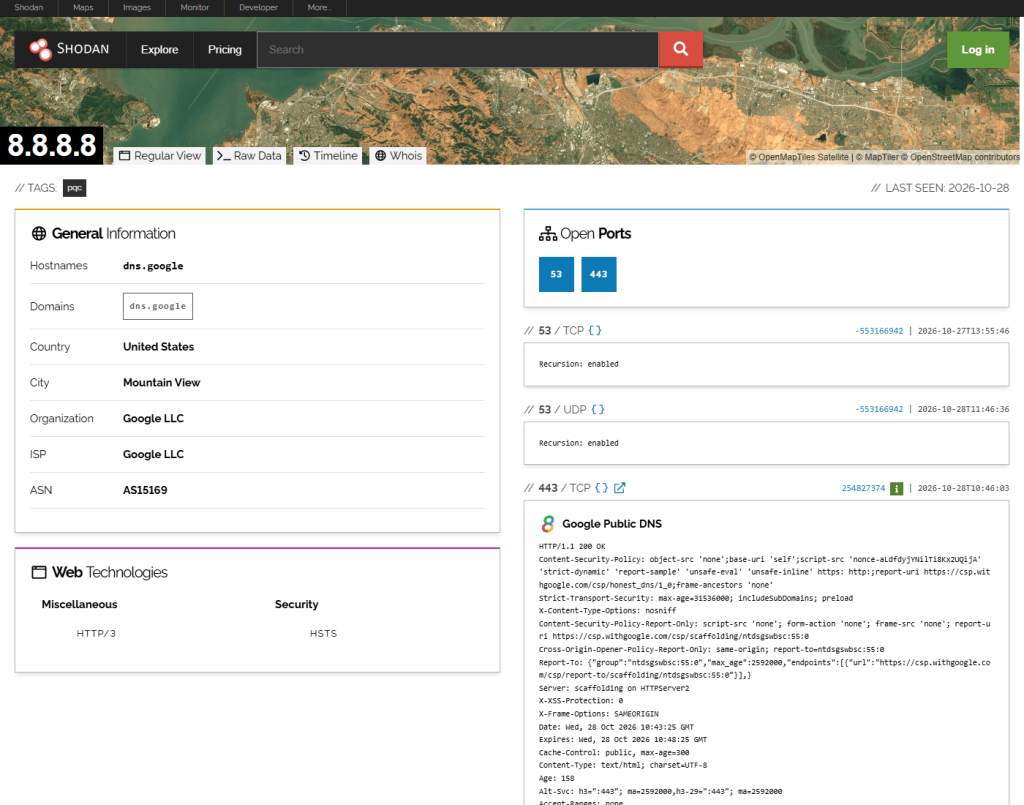
Shodan is a search engine for internet-connected devices. It indexes service banners, open ports, and device details it observes on the public internet, so you can see some of what an attacker would see when they look at your IP ranges. For more ways to find your internet-facing assets, see our best asset discovery tools post.
Key features:
- Service search: Find indexed hosts and services by IP, port, product, or organization.
- Banner details: See the service metadata Shodan collected.
- Search filters: Narrow results by technical attributes.
- API: Supports programmatic lookups, with available functions and query credits depending on your account level.
Pros:
- A user stated that showing Shodan results helped prospects understand their real exposure.
- Another reviewer uses Shodan to track open ports on client-related assets.
Cons:
- A reviewer found the result limits restrictive on their plan and the search tags hard to use.
- Another reviewer found the search output poorly structured.
Pricing: A free account provides limited searches and an API key, but that does not give unrestricted API search access. Filtered API searches and additional result pages require query credits. Check which functions your account includes before building an automated workflow.
13. GitGuardian Free
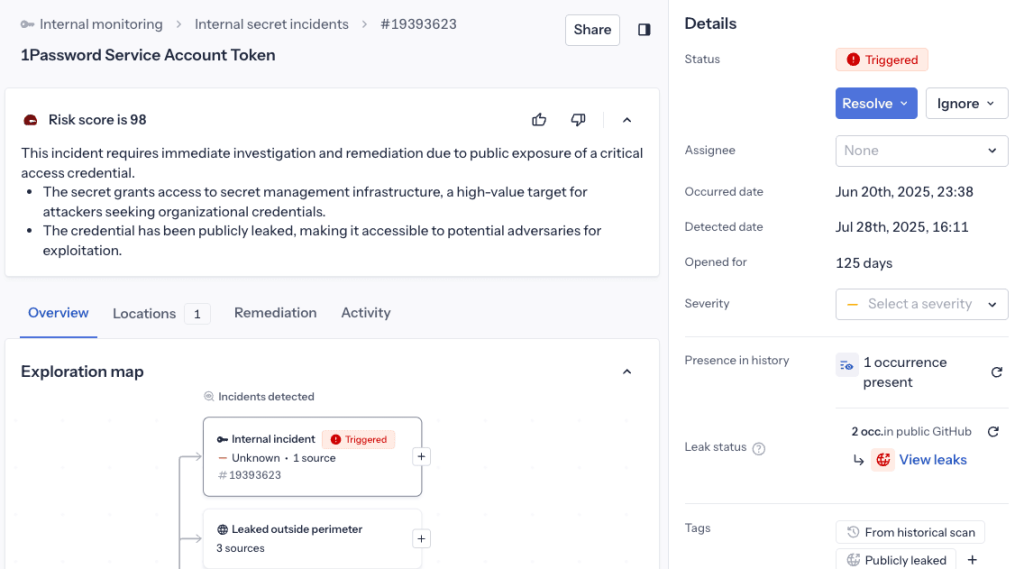
GitGuardian is a secret security platform with commercial plans and a free one. Its free plan connects to your source control, monitors repositories for leaked passwords, API keys, and tokens, and groups the findings into incidents you can investigate. It’s similar to Gitleaks, which also finds secrets, but GitGuardian is hosted, while Gitleaks requires you to run it on your machine or in CI.
Key features:
- Repository monitoring: Scans connected repositories for possible leaked credentials.
- Secret detectors: Recognizes many known credential formats.
- Incident views: Groups findings with the context you need to investigate.
- Real-time scanning: Checks new commits as they arrive.
Pros:
- A developer reported that GitGuardian caught a real secret before it was committed to a Python project. People report that the software does its job!
- A reviewer found that the historical scan surfaced old leaks they didn’t know about.
- A developer said alerts arrive quickly and show where the secret was found, which makes it easier to track them down and fix.
Cons:
- False positives occasionally happen due to test credentials and dummy values.
- A user found the alert volume overwhelming — the familiar curse of cybersecurity work.
Pricing: The free plan is $0 for individuals and teams of up to 25 developers.
Key Features to Look for in Free Cybersecurity Tools
Free tools vary a lot in what they cover and how much work they take, and different security teams have different needs. Below, we list a few boxes a tool should tick — check these six things before you install anything.
- Relevant security coverage: Confirm that the tool works with the assets and risks you actually need to address, such as endpoints, network services, web applications, source code, containers, or public infrastructure. A lesson some practitioners have to learn the hard way is that one vulnerability scanner is not enough for all the different kinds of assets they have in their attack surface.
- Evidence quality and context: Look at how findings are generated, whether they can be reproduced or validated, and what information is provided to investigate potential false positives. Everything generates at least some false positives. The question is how many there are and how easy they are to deal with.
- Automation and integrations: Assess supported APIs, scheduled tasks, CI/CD integrations, log forwarding, and ways to export results into your existing workflow. A great tool that doesn’t feed the data it generates into your workflows is often worse than a merely decent tool that has all the necessary integrations.
- Operational requirements: Factor in agent deployment, supported operating systems, storage, permissions, tuning, and ongoing software updates. We’re sure that as a small security team, you already are painfully aware of the sheer volume of things you are supposed to do.
- Free-plan restrictions: Check asset, test, credit, workflow, and user limits, as well as rules governing commercial use and data sharing. Some platforms that offer a free plan cost an arm and a leg when you exceed quota, and it would be sad when you’re forced to switch and rebuild workflows because of that.
- Reporting and remediation workflow: Determine whether findings can be assigned, exported, correlated, and acted on, not merely displayed in a dashboard.
How to Choose Free Security Tools for a Small Team
With 13 free tools on this list, the quest is picking the tools your team can run and act on without falling behind. Making a decision might be easier when you start with the questions you need answered:
- What do we have on the internet? Search Shodan for your IP ranges and organization name. Or pick Amass, which we discuss in the Best Open-Source Attack Surface Management Tools post.
- Which of those systems have known vulnerabilities? Run Greenbone OpenVas against the network ranges you own, and add credentials to check installed software. For web apps, start with ZAP’s baseline scan, a quick passive check, and run an active scan when you’re authorized to test.
- Does our code contain vulnerabilities or secrets? Use code-focused tools such as Snyk, Semgrep, Gitleaks, and GitGuardian. Whichever fits your CI best.
- Can we see suspicious activity on our servers and endpoints? Wazuh collects logs and flags suspicious events, once someone can own alert triage.
- Can we block common attacks automatically? CrowdSec blocks abusive IPs at your firewall or reverse proxy, and Cloudflare Free puts DDoS protection and a basic WAF in front of a public website.
- Is this file or link malicious? Use VirusTotal to investigate suspicious indicators, checking existing hash reports before uploading files and avoiding confidential submissions. If a machine may be compromised, use Velociraptor to collect evidence.
Choosing tools is only half the decision. Some need server infrastructure; others run on a desktop or in CI. All need configuration, updates, and someone who acts on the output. Every tool you add also brings findings to reconcile with the rest. If nobody is responsible for a tool’s findings, it’s better not to deploy it yet.
When To Choose Commercial Tools Over Free Ones
Free tools can cover a lot, but assembling them into a working security process takes time. On a one- or two-person team, connecting discovery to scanning, bringing findings together, and deciding what to fix first can take too much time that you are already extremely short on.
A commercial platform is the better choice when:
- Your asset list is always out of date: New subdomains, cloud instances, and test sites appear faster than you can add them as scan targets.
- Your tools take more time than your findings: You spend more hours updating tools, fixing scan jobs, and merging exports than fixing issues.
- You can’t tell what to fix first: Each tool scores severity its own way, and combining the results is manual work.
Attaxion Core is built for this situation. It’s an agentless exposure management platform that handles the internet-facing part of several jobs on this list in one place:
- Asset discovery (Shodan): Attaxion keeps discovering your domains, subdomains, IP addresses, open ports, SSL certificates, and technologies, maps how they connect, and pulls in cloud assets from AWS, Google Cloud, Microsoft Azure, and DigitalOcean.
- Vulnerability scanning (Greenbone, for internet-facing hosts): Active scanning checks every discovered asset for known vulnerabilities, so new assets get scanned without you adding them as targets.
- Web app testing (ZAP’s automated scans): It tests web apps for issues such as SQL injection, cross-site scripting (XSS), server-side request forgery (SSRF), and insecure HTTP headers, and it can scan pages behind a login. You don’t need a separate web application scanning license.
- Prioritization: Each finding comes with its CVSS score, EPSS exploitation likelihood, CISA KEV status, and the number of affected assets, so exploitable issues come first.
- Workflow: Alerts go to email, Slack, and Jira, and an API connects Attaxion to the rest of your stack.
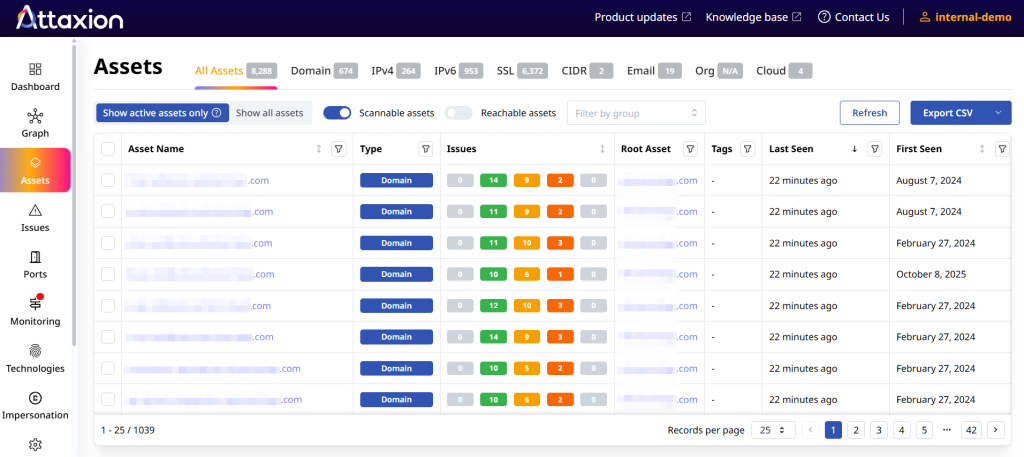
Attaxion covers your external attack surface only. It doesn’t scan internal networks, monitor endpoints like Wazuh, collect forensic evidence like Velociraptor, or scan source code like Semgrep, so keep those tools if you need that coverage.
Attaxion Core is priced for small footprints. Plans start at $129 a month, or $1,290 a year, for up to 40 assets, and only domains, subdomains, and IP addresses count toward that limit. Open ports, SSL certificates, and cloud assets don’t. Every plan includes discovery, active vulnerability scanning, prioritization, and alerts, and you can try it free for 30 days.
Conclusion
A small security team can cover a lot of ground with free tools. Open-source tools like Wazuh, Greenbone, ZAP, CrowdSec, Velociraptor, Gitleaks, and Semgrep can serve you well if you can run and maintain them. Free plans like Cloudflare Free, Snyk Free, and GitGuardian’s free plan save setup time but come with limits you’ll eventually hit.
Many free tools can integrate with other systems, but they don’t come connected out of the box. Shodan shows exposed services, Greenbone flags vulnerabilities, and ZAP tests web apps, but it’s you who still has to configure integrations, bring findings together, keep your asset inventory current, and decide which issues to fix first.
For a team of one or two, that work can take more time than running the scans, so the practical setup is a mix: free tools for code, endpoints, and investigations, and one platform for everything exposed to the internet. Attaxion covers that external side, from asset discovery to prioritized findings.
See what attackers can see before you pick your tools. Start your 30-day Attaxion free trial.