



Shadow IT isn’t a new problem, but in 2026, it has become more complicated than it ever was before. Everybody’s using AI, tools such as Claude Cowork, OpenAI Codex, and AI agents now connect to company data and applications, and every second employee tries to code their own tool. Overall, the chance that you have Shadow IT on your network in 2026 is much, much higher than, say, in 2023, thanks to the AI expansion into everything.
This guide walks through the main categories of shadow IrT, the risks they pose, what to look for in discovery tools, and 12 hand-picked tools that can help you find shadow IT and get it under control.
Spoiler: there’s no one tool that will give you all different types of shadow IT on a silver platter. You’ll need to combine several tools.
The Different Types of Shadow IT in 2026
Shadow IT refers to any technology, software, device, cloud service, or AI tool used by people in an organization without the approval, oversight, or governance of the IT or security department.
Shadow IT assets have never consisted of a single category. However, lately, it has expanded to span at least five distinctly different types, each with its own discovery challenges.
- Devices: This was the original definition of shadow IT — personal laptops used for work, phones connected to corporate email, and USB drives used to transfer files outside corporate systems. All these devices still pose a real risk (even if younger employees may not know what a USB drive is).
- Software: Unauthorized applications installed directly on company workstations and servers, from productivity tools to browser extensions with elevated permissions. These can be hard to track without an endpoint agent.
- Cloud infrastructure: Developer-created AWS, GCP, or Azure environments, forgotten storage buckets, and test instances that never got shut down. These are among the most dangerous forms of shadow IT because they’re internet-facing and often misconfigured.
- SaaS: Any cloud application an employee signed up for using their work email without going through IT procurement, including everything from note-taking apps to AI writing assistants to collaboration tools.
- AI: Shadow AI is the fastest-growing category and the hardest to detect. It’s not just ChatGPT or other LLMs; it also includes AI coding assistants, AI agents, and model context protocol (MCP) servers that connect AI tools to internal applications and data. It’s especially hard to control given that AI chatbots can be found on every second website, and they often can do much more than intended by the website owners. To give a recent funny example, Chipotle’s customer-facing chatbot, which was supposed to help with placing taco orders, turned out to be perfectly capable of writing Python code.
No single tool can discover every type of shadow asset because each category requires a different discovery approach. As you’ll see later, different tools use different discovery methods and provide different levels of coverage.
The Dangers of Shadow IT
- Incomplete visibility: Not being able to see all assets can be very dangerous since security teams cannot protect assets they cannot see. Trend Micro’s 2025 research shows that 74% of organizations have experienced security incidents due to unknown or unmanaged assets.
- Data leakage: Employees regularly feed sensitive business data into unvetted tools — proprietary code goes into AI coding assistants, customer data gets summarized by unauthorized AI chatbots, and financial data gets pasted into productivity apps. A data breach stemming from a shadow IT asset can expose sensitive business and customer data.
- Risk of compliance violation: Shadow IT assets create compliance gaps for regulatory frameworks because they are not on the official inventory and are not covered by security measures, IT policies, and audits.
- Expanded attack surface: Shadow assets create additional entry points for threat actors, especially because they are more likely to contain misconfigurations, weak access controls, or unpatched software. Attackers actively scanning attack surfaces for weaknesses are quite likely to detect such assets and use them.
- Access rights mismanagement: Many SaaS tools request (but do not necessarily require) excessive permissions, such as access to inboxes or calendars. Without governance, nobody reviews what was granted, so an old marketing tool connected to an employee’s calendar two years ago may still have access today, thus increasing the attack surface.
- SaaS sprawl and wasted IT spending: Ungoverned software adoption means paying for duplicate tools, unused licenses, and applications no one remembers signing up for. Finding and getting such subscriptions under control helps reduce not only the attack surface, but also the monthly costs of running the business.
- Shadow AI: An AI agent with access to company data can extract information at machine speed, execute code, or make automated decisions without any human review. IBM’s 2026 “Cost of a Data Breach” report shows that 43% of security incidents involve workers using shadow AI. Gartner predicts that by 2030, more than 40% of enterprises will experience a security or compliance incident linked to unauthorized shadow AI.
What to Look for in Shadow IT Discovery Tools
When deciding which tools to pick, there are some questions worth answering.
What Assets Does It Discover?
Does it find external assets, internal SaaS applications, devices, AI agents, or a combination of these?
Organizations tend to have tools in place that cover at least some areas. For example, internal network monitoring can alert you about devices with previously unseen MAC addresses, effectively covering the “unknown devices” part of shadow IT.
However, organizations can still have blind spots when it comes to other types of shadow IT. In our experience, they often struggle with visibility into new cloud entities that developers spin up in large numbers.
How Does It Discover Assets?
Each method has a different coverage profile that indicates which assets the tool misses. For example, a tool that discovers shadow IT by connecting to OAuth portals will miss everything an employee signs up for on a corporate device with a personal email. Understanding the gaps is as important as knowing what gets covered.
Common Shadow IT Discovery Methods
- OAuth and Single Sign-On (SSO) integration looks at which apps employees have authorized through Google Workspace, Microsoft 365, or Okta. This method works well for SaaS with federated login, but misses everything accessed through a personal email or without OAuth.
- Browser extensions observe what employees actually visit in their browsers, capturing login events across a much wider range of applications than OAuth alone. However, they don’t see anything that is not happening inside the specific browser where they are installed.
- Endpoint agents and EDR tools monitor software installed on managed devices and provide great coverage for on-device software, but they cannot see anything running on unmanaged or personal devices.
- Secure Web Gateways (SWG) inspect traffic at the network level, identifying cloud applications by their traffic patterns. This network monitoring method can detect shadow IT regardless of how the app was signed up for, but requires all traffic to flow through the gateway. If the device leaves the network perimeter, the control is lost.
- Analyzing current and historical DNS records reveals domains and subdomains an organization has used in the past, even if they receive no traffic. From there, tools can map the technologies and connected assets tied to those records.
Does It Integrate with Other Tools?
Because no single tool covers everything, the tools in your stack need to share data. If you want control over shadow IT, you need a single pane of glass — one place that pulls findings from every discovery method into one view, rather than a handful of dashboards each showing part of the picture.
An external attack surface management (EASM) platform that discovers external assets and a SaaS discovery tool that finds sanctioned and unsanctioned SaaS use, should both feed their findings into the same place.
That way, security teams see every category of shadow IT in one place instead of piecing it together from separate tools. Note that the more isolated a tool is, the more manual work it creates, and the further you are from that single view which finally allows you to comprehend the entirety of the shadow IT sprawl that your organization has.
12 Shadow IT Discovery Tools
1. Microsoft Defender for Cloud Apps
Microsoft Defender for Cloud Apps is primarily a Cloud Access Security Broker (CASB) tightly integrated with the rest of the Microsoft security ecosystem (though Microsoft itself positions it as a SaaS security platform that has evolved beyond CASB). It’s designed to give IT teams visibility into which cloud apps employees are using across the organization, including unauthorized ones.
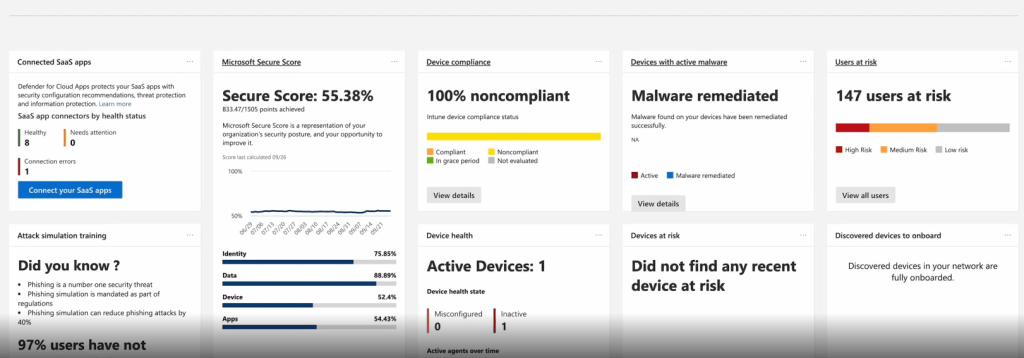
What it discovers: Defender for Cloud Apps detects SaaS apps and reports them with their risk scores and usage data.
What it doesn’t cover: Organizations using a broader mix of third-party security tools may find some integrations less seamless compared to Microsoft-native deployments. Apps accessed through personal accounts outside the corporate network may be harder to detect without Microsoft Defender for Endpoint deployed.
How it discovers: Defender for Cloud Apps discovers shadow IT through endpoint telemetry and network traffic analysis. Organizations can integrate Microsoft Defender for Endpoint for continuous monitoring or upload logs from supported firewalls and proxy servers.
Key features: The Cloud Discovery dashboard shows every discovered app, along with traffic volumes, user counts, and a breakdown of risk scores across general, security, compliance, and legal dimensions. Admins can tag apps as Sanctioned, Unsanctioned, or Monitored. Tagging an app Unsanctioned pushes a block indicator to Defender for Endpoint, which enforces it on managed devices. App discovery policies can generate alerts when new high-risk apps appear.
Separately from Defender for Cloud Apps, Microsoft also offers a preview feature called Shadow AI (Frontier) in the Microsoft 365 admin center that specifically tracks unmanaged AI agents.
What users say: Users value Defender for Cloud Apps’ tight integration with Microsoft 365, although some users note that the initial setup can be complex and not very user-friendly.
2. Attaxion LiveSight
Attaxion LiveSight is an exposure management platform focused on discovering internet-facing assets and gaining visibility into their exposures and activity. It finds domains, subdomains, IP addresses, open ports, SSL certificates, cloud services, and web applications, including those set up by developers or business units without going through IT — the kind of shadow IT that’s visible to attackers from the outside.
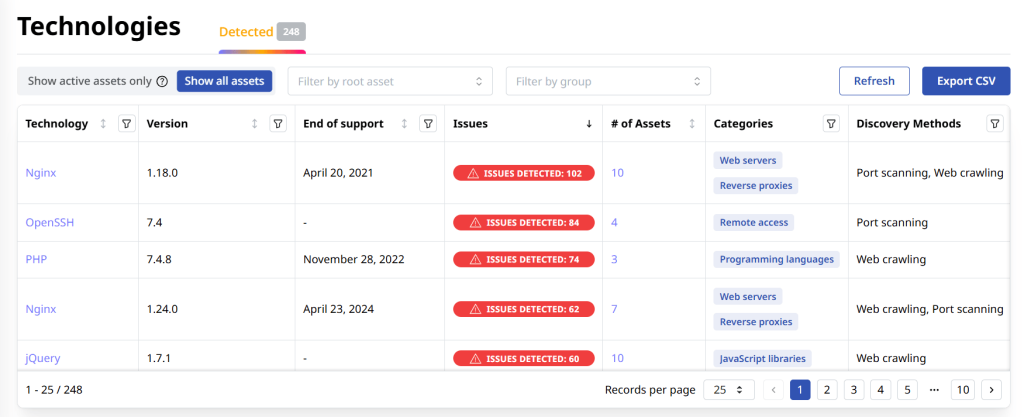
What it discovers: External-facing assets, including shadow cloud resources, forgotten domains and subdomains, open ports, and the technologies running on each asset.
What it doesn’t cover: Internal applications installed on employee devices and OAuth connections are outside its scope.
How it discovers: Attaxion uses passive DNS lookups, WHOIS data, certificate transparency logs, reverse DNS, and web crawling to discover assets. It also offers agentless traffic monitoring, analyzing global aggregated NetFlow data to see traffic on open ports.
Key features: Attaxion identifies the software stack running on each discovered asset, continuously detecting new assets, changes, and asset activity over time. It also scans all assets for security vulnerabilities and misconfigurations.
What users say: Users note that Attaxion finds assets they didn’t know existed and delivers value quickly after setup.
3. Stitchflow Shadow IT Scan
Stitchflow’s Shadow IT Scan is a free tool for teams who want an immediate look at what’s connected to their Google Workspace or Microsoft 365 environment via OAuth. Connect an admin account to the platform — and it immediately detects third-party applications that employees have authorized.
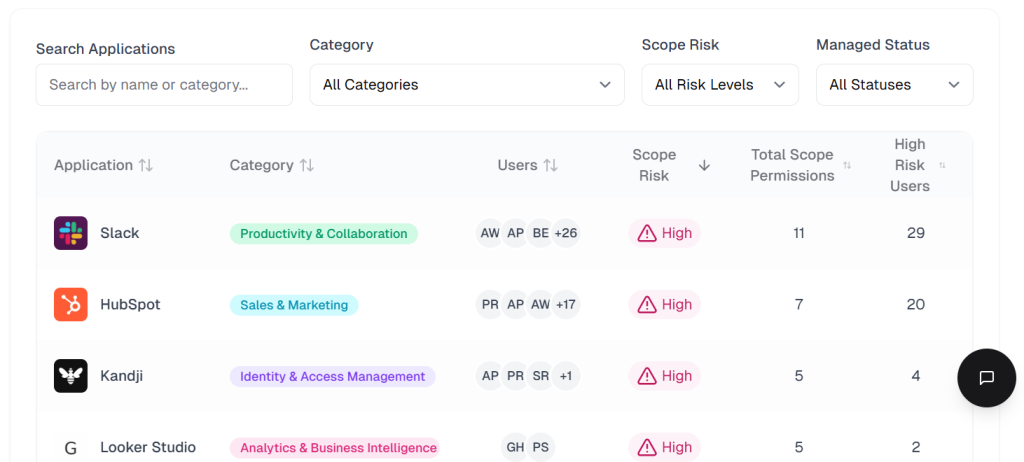
What it discovers: Third-party apps connected via OAuth tokens to Google Workspace or Microsoft 365, the specific permissions each app holds, and which users authorized them.
What it doesn’t cover: Anything not connected via OAuth tokens. Apps accessed with a personal email, through a browser without sign-in, or without OAuth integration won’t appear. As a free, single-method tool, it covers a meaningful portion, but it by no means can be the only discovery method.
How it discovers: It analyzes OAuth authorization data directly from the identity provider. No agents or ongoing deployment required.
Key features: Free to use. Results appear in minutes. Apps are ranked by risk based on their OAuth scopes, placing apps with inbox, calendar, or admin access at the top. It’s a strong starting point for organizations that don’t yet have formal shadow IT governance in place.
What users say: On Capterra, one verified reviewer credited Stitchflow with closing visibility gaps, from spotting users still active in other apps after being suspended in Okta, to detecting applications bought without IT’s knowledge.
4. AccessOwl Shadow IT Scan
AccessOwl Shadow IT Scan is a free standalone scanner that works as a preview of the platform.
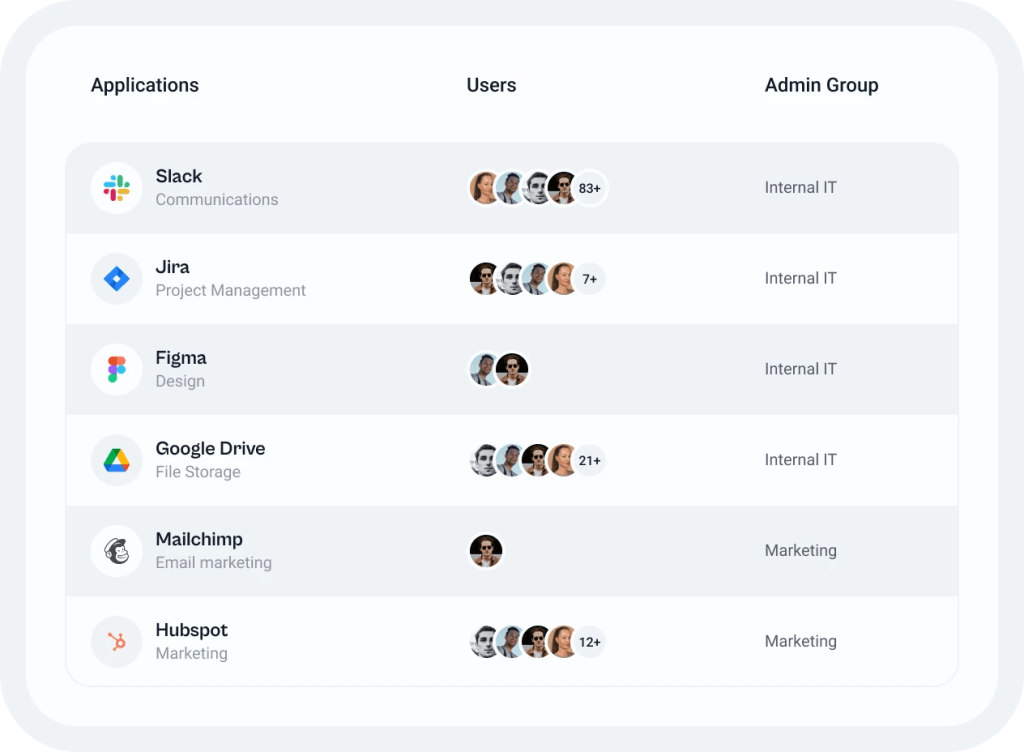
What it discovers: SaaS applications connected to Google Workspace or Microsoft 365 via OAuth, the users behind each connection, and the risk level of the OAuth scopes granted by each app.
What it doesn’t cover: Like Stitchflow’s scanner, it’s an OAuth-first tool, which means apps accessed through a personal email address won’t be detected. Apps used without creating an account, or accessed through means that don’t generate work email notifications, also fall outside its coverage.
How it discovers: AccessOwl Shadow IT Scan combines two methods: it audits OAuth logs from Google Workspace or Microsoft 365 to find apps authorized via SSO, and it scans work-inbox invitation/sign-up emails to surface apps employees signed up for with just a username and password.
Key features: The tool is free to use and requires no agents or ongoing deployment. The full AccessOwl platform, which the scan is a gateway to, adds continuous monitoring, Slack-based alerts when new apps appear, and automated workflows for provisioning and deprovisioning assets.
What users say: There are no reviews specifically for the free tool, but the full AccessOwl platform is praised for simplicity and ease of use, although some users find its integration features somewhat lacking.
5. Netskope One
Netskope is a Security Service Edge (SSE) platform built around a cloud-native architecture. User devices are configured to route traffic through it. As a result, it sits between users and the internet, inspecting all traffic for risk. Shadow IT discovery is a core capability, and Netskope has been adding dedicated tooling to track shadow AI.
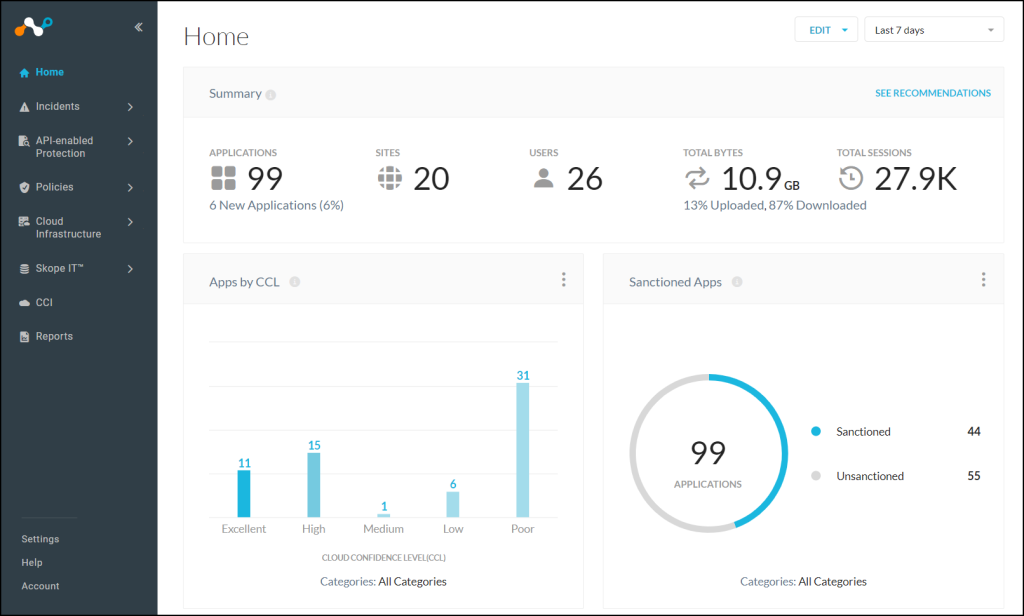
What it discovers: Cloud apps, SaaS services, and shadow AI tools accessed by employees on managed devices. Risk scoring is based on the Cloud Confidence Index (CCI), which covers over 80,000 applications and 370+ GenAI tools rated across 50+ attributes.
What it doesn’t cover: Devices without the Netskope client fall outside its visibility. Personal web browsing, native desktop apps, and unmanaged applications are not covered. Netskope can only secure browser-based traffic to managed corporate cloud applications from these unmanaged devices if it is explicitly steered into the platform using a reverse proxy or the Netskope One Enterprise Browser.
How it discovers: A lightweight endpoint client on managed devices routes traffic through the Netskope One platform, where it’s inspected and classified. This covers both browser-based and app-based traffic, regardless of whether users are on the corporate network.
Key features: The Cloud XD engine goes beyond identifying which apps are accessed and shows what users actually did inside them, which files they downloaded, what they uploaded, and which accounts they used. This matters for shadow IT because it helps distinguish between someone who briefly visited a tool and someone who is actively storing company data there.
What users say: Users praise the platform’s granular and deep activity-level visibility. However, they also note a steep learning curve and complex initial configuration that may require significant technical expertise or dedicated training to manage effectively.
6. Zscaler Internet Access
Zscaler Internet Access is a cloud-native Security Service Edge (SSE) platform built on a zero-trust proxy architecture that routes all traffic through Zscaler’s global network for inspection. Shadow IT discovery comes as part of its integrated CASB capability, which identifies unsanctioned cloud apps automatically as traffic flows through the platform.
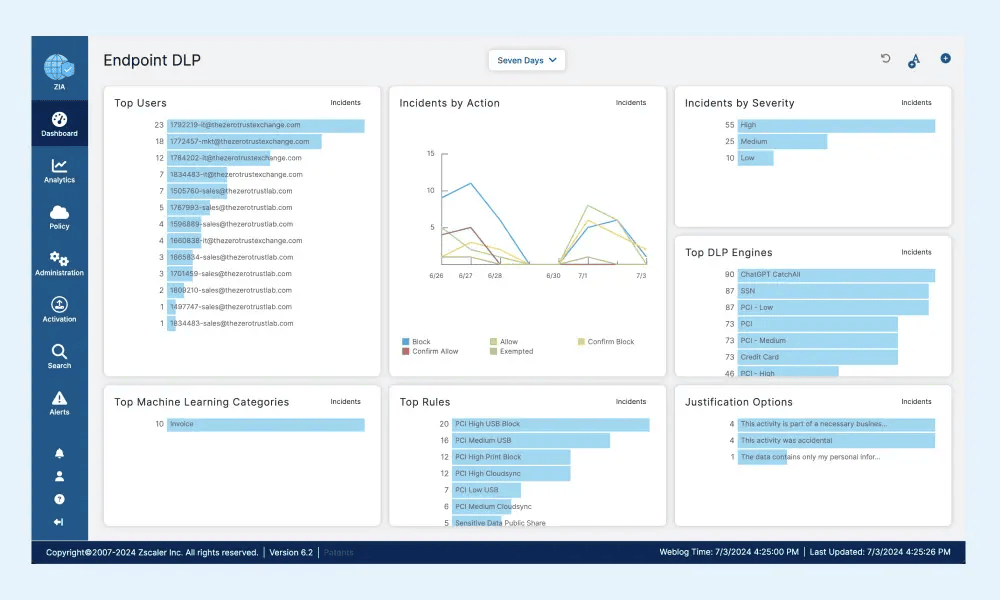
What it discovers: SaaS apps and cloud services in use. Shadow AI detection falls under its broader CASB and AI security capabilities.
What it doesn’t cover: Applications accessed on devices without the Zscaler client, including unmanaged personal devices used for work.
How it discovers: Zscaler describes its CASB as multimode — combining inline, real-time TLS/SSL inspection of data in motion with out-of-band, API-based scanning of data at rest. Discovery is automatic and continuous, covering users both on and off the corporate network as long as the Zscaler client is running.
Key features: Cloud App Control applies granular access and usage policies to the discovered cloud apps, whether users are on or off the corporate network. Shadow IT apps can be blocked, monitored, or allowed with coaching messages based on their risk score.
What users say: Enterprise reviewers rate Zscaler highly for its strong cloud-based security architecture and zero-trust enforcement. Some note that the platform can be overwhelming at first and that the learning curve can be steep.
7. Reco Application Discovery
Reco is a SaaS security platform focused on discovering shadow apps. It uses an AI-based knowledge graph to map relationships between apps, identities, and data flows.
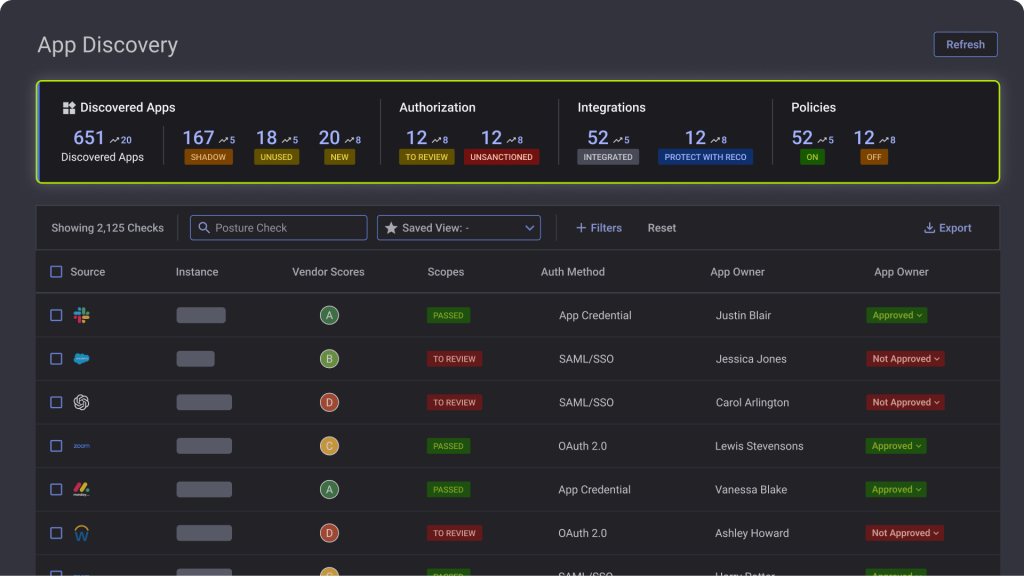
What it discovers: SaaS apps, shadow AI tools (including unauthorized use of ChatGPT, Claude, and AI agents), embedded AI features within existing apps, and non-human identities such as service accounts and API tokens across the SaaS stack.
What it doesn’t cover: Reco does not cover physical hardware, on-premises infrastructure, or local desktop software that doesn’t have a SaaS component.
How it discovers: Reco discovers shadow IT by first integrating with identity providers like Microsoft Entra ID or Okta to establish a baseline of authorized applications. The platform then analyzes email metadata from Gmail and Outlook to detect usage indicators — such as account confirmations or download requests — while filtering out internal tools and marketing emails. Finally, a proprietary GenAI module uses natural language processing to consolidate these data points, matching user identities with unauthorized tools and providing a clear inventory of shadow applications and their authentication methods.
Key features: Reco’s App Factory can add support for new apps in three to five days, which matters given how quickly new AI tools appear. It maps SaaS-to-SaaS connections, showing which shadow apps have been connected to Google Workspace, Microsoft 365, and Salesforce, and what user permissions they hold.
What users say: Users report that Reco is easy to deploy and use. It provides them with visibility into SaaS usage across the enterprise. Since the company is relatively young (founded in 2020), most users are tolerant of the platform’s limitations (minor features that aren’t fully mature, lack of a built-in remediation plan).
8. Josys
Josys is a SaaS management platform built for IT teams that need to know which applications employees are actually using. Its shadow IT discovery engine combines identity provider data with browser-level monitoring to cover apps that OAuth alone would miss.
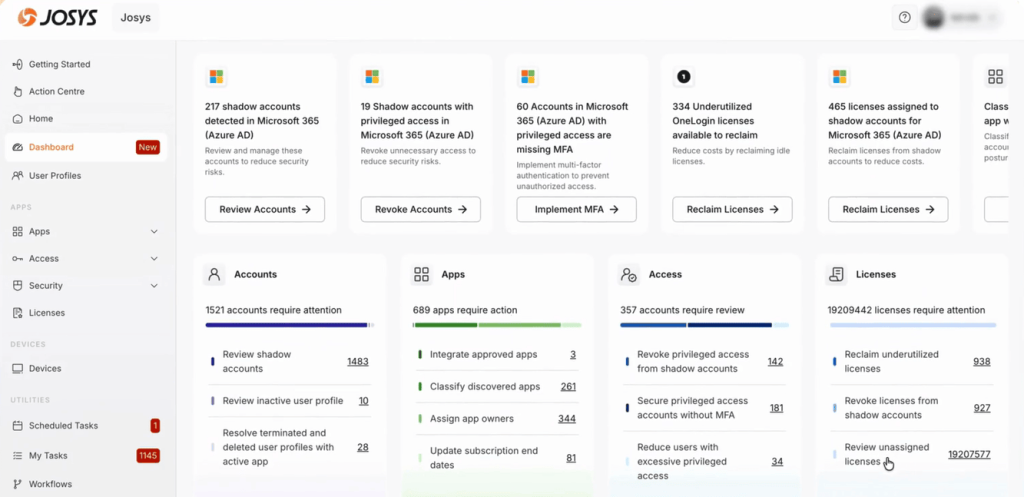
What it discovers: SaaS apps, including both those managed through an identity provider and those accessed in the browser without SSO.
What it doesn’t cover: Apps accessed using personal email, or through browsers where the extension isn’t deployed.
How it discovers: Josys pulls from three sources. It integrates with Microsoft Entra ID, Google Workspace, and Okta to collect data on OAuth-authorized apps. Its Chromium-based browser extension monitors what employees actually visit and log into, capturing apps that never touch the identity provider. And its Okta integration, added in late 2024, covers apps connected through Okta SSO.
Key features: The Josys Discovery Engine surfaces all discovered apps with risk ratings, compliance data, and usage patterns. Each app is categorized and flagged if it appears to be unauthorized. The browser extension tracks URL visits, timestamps, and tab events, and only collects data on applications in Josys’s App Dictionary. An AI-powered SaaS Risk Analyzer helps IT prioritize which shadow apps need attention first.
What users say: Josys users like its intuitive interface and centralized management, which
allows various staff members to manage accounts efficiently. Some users find that limited application integrations can restrict their ability to create automated workflows.
9. DataFence
DataFence is a data loss prevention (DLP) platform that works at the browser level, monitoring and blocking file uploads to unauthorized websites, cloud storage services, and AI tools. Its shadow IT discovery capability is part of a broader focus on stopping data from leaving through unsanctioned channels.
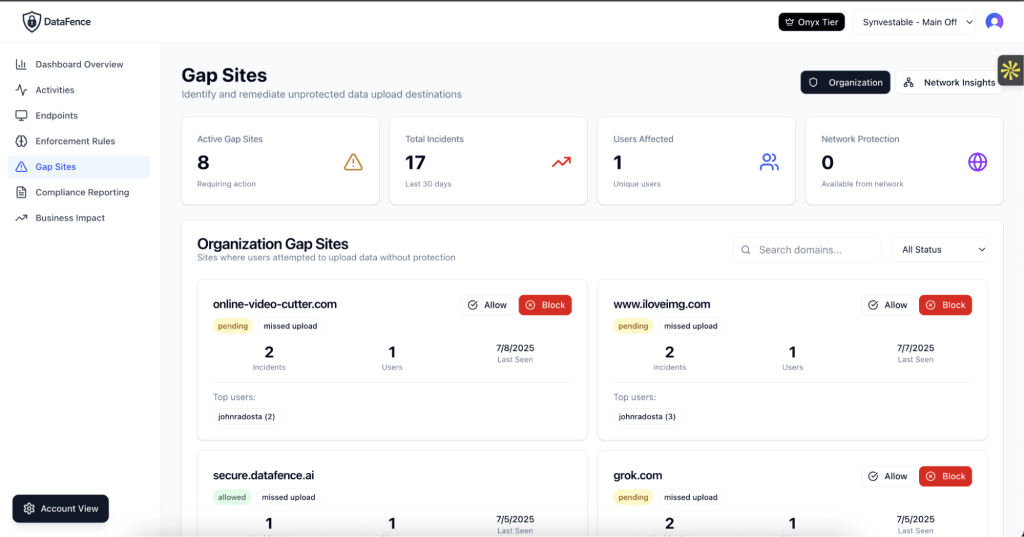
What it discovers: Cloud applications and websites that employees access and upload data to, including AI tools, cloud storage services, and social platforms.
What it doesn’t cover: DataFence cannot monitor native desktop apps, email clients, network protocols, or unmanaged browsers. Because it operates as a browser extension, any data transfers, file movements, or communication occurring outside the browser interface fall entirely outside its scope.
How it discovers: DataFence discovers shadow IT through a browser-based approach that monitors domain access, file uploads, and authentication flows to cloud services in real time. It tracks API calls and form submissions to identify the systems where data is moving and compares destinations against your approved software list. It then automatically flags unauthorized tools and assigns risk scores based on security posture, compliance certifications, and employee usage patterns.
Key features: If an employee uploads files to a shadow IT app, DataFence detects the activity and can block, warn, or log it based on policy. Crowdsourced risk intelligence from the DataFence network adds context on emerging shadow IT trends.
What users say: User feedback is rare. Only one review is on Gartner, where a partner said they liked how the platform addresses DLP and AI security risks through a policy-driven approach, although initial data ingestion required careful planning.
10. Productiv
Productiv is a SaaS intelligence platform focused on AI governance. It unifies SSO, expense, and contract data into a single view of all SaaS and AI in use, including AI features that vendors have added to existing tools.
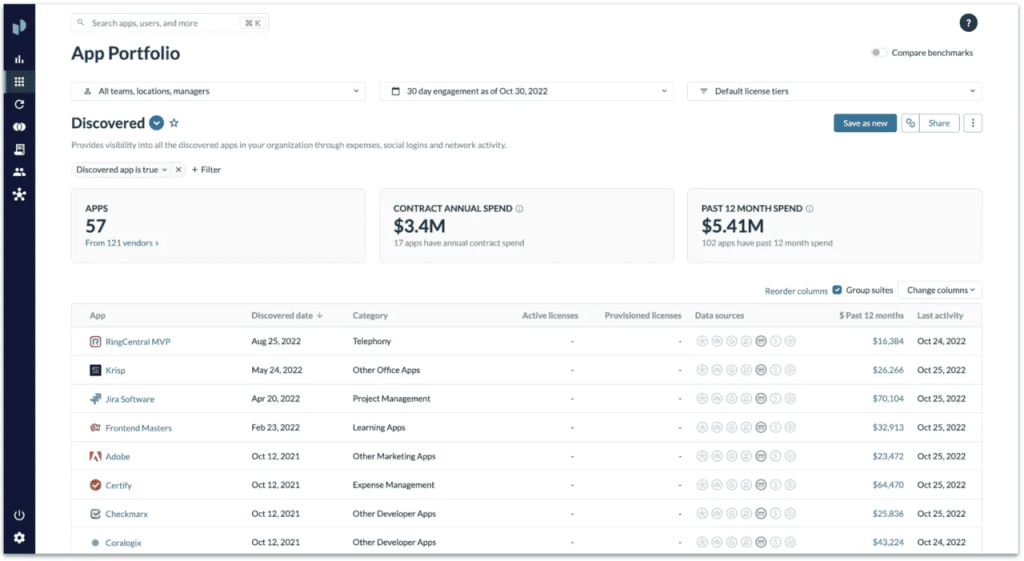
What it discovers: SaaS applications, shadow AI, and AI capabilities embedded in existing tools that employees already use.
What it doesn’t cover: Since Productiv is SaaS-centric, it doesn’t detect shadow IT on endpoints or external infrastructure.
How it discovers: Productiv integrates with Okta, Entra ID, and Google via SSO, then enriches that with expense reports and contract data to catch apps that bypass SSO entirely. New shadow IT apps are automatically flagged as they appear in any data source.
Key features: Its AI Visibility feature scans the existing SaaS portfolio for AI capabilities that vendors have added, which is relevant because many apps now include generative AI features that were never reviewed by IT. Productiv also tracks which apps have gone through an AI security review and which haven’t, supporting AI governance committee workflows.
What users say: Users on AWS Marketplace (which syndicates G2 reviews as well) praise Productiv for its intuitive UI and deep visibility into SaaS spend and usage, which helps centralize data and optimize costs. While highly effective for IT and finance, some users complain about a learning curve for advanced features and limited customization.
11. Nudge Security
Nudge Security uses a behavioral approach to shadow IT discovery. Its patented method starts with a lightweight email integration that builds a historical inventory of every tool employees have ever signed up for, from day one.
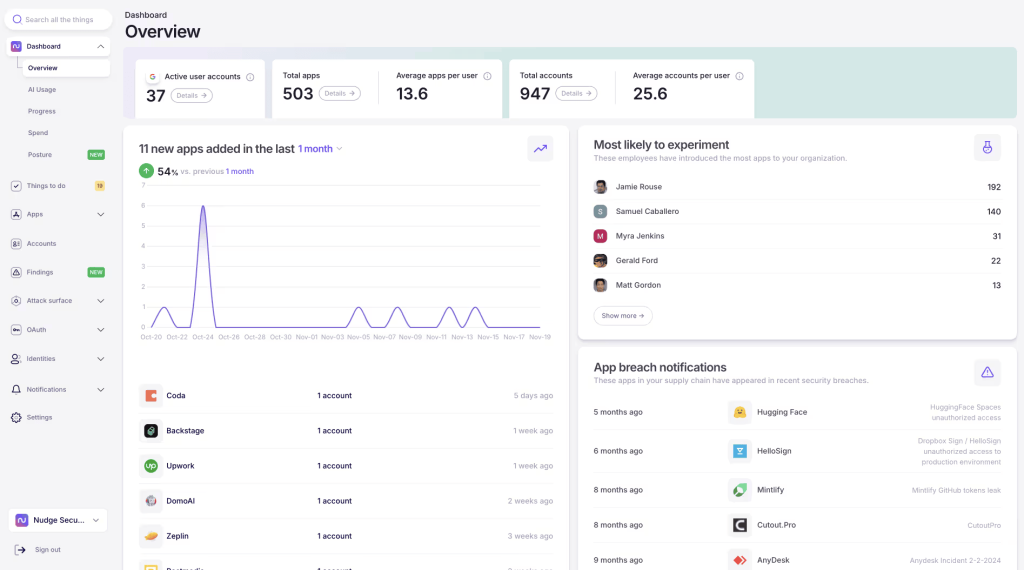
What it discovers: SaaS applications, shadow AI tools, MCP server integrations, OAuth grants, and account activity across the organization.
What it doesn’t cover: Apps registered with a personal email address or downloaded without creating an account won’t generate work email notifications, so they won’t appear in the email scan.
How it discovers: The primary method is email-based. Nudge connects to Microsoft 365 or Google Workspace and scans for emails from SaaS providers, account confirmations, invoices, and usage notifications, to build an inventory of apps employees have accounts with. A browser extension adds real-time monitoring of AI tool usage. API integrations into specific SaaS apps provide deeper posture data. Nudge also discovers MCP server integrations through OAuth analysis.
Key features: The platform generates a complete SaaS inventory within minutes of activation. Shadow apps are reported with vendor risk profiles, authentication methods, and data access information. Automated nudges, sent via Slack or email, prompt employees to discontinue unsanctioned apps, switch to approved alternatives, or enable MFA, reducing the manual burden on security teams. New app alerts are sent the moment a new account is created.
What users say: Users value the platform’s ability to uncover previously undetected services and provide real-time Slack alerts. However, others report that automated nudges can lead to alert fatigue.
12. Flexera One
Flexera One is an enterprise IT asset management (ITAM) and SaaS management platform that gives IT, finance, and procurement teams a unified view of software, hardware, SaaS, and cloud assets across a hybrid environment. Its SaaS Management module, which incorporates Snow SaaS management capabilities after an acquisition, focuses specifically on discovering shadow SaaS and AI tools that bypass procurement.
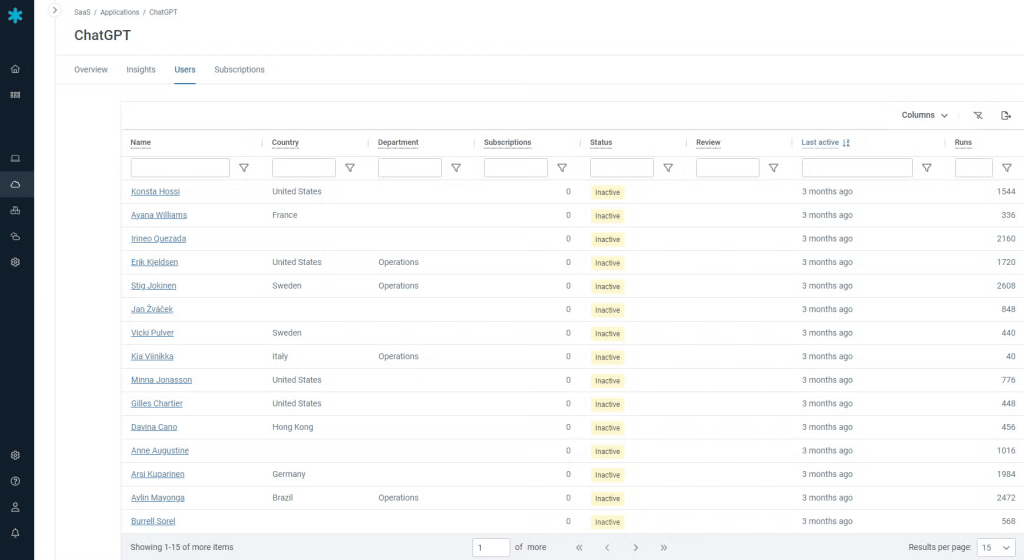
What it discovers: SaaS applications, shadow SaaS, generative AI tools used by employees, free and freemium apps, and cloud-to-cloud integrations. Through its ITAM capabilities, it also covers on-premises software, hardware assets, and cloud infrastructure.
What it doesn’t cover: It doesn’t cover external-facing infrastructure or network-level traffic inspection.
How it discovers: Flexera One combines multiple discovery methods, including a browser extension that captures what employees actually access and log into, direct API connectors that pull usage and entitlement data from major SaaS vendors, and SSO integrations with platforms like Okta and Microsoft Entra ID that add identity-based coverage. Financial system and expense report integration catches paid shadow SaaS that employees expense through credit cards. For on-premises and hybrid environments, lightweight agents and agentless scanners discover installed software and hardware.
Key features: Shadow IT applications are reported along with user activity data, subscription details, renewal dates, cost information, and security risk assessments — giving IT teams the context to prioritize which apps to act on first. A dedicated shadow IT dashboard centralizes all unsanctioned app findings.
What users say: While the platform is noted for its ease of use, deep intelligence, and strong integration with tools like ServiceNow, many users highlight a steep learning curve and a time-consuming initial setup.
Conclusion
Shadow IT has definitely evolved over the years. It now encompasses everything from unauthorized software to autonomous AI agents, and no single tool can cover it all.
To gain complete shadow IT visibility, organizations should use multiple tools that work together and share data to ensure no asset stays hidden and unprotected. One tool might excel at finding external-facing assets, while another focuses on third-party SaaS connections or browser activity. Combining these tools gives the security team a full picture of the different kinds of shadow IT in use, so they can review, prioritize, and either bring it under policy or reduce it.
Combine Attaxion LiveSight with your CASB tool to get a complete picture of your organization’s shadow IT. Book a demo.