



As a threat hunter, you’ve probably been told countless times to hunt for things at the top of the Pyramid of Pain because it hurts attackers the most. That means focusing on attack tactics, techniques, and procedures (TTPs), which involve spending time and resources analyzing and looking for adversary behaviors and attack techniques.
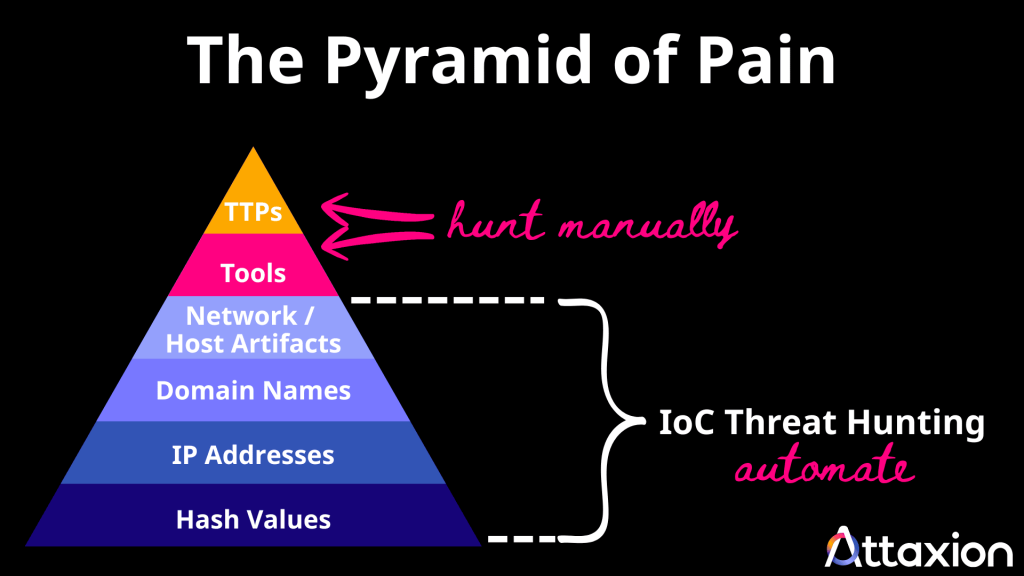
Well, it’s good advice, and who are we to disagree? But if you’re already doing that, it might also be worthwhile to have IoC threat hunting running automatically in the background — that is, have automated security tools look for things in the lower part of the Pyramid of Pain (i.e., file hashes, IP addresses, domain names, and other digital fingerprints left during cyberattacks) as this makes incident response much faster.
Let’s talk about IoC threat hunting in greater detail, including the security tools you need to do it and what to hunt for.
What Is IoC Threat Hunting?
IoC threat hunting is the process of actively looking for known indicators of compromise (IoCs) within your systems and network. These IoCs typically come from third-party threat intelligence data feeds. IoC threat hunting is a quick way to detect known malicious activity and speed up incident response.
This is an important form of threat hunting because IoCs are technical artifacts that indicate a possible intrusion or breach. If such artifacts show up in your environment, it may mean attackers are probing for access — or that your network has already been compromised.
What to Hunt for During IoC Threat Hunting
Common examples of IoCs include data found in cyber threat intelligence sources:
- malicious file hashes
- malicious IP addresses
- domain names
- email addresses
- file names
However, IoCs aren’t limited to known hashes or domains—some can be behavioral anomalies that require human review. For example, unusual traffic from unexpected geolocations may indicate suspicious activity, along with other forensic signals that suggest malicious behavior in a system or network.
We categorize the different types of IoCs below into network-based, host-based, file-based, and behavioral-based IoCs.
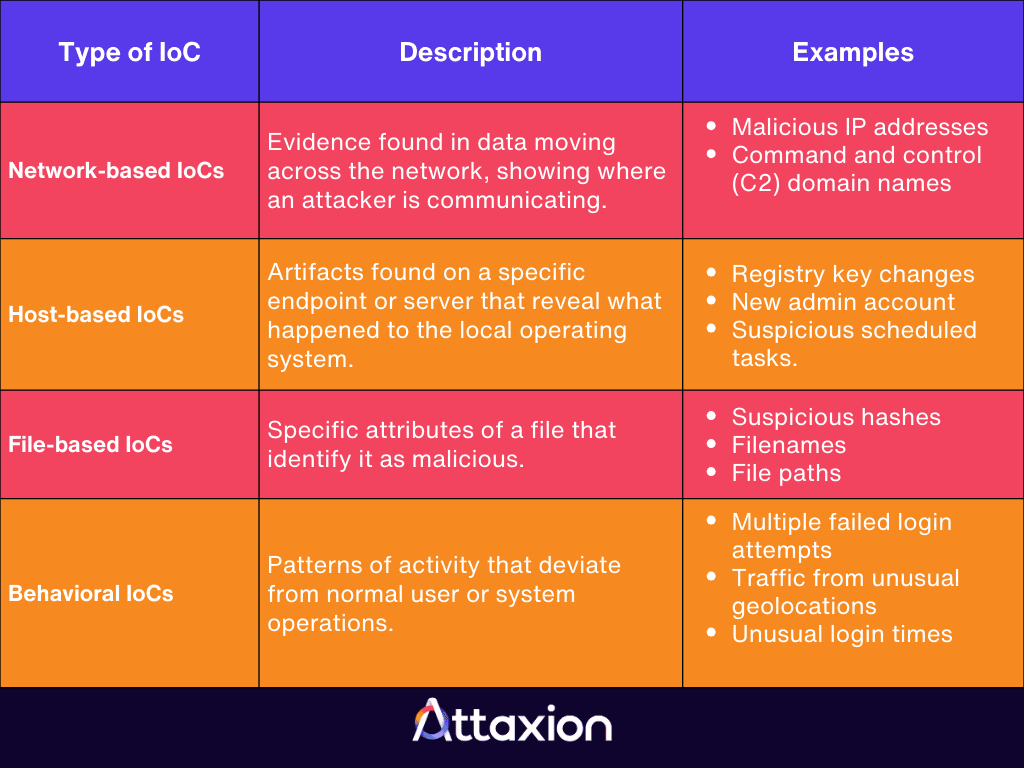
Network-Based IoCs
Network indicators involve evidence found in data moving across your network. These artifacts reveal the protocols an attacker uses for communication as well as endpoints, such as:
- malicious IP addresses
- command-and-control (C2) domain names
Hunters also look for more subtle signs, including:
- unusual DNS requests
- unusual outbound volume
These may indicate hidden code or data exfiltration.
Host-Based IoCs
Host indicators are forensic artifacts found on a specific endpoint or server. They reveal what happened to the local operating system during an intrusion. Common examples include:
- unauthorized registry key changes
- the creation of new admin accounts
- suspicious scheduled tasks
You can also watch for unexpected software updates and processes disguised as legitimate services, like a fake services.exe running from an unusual directory.
File-Based IoCs
File indicators are specific attributes of a file that identify it as malicious. These are often the easiest to automate, sweeping computers for suspicious file hashes like:
- SHA-256 hashes
- MD5 hashes
Aside from these, hunters look for:
- unexpected filenames
- unusual file paths
- unauthorized browser extensions that may have been side-loaded onto a user’s machine
Behavioral IoCs
Behavioral indicators of compromise focus on patterns of activity that deviate from normal operations. This includes:
- high-volume events like multiple failed login attempts
- increased database read volumes that suggest a threat actor is searching for sensitive information
- network traffic originating from unusual geolocations
- unusual network patterns that suggest data is being sent to an external command center
IoC vs. TTP Threat Hunting
There’s a fine line between the two types of proactive threat hunting, specifically between behavioral IoCs and TTPs, since they both involve behavioral analytics. Here’s how you can distinguish them:
- IoCs are the what. When hunting for indicators of compromise, you are looking for pieces of concrete evidence that an attack has occurred.
- TTPs are the how. TTP threat hunting, therefore, involves searching for certain methods and attack techniques that help you understand how the attacker operates.
Behavioral IoCs are observable signals, while TTPs are the techniques those signals suggest.
For example, you may suspect a threat actor is trying to gain access to employee accounts. A behavioral IoC could be an unusual spike in failed login attempts — especially across many users or from the same source. After investigating those events, you might determine the attacker was systematically trying common passwords across the organization, which points to a brute-force password spraying technique (a TTP).
How to Approach IoC Threat Hunting
There are two primary ways to approach your hunt. You can either follow the trail of known adversaries or start with a theory of your own.
- Using strategic threat intelligence: Instead of hunting for every possible threat, limit your scope to the actors who actually target you. Use strategic threat intelligence to identify threat groups that target your specific industry or geographic region. For example, Palo Alto’s Unit 42 has recently identified two nation-state threat groups that target organizations in Association of Southeast Asian Nations (ASEAN) member states. Once you have a shortlist of these actors, you can hunt for the specific IoCs attributed to their recent campaigns. This makes your hunt more efficient and relevant, enabling faster incident response.
- Developing an attack hypothesis: This method starts with an educated guess. You might say, “I believe an attacker has breached our HR department via a phishing link, and they are now trying to exfiltrate data.” Based on this attack hypothesis, you would look for specific signs, such as unusual network traffic on a specific port or a sudden increase in data transfers from the HR server. If the evidence aligns with your hypothesis, you can escalate the investigation and respond faster.
The IoC Threat Hunting Toolbox
To hunt and detect security breaches effectively, you need a tool stack that provides visibility across your entire environment.
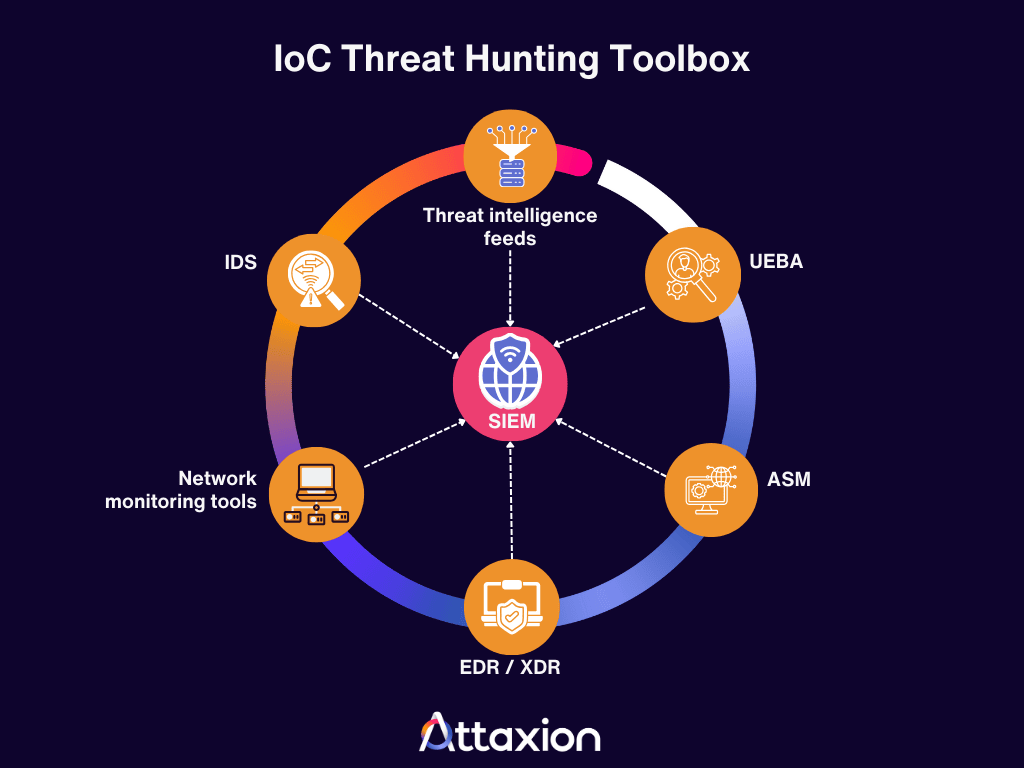
- Threat intelligence feeds: This — together with internal telemetry — is your primary source of IoCs. While commercial feeds are convenient and structured, you may consider including cybersecurity blogs or even looking for IoCs on X (formerly Twitter). Researchers often share newly discovered IoCs there, sometimes even before they are added to official feeds. And you can’t pay for all the feeds, can you? IoCs on social media should be taken with a grain of salt, but they can be useful nonetheless.
- Security information and event management (SIEM) platforms and log analytics: These threat hunting tools serve as a central repository for historical deep dives and all security events. They help you correlate events to find host-based IoCs or network-based IoCs that might look harmless in isolation.
Your SIEM needs to pull data from multiple sources, which include:
- Network monitoring tools: These are security tools that provide the raw data needed for network-based anomaly detection, such as unauthorized port usage or large, unexpected data transfers. You can check out this list of the top network monitoring tools. In particular, we’d like to highlight NIDS — network intrusion detection systems. They specialize in flagging network-based IoCs, as well as detecting unusual network behaviors. They help spot connections to known malicious IPs or identify the signatures of command-and-control (C2) traffic.
- Endpoint Detection and Response (EDR) and Extended Detection and Response (XDR): These threat detection tools watch exactly what happens on a computer or server. They excel at finding file-based IoCs, like malicious hashes, and host-based IoCs, such as new registry keys or unauthorized admin accounts. In addition to that, EDR/XDR helps collect endpoint telemetry.
- Attack Surface Management (ASM): You cannot hunt for threat indicators on assets you do not know exist. ASM ensures you have a complete inventory of your external-facing assets, which is the foundation for finding any network-based or host-based IoCs. Here’s a list of top ASM platforms for you to choose from.
- User and Entity Behavior Analytics (UEBA): These solutions establish a baseline for normal activity. They are the primary way to catch behavioral IoCs, such as impossible travel logins or multiple failed login attempts that deviate from a user’s typical habits.
How Attaxion Supports IoC Threat Hunting
As an exposure management platform with ASM capabilities, Attaxion simplifies the threat detection process by bridging the gap between external asset visibility and threat intelligence. In particular, Attaxion provides these capabilities:
Asset-to-Exposure Mapping
External infrastructure is prone to changes, and it’s important to identify and catalog new assets, check them for vulnerabilities, and identify connections to known IoCs. Attaxion helps you do this as it continuously scans for new assets and automatically assesses them for vulnerabilities, helping you find previously unknown assets that may be vulnerable to cyber threats.
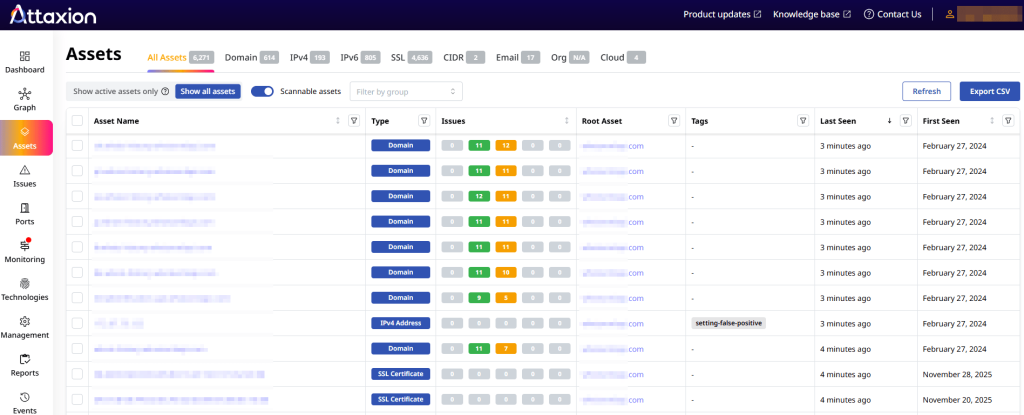
If you own and recognize those new vulnerable assets, you proceed with a remediation plan. If you own but don’t recognize them, they pose a shadow IT risk. Or they could be attacker-controlled resources that you can then map to TTPs and align with the MITRE ATT&CK Framework.
Traffic and IP Intelligence
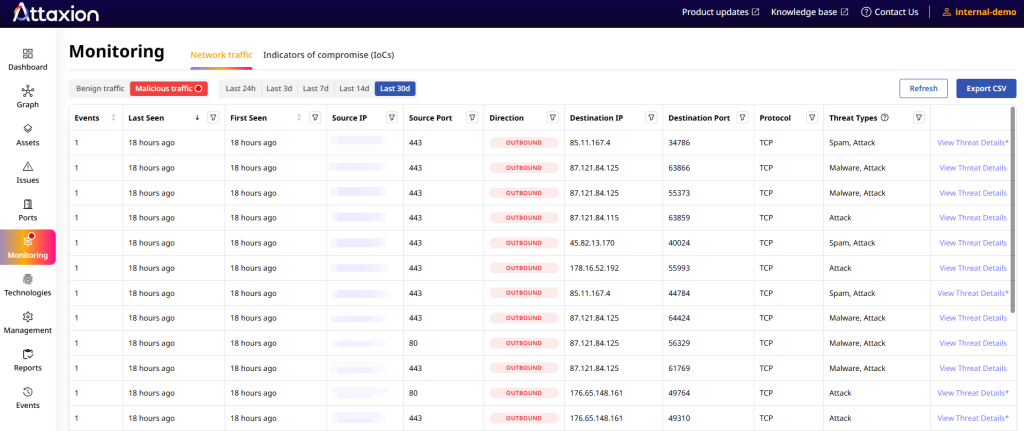
Attaxion has a NetFlow-based agentless traffic monitoring feature that monitors communications to catch suspicious network traffic patterns or connections to suspicious IP addresses flagged by integrated threat intelligence feeds. It does so without the need to install any agents on any systems. This enables security operations teams to distinguish between benign and malicious traffic. Seeing plenty of traffic from one of your external IPs to a known malicious resource, on a port that should not be open? You know what to do.
Continuous IoC Monitoring
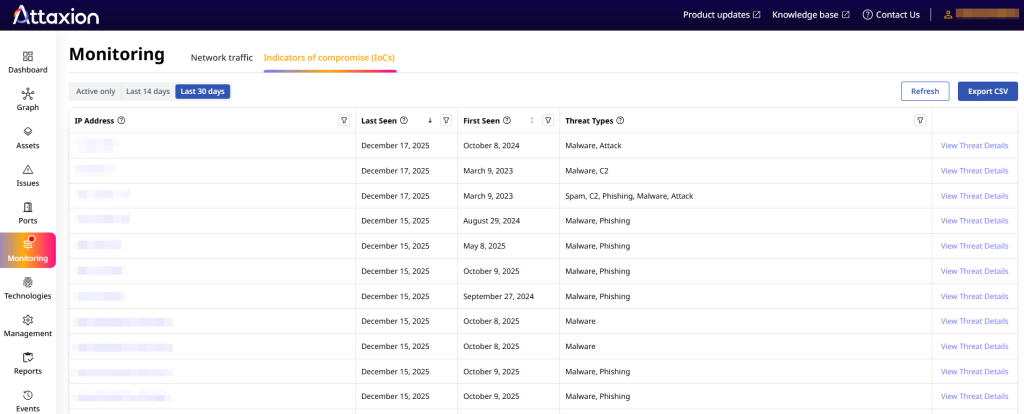
Attaxion also checks if any of your own external IP addresses are associated with known IoCs, acting as an early warning system and making incident response faster. It also gives you details about the associated threat. Essentially, this feature partially automates IoC threat hunting by:
- Automatically ingesting threat intelligence data feeds
- Looking across your external systems for IoCs from these feeds
Conclusion
While modern cybersecurity often preaches manually hunting at the top of the Pyramid of Pain, there is an opportunity to automate hunting for things on the lower part of the pyramid, adding another layer of defense. TTP-based hunting is a must for identifying the sophisticated and often hidden methods of a threat actor, but it is also resource-intensive and requires high-level expertise.
IoC threat hunting can complement it. It is easier to execute because it relies on concrete and searchable data and is well suited for automation. You can let threat detection systems handle the what (IoCs) while human threat hunters can spend their time investigating the how (TTPs). You are probably doing it already to some extent with SIEM rules or EDR IoC matching, but there is always so much more to be done, and “only hunt at the top of the pyramid” should not discourage you from doing it.
As a security platform with ASM and network traffic monitoring capabilities that also has built-in threat intelligence feeds, Attaxion partially automates this for you. It continuously scans your external attack surface and compares your asset data against live threat intelligence feeds to identify potentially malicious communications and known IoC associations.
Try out automated IoC threat hunting with Attaxion. Sign up for a free trial or book a demo with our experts.