


Brand reputation takes years to build, but a threat actor can tarnish it much faster by impersonating you online.
When a scammer or fraudster mimics your brand, the first victims are your customers, and when customers lose money because someone imitated your brand, they tend to lose trust in you — which means both your reputation and revenue take a hit.
While reputation damage and loss of customer trust are hard to quantify, revenue loss can be significant. According to TransUnion, companies worldwide lost 7.7% of their revenue to fraud in 2025, totaling $534 billion across the 1,200 organizations surveyed. In the US, the number is even higher — 9.8%, a 46% increase since last year.
To effectively prevent fraud aimed at customers and potential customers, organizations must prioritize digital brand protection as a core security measure.
Table of Contents
- What Is Digital Brand Protection?
- Types of Brand Impersonation
- How Does Digital Brand Protection Work?
- How Attaxion Helps Protect Your Brand
What Is Digital Brand Protection?
Digital brand protection is the proactive process of identifying, monitoring, and mitigating brand abuse, which can come in the form of trademark infringement and brand impersonation.
While it sounds like something that marketing and legal departments should be doing together, it often falls under the cybersecurity umbrella. It is considered a branch of Digital Risk Protection (DRP), which is the cybersecurity practice of finding and reducing external digital risks, covering a wide spectrum of issues such as leaked employee credentials, exposed technical data, and vulnerabilities in your supply chain.
Online brand protection is a specific part of that broader strategy. It focuses on how other entities use your identity online, since most brand attacks start with a convincing impersonation.
Types of Brand Impersonation Attacks
Attackers can use various methods to mimic you. They tailor their approach to specific targets and campaigns and select platforms based on who that target is. Here are the most common types of brand impersonation you might encounter.
Social Media Impersonation
This type of impersonation refers to fake profiles on LinkedIn, X, Facebook, Instagram, and other social media platforms. Attackers can use your logo, official brand colors, and even your recent posts to create social media accounts that look authentic. They might add a single extra character to the username that most users will miss.
These fake accounts are used for social engineering purposes, to run fake ads or to direct users to phishing pages.
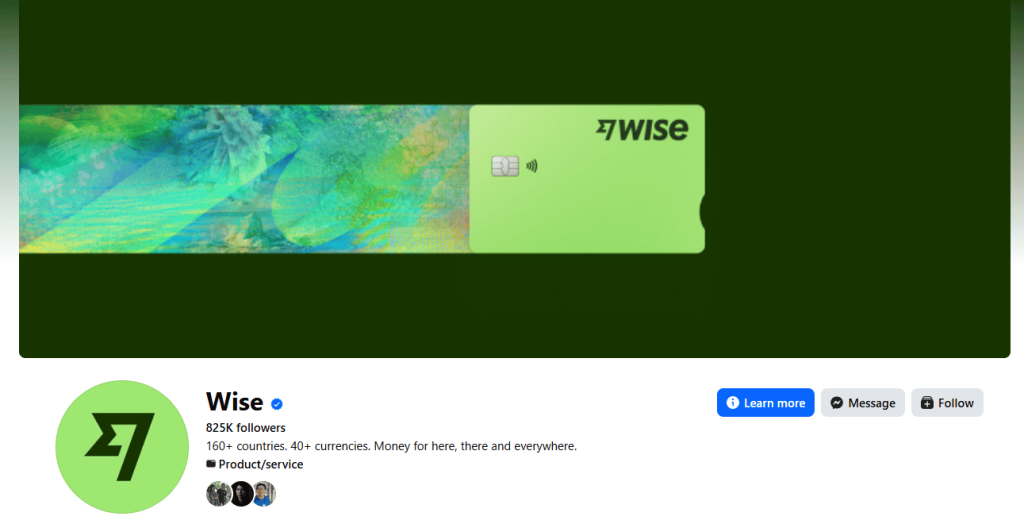
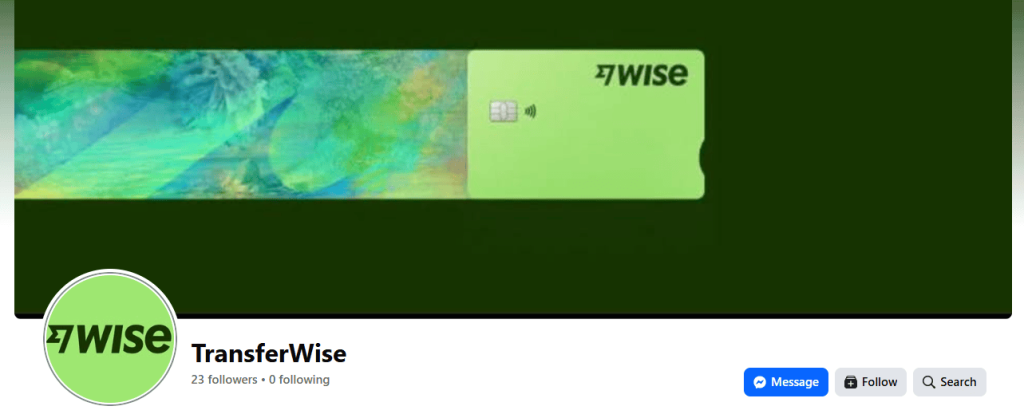
Example: Take a look at the Facebook page of Wise (formerly Transferwise) and compare it with another page that uses the same logo and cover photo, but is under the old company name.
Communication Impersonation
Attackers can impersonate you via phishing, smishing (SMS phishing), or vishing (voice phishing). They send messages that look like they come from your support team or your billing department. The goal is to create a sense of urgency and use it to lure you into transferring money or account ownership to them.
Hoxhunt data shows a significant rise in phishing between 2021 and 2025, with overall incidents up 49% and organization-focused phishing growing by 69%..
Example: A customer receives an SMS stating that their account has been locked due to suspicious activity. The message includes a link to a login page that looks exactly like your official site. When the customer enters their password, the attacker steals it.
Executive Impersonation
Executive impersonation occurs when an attacker steals (or assumes) the digital identity of a high-ranking leader to trick employees, partners, or customers. The goal is to exploit the natural tendency of people to follow instructions from their bosses. Because these messages appear to come from the top, victims often bypass standard security protocols to be helpful or avoid getting in trouble.
Again, thanks to AI and its capabilities that allow attackers to create deepfakes, recently executive impersonation became much more convincing — and thus widespread. According to McAfee’s data, an average American encounters 2.6 deepfakes daily. But deepfakes are not the only type of executive impersonation.
Example: A specific type of executive impersonation is business email compromise (BEC), which is executed through email. In a BEC scam, the criminal sends a message that looks like it came from an executive’s actual account or a very similar look-alike address. These emails rarely contain malicious links or attachments and rely entirely on social engineering.
In 2019, a BEC attacker convinced someone with financial authority at a European subsidiary of Toyota to change the account details on an electronic fund transfer, which led to a $37 million loss.
Product Impersonation
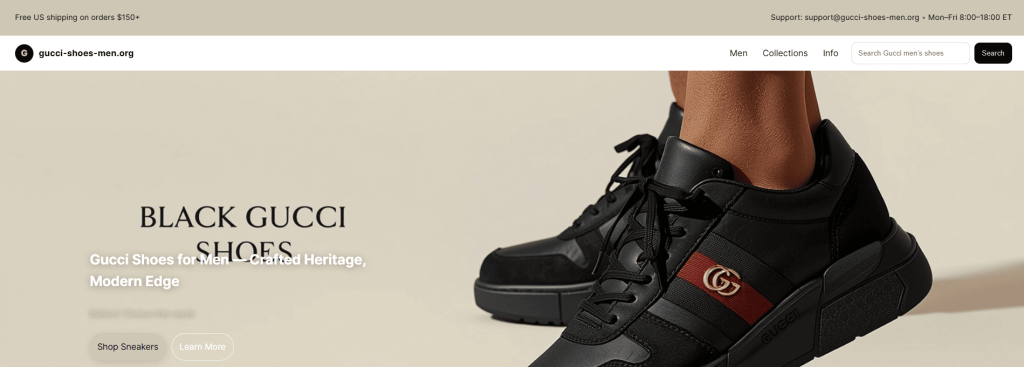
This is the sale of counterfeit products on third-party marketplaces or dedicated clearance websites. Counterfeiters can use your trademarked images and descriptions to look like the real deal. This way, they not only can steal customers and sales, but also put customer trust and your brand reputation at risk when the low-quality fake breaks or causes harm.
Example: There are thousands of websites that sell counterfeit products, but one live example (as of the time of writing) is gucci-shoes-men[.]org.

Software and Mobile App Impersonation
Attackers can upload malicious apps to unofficial stores or host them on spoofed landing pages. These fake mobile apps look like official software products. They might even function correctly, but they contain malware designed to infect user devices or steal data in the background.
Example: In May 2025, Mandiant investigated a UNC6032 campaign that tricked users into downloading fake AI tools to distribute malware. These tools imitated popular AI video generators, such as Luma AI, Canva Dream Lab, and Kling AI.

Domain Impersonation
Domain impersonation is the backbone of most brand abuse. Almost all of the threats mentioned above rely on a deceptive domain name. Attackers use these fake domains to sell counterfeit products, impersonate top executives through email, or host landing pages for fake software downloads. Once an attacker owns a domain that looks like yours, they have a platform to launch any number of attacks.
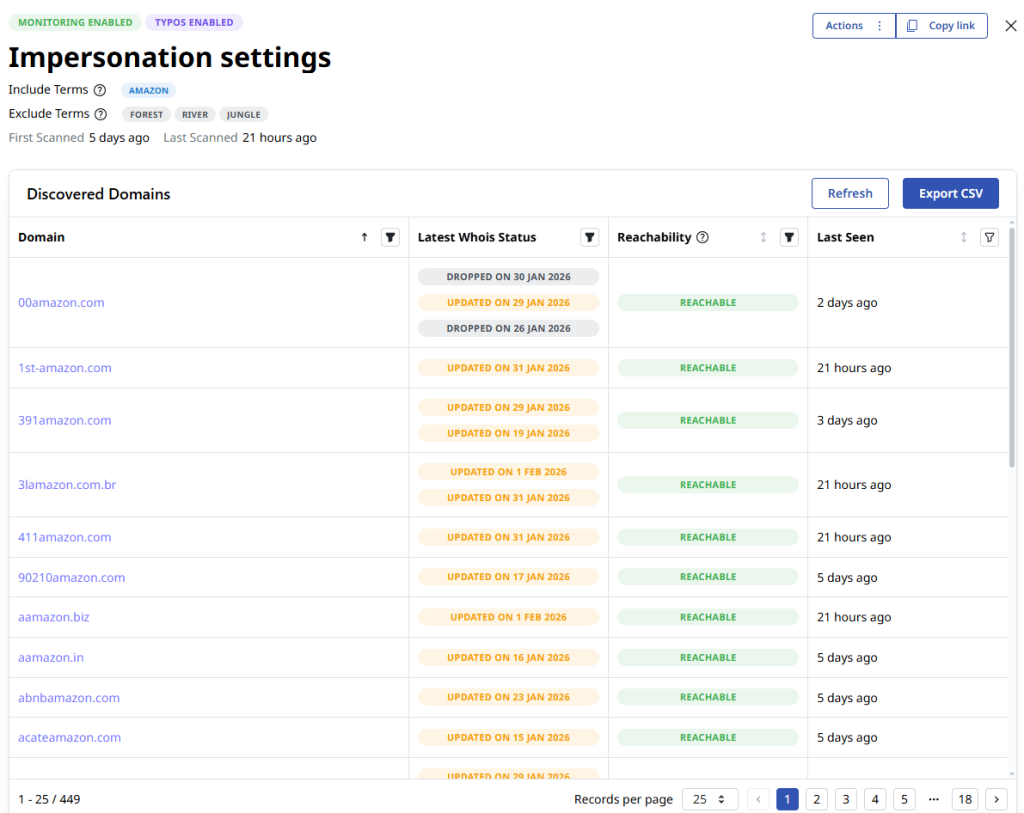
Example: Threat actors can register a domain name that looks exactly like yours, but uses different top-level domains (TLDs), such as, for example, .top, .biz, or .org instead of .com. They can also use typosquatting domains, which rely on common misspellings of your brand, like “aamazon” instead of “amazon.”
Below are some examples of domains that Attaxion’s domain brand monitoring picked up when we searched for “Amazon.” Note that probably not all of them are created with malicious intent or are trying to impersonate Amazon, but it’s safe to say that many of them are.
How Does Digital Brand Protection Work?
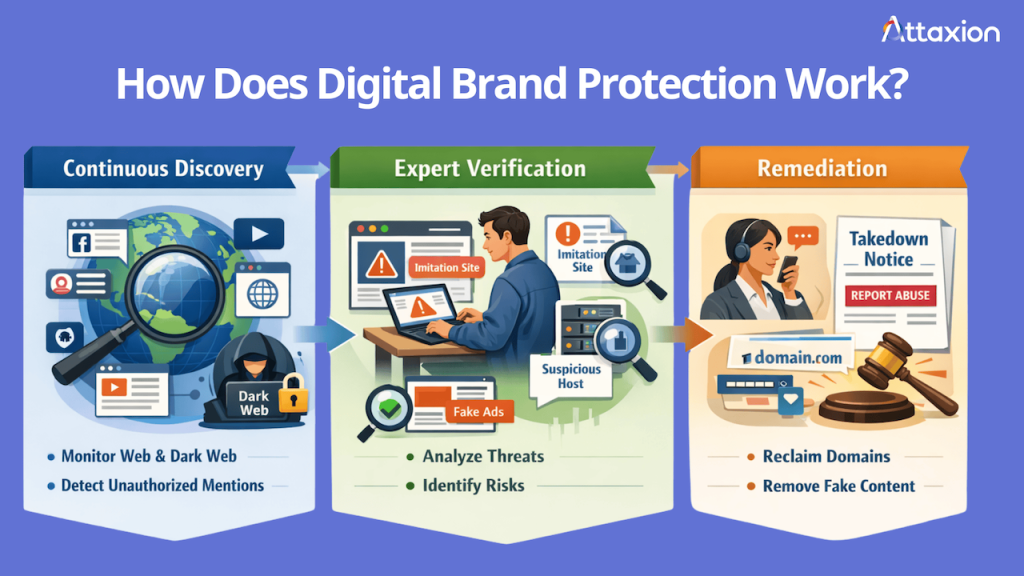
Protecting a brand requires a consistent cycle of discovery, verification, and removal of assets used for impersonation. It’s not a one-time task, but rather a continuous effort to stay ahead of threat actors who are constantly registering new digital assets.
Continuous Discovery
Total brand awareness means looking everywhere your name might appear. You have to monitor social media, app stores, and domain registries. Some organizations even go as far as searching dark web forums to see if criminals are discussing or leaking their data.
This discovery phase focuses on publicly available data. It gathers everything that could possibly be related to your digital assets, including your name, trademarks, slogans, and even the names of your top executives. The goal is to find every instance where your assets appear online without your permission.
Covering all these digital risks means using a combination of three tools — social media listening tools like Brandwatch, dark web monitoring, and domain monitoring. These tools are sometimes built into one platform, but they can also be integrated into other solutions.
Expert Verification
Not every mention of your brand is a cyber threat. A fan post on their social media accounts or a news article is generally positive. Unfortunately, it’s not easy for automation to distinguish good from bad, even though AI helps make it somewhat easier. Still, it falls on analysts’ shoulders to review everything that has been detected to separate legitimate use from malicious intent and see which ones should be prioritized. Verification may involve the following processes:
- Visual analysis: Checking if logos or marketing materials are being used to trick users.
- Linguistic matches: Identifying when your specific slogans or brand voice are being mimicked.
- Metadata investigation: Looking at where a site is hosted. If a domain uses your brand name and logo but is hosted on a server frequently associated with phishing attacks, it should be moved to the top of the priority list.
Remediation
Once you verify a threat, you must take it down with the help of relevant parties. If someone registers a domain that imitates your brand, send a report to the registrar, like GoDaddy (here’s their “Report Abuse” page) or Namecheap (they have different emails to report abuse for domains registered with them and domains hosted with them) to request a suspension for brand impersonation. If a fake site is live, contact the hosting provider to have the content removed for violating their Terms of Service (ToS).
For persistent domain disputes, organizations use the Uniform Domain Name Dispute Resolution Policy (UDRP), a process established by the Internet Corporation for Assigned Names and Numbers (ICANN) that helps trademark holders and brand owners reclaim domains registered in bad faith.
Social media platforms also have their reporting processes, so you can use those to flag fake profiles.
How Attaxion Helps Protect Your Brand
Many companies end up with too many security tools that don’t talk to each other, making digital brand protection more complicated. Attaxion simplifies this by making online brand protection a core part of your exposure management strategy. Here’s how it works.
- Integrated digital brand protection: Attaxion provides domain monitoring within our broader exposure management platform, reducing tool sprawl. Instead of logging into five different dashboards, you can see your external attack surface and your brand threats in one place.
- Always-on monitoring: The platform continuously checks for new domain registrations, allowing you to address cyber threats before an attacker has time to launch a phishing campaign or a counterfeit store. The best way to stop a scam is to catch the domain while it is still empty.
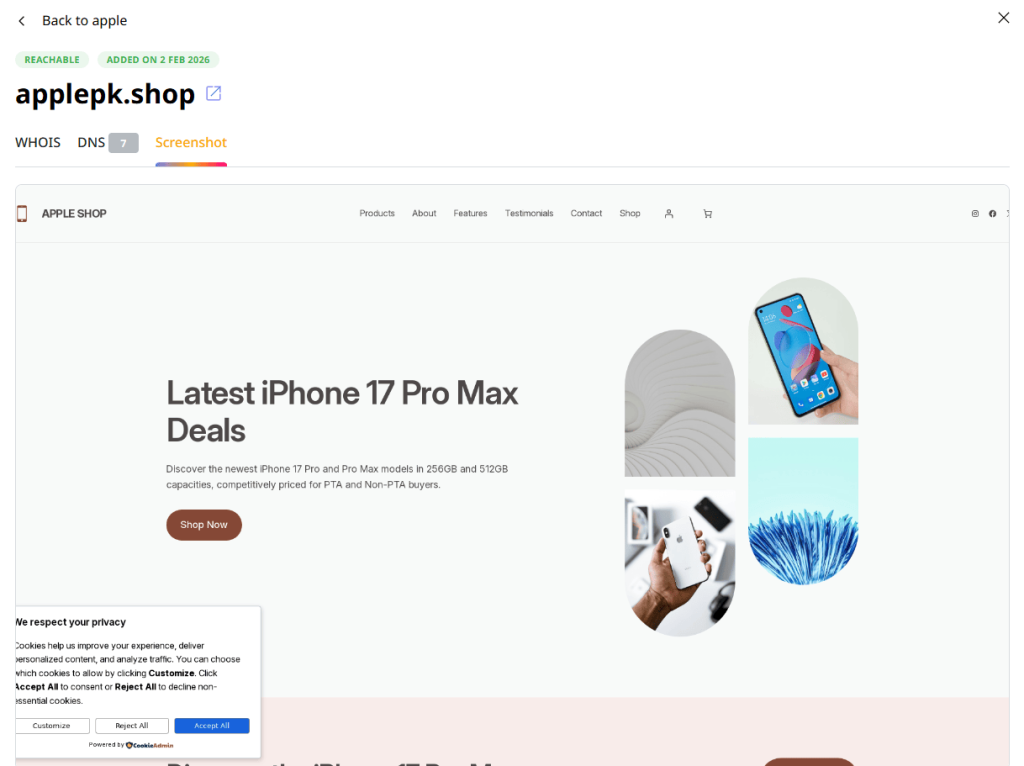
- Automated screenshots: Investigating suspicious sites can be dangerous, so you don’t want your employees visiting live phishing sites or malware hubs. Attaxion helps by providing screenshots of any content hosted on the site you’re investigating, giving you immediate visual proof of trademark abuse, executive impersonation, or any other malicious intent.
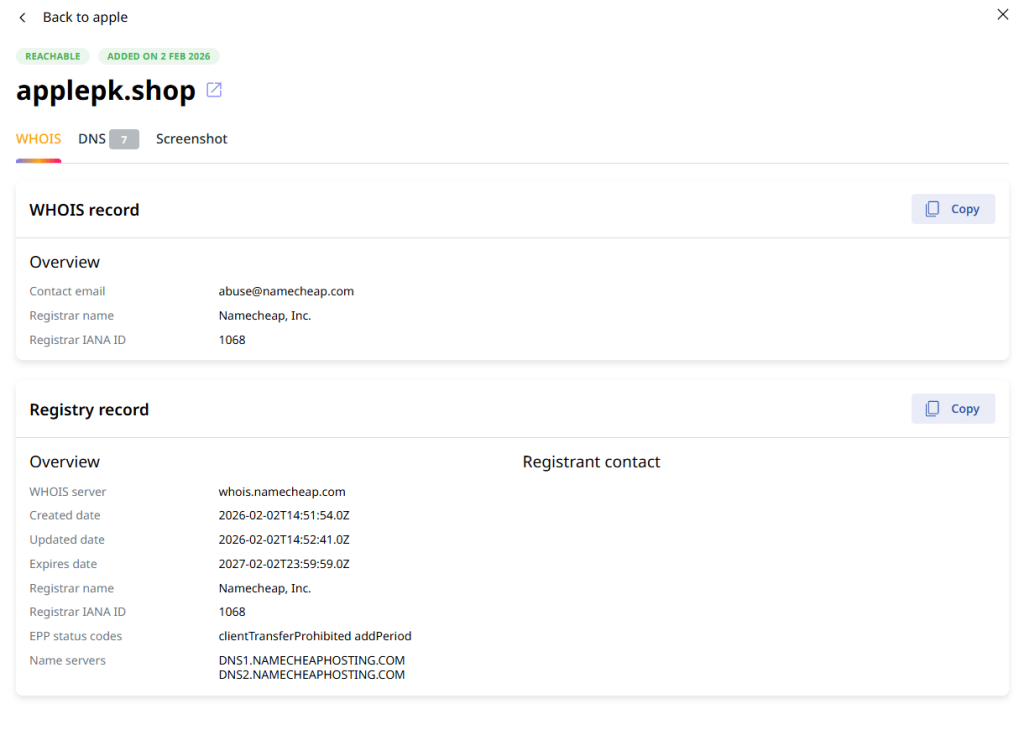
- WHOIS tracking: Attaxion provides WHOIS data to help you trace the entity behind imitation sites. You can see the registrant’s name (if available), the registrar, and other information that can be used for legal remediation.
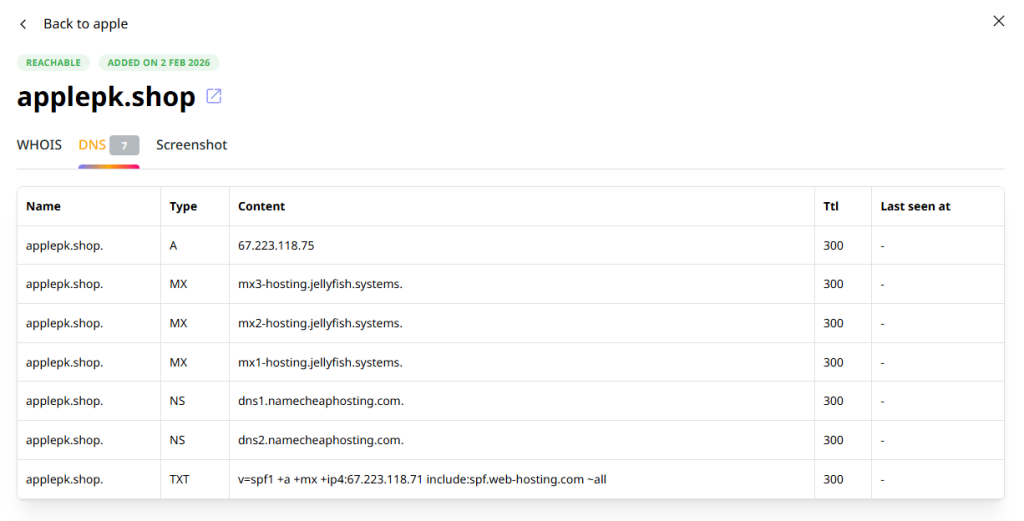
- DNS records retrieval: Attaxion also pulls DNS records to see the infrastructure behind a suspicious domain. This is one of the most practical ways to see signs of attackers’ intent. For example, if a typosquatting domain has MX records configured, it means the attacker is ready to send and receive emails. This could be a sign that a BEC or phishing attack is imminent.
Conclusion
Your brand is your most valuable intangible asset. It represents the trust you have built with your customers, but that trust is fragile in a world where impersonation is easy.
Throughout this post, we have explored how attackers use everything from social media spoofing and phishing to sophisticated business email compromise attacks and counterfeit apps. Most of these threats rely on domain impersonation. The attackers register look-alike domains to create a platform for deception and to steal from your customers.
Defending your brand requires a continuous cycle of discovery, verification, and remediation. You must crawl the web for mentions of your assets and work with providers to take down malicious content.
Attaxion helps you by integrating brand protection into the broader exposure management. With always-on monitoring, visual confirmation via screenshots, as well as DNS and WHOIS context, you can see and deal with brand threats as they emerge.
Learn how Attaxion can help you take control of your digital brand identity. Start your free trial now.