



The cloud’s biggest advantage — quick scaling — is also the source of its main peril: clouds are hard to control. New assets spin up, configs drift, and gaps appear, all with a few mouse clicks. To keep it under control, security professionals run regular cloud security assessments. In this post, we discuss the different types of those assessments, and what one should be paying attention to when attempting to do one.
What Is a Cloud Security Assessment?
A cloud security assessment is a structured review of your cloud infrastructure, including its architecture, configurations, services, and operational practices, to evaluate how well it’s protected. The purpose of a cloud security assessment is to:
- identify risks,
- spot misconfigurations or vulnerabilities,
- verify security controls,
- and ensure that data, identities, and workloads meet both business and compliance requirements.
Essentially, when you’re running a cloud security assessment, you’re answering these three questions:
- What assets and services are running in our cloud environment?
- Are they configured securely and aligned with compliance frameworks?
- What risks are there and how can we reduce or eliminate them?
But aren’t cloud service providers supposed to take the burden of securing everything, just like they’ve taken the burden of running the infrastructure? It turns out, you share this responsibility with them.
The Shared Responsibility Model and Why It Matters
Major cloud service providers like AWS, Azure, and Google Cloud operate under a shared responsibility model — meaning some aspects of security are handled by them, while the rest are up to you.
- Cloud providers manage the physical infrastructure and core services.
- Customers are responsible for how cloud resources are configured, accessed, and secured.
The shared responsibility model differs slightly between cloud providers, and responsibilities also vary depending on what kind of products you’re ordering from them — whether it’s infrastructure-as-a-service (Iaas), platform-as-a-service (PaaS), or software-as-a-service (SaaS). We won’t be going into much detail in this article, or it would become too long, but if you’re looking for specifics, we suggest that you check out the shared responsibility guides by AWS, GCP, and Microsoft.
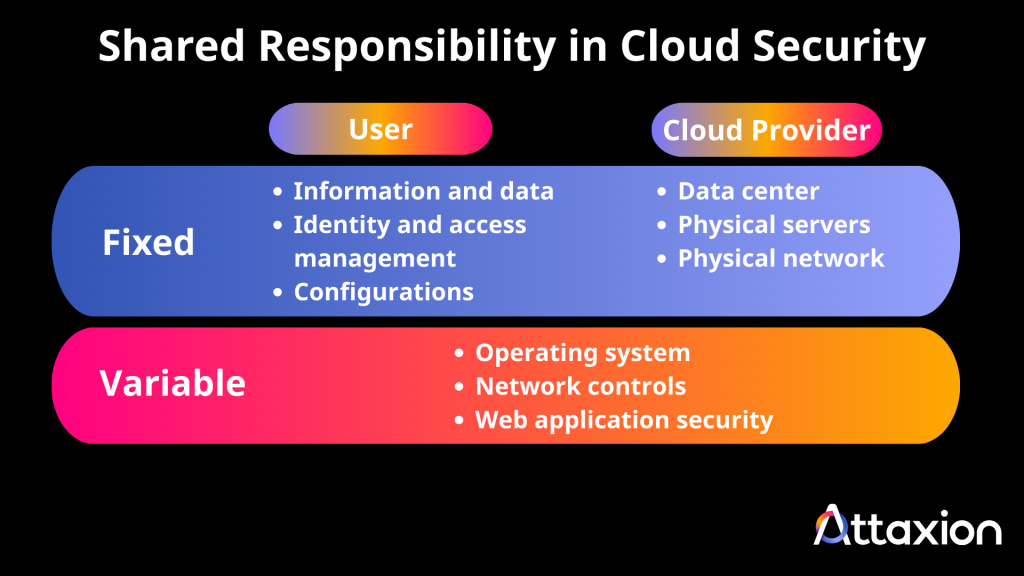
Either way, most cloud data breaches are caused not by the providers, but by customer-side mistakes: misconfigured storage, open ports, exposed credentials, excessive permissions, and forgotten assets. A cloud security assessment helps identify and correct these exposures before attackers can take advantage.
Types of Cloud Security Assessments
Configuration and Posture Assessments
If not the most common, then the most standard type of assessment, with the goal of checking whether your cloud environment follows security best practices. It aims to find issues like:
- Misconfigured or publicly exposed storage
- Overly permissive IAM roles
- Cloud network misconfigurations
- Missing encryption
- Limited or no logging and monitoring
The ultimate tool type for this assessment is Cloud Security Posture Management (CSPM), or if you already have an exposure management tool, it would cover some parts of it.
Compliance-Focused Assessments
Organizations bound by regulatory requirements need to ensure their cloud setup meets specific standards, and the goal of these assessments is to do exactly that, mapping configurations to compliance frameworks such as:
- SOC 2 – Controls around security, availability, and confidentiality
- ISO 27001 – Information security management
- PCI DSS – Payment card data protection
- HIPAA – Protecting health information
A compliance assessment helps prepare for audits and reduce regulatory risk. External attack surface management tools and exposure management tools that are able to generate compliance reports are well-suited for this type of assessment.
Penetration Testing and Adversary Simulation
These mostly manual tests simulate real-world attack techniques to uncover practical weaknesses. They focus on:
- Identity abuse and token theft
- Privilege escalation
- Lateral movement across services
- Insecure APIs and misconfigured endpoints
- Serverless or container-based risks
Unlike automated scans, adversarial testing shows how attackers could move through your environment in practice. But, just like every other manual thing, they take more time and effort.
Point-in-Time vs. Continuous Assessments
A point-in-time assessment offers a security snapshot — ideal for audits, product launches, or mergers.
But cloud infrastructure is fluid: assets are spun up and down, permissions shift, and code is deployed daily. That’s why many organizations prefer continuous assessments, which track:
- Drift from secure configurations
- The appearance of unmanaged or shadow assets
- Emerging threats and vulnerabilities
- Deployment-related misconfigurations
Combining both methods provides a stronger security posture—deep analysis when needed, plus always-on monitoring to catch new risks as they emerge.
What Does a Cloud Security Assessment Usually Include? (Checklist)
A well-executed cloud security assessment covers every layer where risk can emerge. Below, we’ll provide a checklist, but here’s a disclaimer right away — a good assessment is more than just going through the checklist. There will be places where you might need to dig deeper than the checklist suggests.
Here’s what’s typically included:
Overall Security Posture
This high-level view evaluates how well your environment aligns with security best practices and organizational policies. It includes:
- Coverage and effectiveness of security controls
- Visibility into assets and services
- Risk exposure across accounts, regions, and workloads
- Alignment with compliance requirements
The goal is to surface gaps and recommend actions to close them.
Network Security
This part of the assessment focuses on how traffic flows within your cloud environment — and how it’s protected. Key areas include:
- Ingress and egress rules
- Firewall and security group configurations
- Public vs. private endpoint exposure
- Segmentation between critical workloads
Misconfigured network paths are a common entry point for attackers. Identifying them early reduces unnecessary exposure.
Storage Security
Data storage is often where sensitive information lives, and it’s frequently misconfigured. The assessment looks at:
- Storage bucket permissions
- Public access settings
- Encryption at rest and in transit
- Versioning and backup settings
These checks help ensure sensitive data isn’t accidentally exposed or left unprotected.
Access Management
Who can access what—and how—is one of the most important aspects of cloud security. This part of the assessment evaluates:
- Identity and Access Management (IAM) policies
- Role-based access and least privilege enforcement
- Use of multi-factor authentication (MFA)
- Key and secret management practices
Overly broad or outdated access controls are often responsible for privilege escalation and data exposure.
Platform-Specific Services and Configurations
Each cloud provider has unique services—serverless functions, managed databases, container platforms, and more. The assessment includes a review of:
- Platform-native security tools (e.g., AWS GuardDuty, Azure Defender)
- Service-specific configuration settings
- Logging and audit trail coverage
- Misused or misconfigured managed services
Understanding the security posture of these services helps avoid blind spots, especially as cloud usage grows.
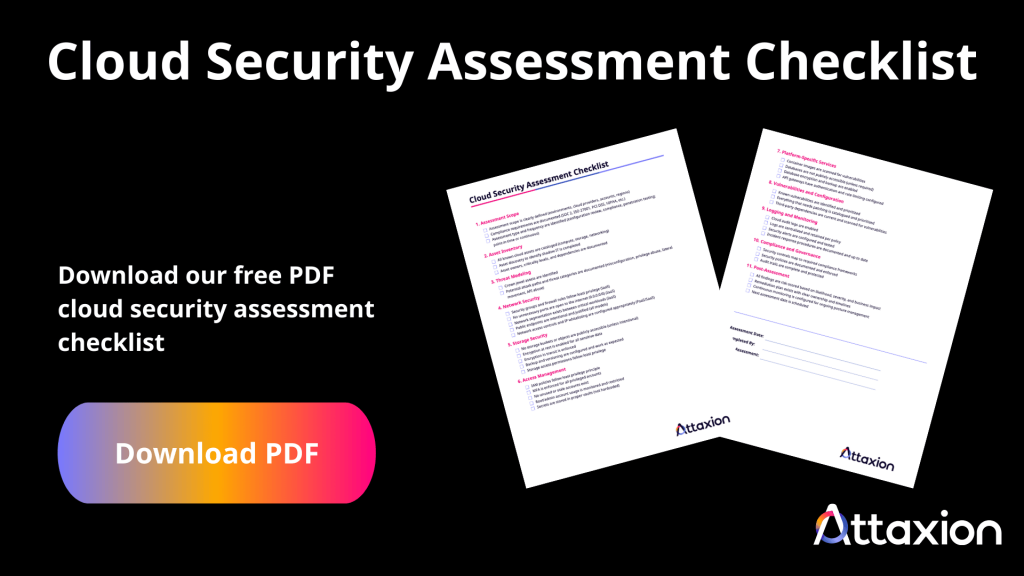
You can download our cloud security assessment checklist PDF and use it as a reference or as a staring point for your own checklist that fits your specific cloud situation.
How to Perform a Cloud Security Assessment in 10 Steps
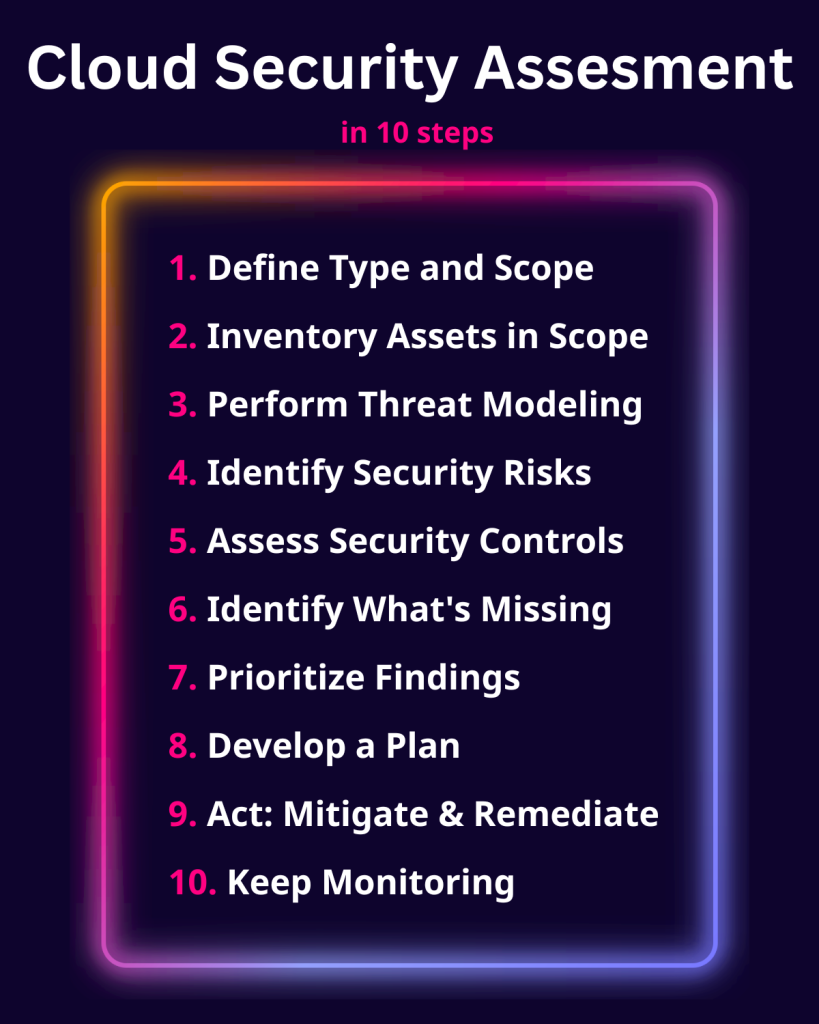
1. Define the Assessment Type and Scope
Start by identifying the type of cloud security assessment that you need (pick one from the list above). Then, define the clear boundaries for what it should cover:
- Identify which environments are in scope (development, staging, production)
- List the cloud providers, accounts, and regions to include.
- If there are compliance requirements, list them (and the respective frameworks)
2. Inventory Assets in Scope
When you define the scope, you may think that you know what’s in there. The asset discovery and inventory stage helps you avoid surprises during audits and to further detail the scope. The goal of this stage is to map out:
- Known assets and services (you already know they are there, but this can show you how they are connected)
- Shadow IT — forgotten, abandoned, or undocumented resources (something you didn’t know about, yet they are there)
If you haven’t done it before with a good asset discovery tool, you probably are up for some surprises, as the tool would likely find assets that you haven’t known about, yet that are well within the scope of the assessment.
Don’t skip this stage. Without a complete asset inventory, all further risk analysis will always have blind spots.
3. Perform Threat Modeling
Once assets are mapped, analyze how they could be targeted:
- Identify your most critical assets and services (some call them “crown jewels”)
- Map out possible attack paths, internally and externally (tools like Attaxion can help here by providing a graph that shows connections between assets)
- Understand threat types: misconfiguration, privilege misuse, lateral movement, API abuse
This step helps prioritize the assessment around what matters most to your business.
4. Identify Security Risks
Run an automated scanner across all those assets to look for specific risks:
- Vulnerabilities in infrastructure and code
- Access control issues and privilege mismanagement (this may require manual review)
- Network exposures and open ports
- Data privacy concerns and missing encryption (may require manual review for data sensitivity and business context)
- Risks in third-party dependencies and outdated components (and this may require a manual review too, as scans would probably find a lot of “technically vulnerable but not exploitable in your particular situation” things)
- Misconfigurations in cloud-native tools or services
The goal here is to surface actionable findings.
5. Assess Existing Security Controls
Evaluate how current controls are set up and how well they work to detect and prevent attacks that exploit the identified risks:
- Coverage and effectiveness of preventive and detective controls
- Logging, monitoring, and alerting configurations
- Operational workflows like CI/CD, change control, and incident response readiness
6. Identify What’s Missing
You’ve got a list of issues. You’ve got a list of controls. Compare them against each other, and you get a list of gaps:
- Missing technical safeguards (e.g., encryption, MFA, endpoint protection)
- Weak or absent governance processes
- Incomplete documentation or unclear security policies
Essentially, that’s the main output of a cloud security assessment. But there are a few more steps needed to make it truly actionable.
7. Prioritize Findings Based on Business Risk
Not all risks are equal. Use context to make smart decisions:
- Score risks based on likelihood, severity, and asset business criticality
- Using that scoring, build a clear, prioritized remediation roadmap
That’s it — that’s the assessment that you can present to the stakeholders. The following steps are there because we want to act on it and
8. Develop a Plan
Translate findings into actionable steps for the organization:
- Technical remediation tasks with clear ownership
- Policy updates and process adjustments
- Enhancements to detection, response, and recovery procedures
Do we need to say that plans should be realistic, time-bound, and measurable? You’ve probably heard it before.
9. Act: Mitigate, Remediate, Build Missing Controls
Now, it’s time to close the gaps:
- Just do what you’ve planned. This is where the security improvements you’ve suggested move from paper to production.
10. Keep Monitoring and Improving
And finally, because a one-time assessment isn’t enough (cloud environments change constantly), you want to do it all again:
- Set up continuous security monitoring and alerting
- Schedule regular reassessments (quarterly or after major changes)
- Integrate security checks into DevSecOps pipelines for real-time visibility
It’s relatively straightforward, but pretty hard to implement without proper tooling. A cloud security assessment is only useful if it’s:
- complete,
- prioritized, and
- repeatable.
In practice, teams often run into the same problems: incomplete inventories, too many noisy findings, unclear priorities, and fixes that don’t stick because the cloud changes again a week later. That’s what quality tools and some time spent on automation are supposed to fix.
How Attaxion Can Help With Cloud Security Assessments
Attaxion helps you turn the tide and make cloud security assessments work for you, rather than you spending too much time and effort on them to no avail. Essentially, you need to have time to shift processes in the organization rather than spend it on manually assessing everything. With Attaxion, you can find issues faster, fix the right ones first, and keep your posture under control over time. And free up this precious time that you can spend on changing how your organization approaches cybersecurity. Here’s what Attaxion can help with:
Automated Cloud Asset Discovery (Including Shadow IT)
Attaxion helps you build a complete inventory of cloud-facing assets across environments, including easy-to-miss resources like forgotten services, abandoned instances, and “temporary” deployments that quietly became permanent. That closes one of the biggest assessment gaps: you can’t secure what you don’t know exists.
In addition to a wide variety of reconnaissance techniques, Attaxion has connectors to all major cloud platforms like AWS, GCP, Microsoft Azure, and DigitalOcean. So, whenever something changes there, you’ll see it in your asset inventory.
Vulnerability Scans and Continuous Monitoring for Misconfigurations
Instead of relying on one-off reviews, Attaxion continuously and automatically checks for the issues that commonly lead to incidents — exposed services, weak encryption, and known vulnerabilities — so you can catch problems early, not after they’ve been exploited.
Supply Chain and Dependency Visibility
Cloud environments are built on third-party software, libraries, container images, and integrations. Attaxion helps you understand what technologies you’re running, what’s outdated, and where they could be adding unnecessary exposure.
Risk Scoring and Prioritization
Assessments often produce long lists of findings. Attaxion does that too, but it helps you prioritize based on risk, giving you enough data (CVSS, EPSS, CISA KEV, etc.) and context to pick the exposures and weaknesses that matter most, so that your team spends time fixing high-impact problems instead of chasing noise.
Automated Remediation Insights
Attaxion also provides actionable remediation guidance and allows you to create support tickets in one click to speed up remediation. For example, Rand Machine reduced mean time to remediate (MTTR) by 20% after implementing Attaxion. They are now spending the freed-up time to focus on internal asset security and better compliance. You can spend it on whatever needs more attention in your organization’s security posture, knowing that most of the cloud-related stuff is automated and under control.
Reporting for Both Executives and Engineers
You still need to communicate the security findings to different audiences. Attaxion provides dashboards and reporting that work for both:
- Executives, who get high-level visibility into risk and security posture trends
- Engineering and security teams, who get technical details and clear next steps
Support for Continuous Cloud Posture Management
And finally, Attaxion does it all continuously. Cloud security is not a one-time project. Attaxion supports continuous posture management by helping you monitor changes over time, track improvements, and stay ahead of misconfigurations and vulnerabilities as your cloud footprint grows.
Improve your cloud security posture now. Start your 30-day Attaxion free trial or hop on a demo call to talk with our experts.